Superb quality and spec AB-Com PULSe 4K SE. Crazy offer! Only £129! FREE UK DELIVERY! 4K UHD, Enigma 2, Multiboot 4 images & more!...
Superb quality and spec AB-Com PULSe 4K Rev II Twin Satellite tuner only £179! FREE UK DELIVERY! 4K UHD, Enigma 2, SATA HDD facility, Multiboot 4 images & more!...

ViXBMC_1080

  • Thread starter Thread starter rossi2000
  • Start date Start date
ok ive added it to list and i'll see what i can do for you, i need to check its skinnable and if not, try to edit the source if its open.
 
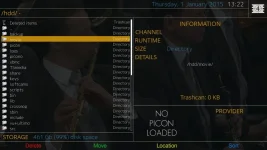
This is how it looks when I select a playable file and move to the main directory. Quite allright.
 

Attachments

  • 1_0_19_1334_3EF_1_C00000_0_0_0 (1).webp
    1_0_19_1334_3EF_1_C00000_0_0_0 (1).webp
    33.2 KB · Views: 74
Last edited:
Hi there ...

no hope for me ? ;) Now i updated to Apollo 115 and tried the 1080 Skin ...
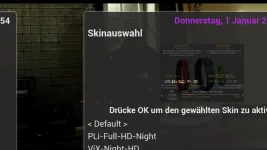
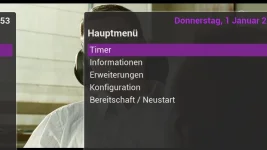
But that wont work ... I also tried the new BELLO 1080 and also that skin will not work here.
But why ? I set my LG TV to "Just skan" in the Settings and the VU+Solo2 is on 1080p 50HZ.

1_0_19_283D_3FB_1_C00000_0_0_0-2.webp
1_0_19_283D_3FB_1_C00000_0_0_0.webp

What can I ... what can we do ?

Greetings No.Trace ...
 
What values have you set in Menu -> Setup -> System -> User Interface -> Position Setup?
 
This is a weird issue. Ive never come across this before. Im not too sure what to suggest atm mate.
 
@No.Trace, Could you post screenshot of A/V settings? Menu -> Setup -> System -> A/V Settings


UPDATE:

It doesn't look like it's a position setup problem, rather it's a scan/refresh rate issue.

Also, have you tried other settings on your TV like Set By Program, 16:9 or Auto for whatever HDMI input you're using?
 
Last edited:
Funny, every day learning something new. By mistake I pushed the button beside the menu button in my remote control. And the file list opened, as it should, in the ViXBMC_1080-skin, without any filebrowser plugin. So, this solves the problem, no plugin needed in filebrowsing.
 
Thanks I have been trying to find a good skin for my old duo but vix spin happens sometimes. Is memory it?
 
Hi there ...

no hope for me ? ;) Now i updated to Apollo 115 and tried the 1080 Skin ...
But that wont work ... I also tried the new BELLO 1080 and also that skin will not work here.
But why ? I set my LG TV to "Just skan" in the Settings and the VU+Solo2 is on 1080p 50HZ.

View attachment 39788
View attachment 39789

What can I ... what can we do ?

Greetings No.Trace ...
What is the LG model number?
 
Hi there ...

so many questions ;)

- No, till today i didn't tried a fresh flash.
- I tried different settings on my LG TV
- The Model is LG 55 LM 620 S

Greetings No.Trace ...
 
Hi there ...

But why ? I set my LG TV to "Just skan" in the Settings and the VU+Solo2 is on 1080p 50HZ.

I would set the aspect ratio to "Original" or "16:9" NOT "Just scan" or any of the other modes available on your model, then see what happens.
Also as an aside, if your model has it, in my opinion ( :) )you should set AVmode and Picture mode to THX to get the most accurate picture.
 
@No.Trace, On my Solo2 I don't have any problem with TV looking like that with VixBNC skin 1080 skin. I assume this happens to all 1080 HD skins?

I was, briefly, able to get screen to go off slightly similar to your problem and that was when I was changing mode from 720p to 1080p (but it then corrected itself).

Could you try doing a full usb flash (without settings restore) to latest build 115 wich has latest drivers. Obviously make a full backup before doing this so you can always go back to this if it makes no difference.

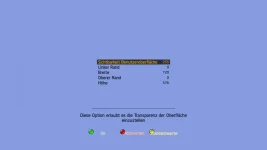
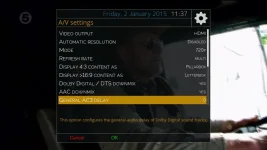
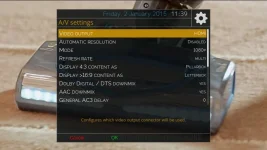
After doing a full usb re-flash (without settings restore) if you still have same problem screen pushed to the right then could you change your A/V settings to those listed in pics (try both settings).

AVSettings1.webp AVSettings2.webp

If that doesn't make any difference then can you try another HDMI cable (maybe one you have with your BluRay/DVD player)?
 
Hi ...

perhaps i will try it next week ;)
thanks for your help.

cu no.trace
 
perhaps i will try it next week ;)
No problem. If you haven't time (just yet) to do the full usb flash then miss that out and try my other suggestions. If still no good then a full usb flash (without restore of settings) is needed to rule that out.
 
Hi there ...

i can not belive it ... now i did a reflash of my et4000 (not the solo2) and tried the skins (vixbmc and bello) on that box ...
and i got the same wrong skin also on that box ... whats that ? i tried the settings with 720p and 1080p but that even won't work.

Now i got back to the FullHD OpenPLI Skin ... but on that skin i am missing the vix-colored buttons on the info-panel an the update-icon also ;(

Perhaps i try it later again ... thanks no.trace

p.s. my system settings on both receivers is german ... can that be a problem ?
 
@No.Trace, I think it's TV and or other things related to that rather than your boxes.

Did you set refresh rate on both your boxes to multi when you were trying 720P and 1080P settings?

If you have a DVD/BluRay Player, can you take the HDMI lead out of back of BluRay Player and put that in back of either of your E2 boxes, leaving the side of cable that goes into back of TV in the same port (ie use the same port in back of TV for both BluRay player and your E2 boxes).

Also, can you clarify if your HDMI lead goes straight from E2 box to the TV and not via anything else like splitter/diverter or other AV equipment?
 
Last edited:

OpenViX Feeds Status

Back
Top