
Superb quality and spec AB-Com PULSe 4K SE. Crazy offer! Only £129! FREE UK DELIVERY! 4K UHD, Enigma 2, Multiboot 4 images & more!...
Superb quality and spec AB-Com PULSe 4K Rev II Twin Satellite tuner only £179! FREE UK DELIVERY! 4K UHD, Enigma 2, SATA HDD facility, Multiboot 4 images & more!...
You are using an out of date browser. It may not display this or other websites correctly.
You should upgrade or use an alternative browser.
You should upgrade or use an alternative browser.

R
rossi2000
Guest
the skin is overriding what code?
ahh I see, date width needs adding to that skin.
ahh I see, date width needs adding to that skin.
Last edited by a moderator:
Hi Rossi,
Regards,
Ian.
I would be happy to work with you to fine tune the code or the skin to maximise compatibility with the new date / time code should you wish to enable the feature in any of your skins.the skin is overriding what code?
ahh I see, date width needs adding to that skin.
Regards,
Ian.


abu baniaz
Moderator
Fix will be in next image update
G
gingeee85
Guest
is there a way to get this on a box that can no longer connect to plugins? my dad has seen this on my zero and wants it on his haha
Thanks guys all good nowFix will be in next image update
Sent from my HUAWEI VNS-L31 using Tapatalk
D
daba
Guest
This is a very good looking skin, but i wish it had channel preview in the channel list + epg, it would have made it perfect.
B
brankopack
Guest
^You mean this, maybe?
D
daba
Guest
yes , but the image in the video is not vixbmc_1080 (or is it) ! i think it's ViXBMC Confluence 1080 , that's the one i'm using .:thumbsup:
R
rossi2000
Guest
yes ViXBMX_1080 doesn't have PIG
it was designed this way, you can see the TV screen through the OSD.
it doesn't need PIG.
it was designed this way, you can see the TV screen through the OSD.
it doesn't need PIG.
D
daba
Guest
i didnt know that ,thanks for the info i'll give it a go once more.
invisiblelayer
Member
- Joined
- Aug 29, 2012
- Messages
- 98
- Reaction score
- 0
- Points
- 6
- Age
- 45
Still the best skin for me, set up new box for a friend with this. Tried ones that look like sly but always come back to this, nice and clean
mIcHyAmRaNe
New member
- Joined
- Apr 11, 2023
- Messages
- 7
- Reaction score
- 0
- Points
- 0
Hello
i'm using OpenVix 6 3 007 Release in my Zgemmah11s
i installed this skin from feeds, but i noticed a little bug
when i enter to plugin list then press green key to download/install new plugins, it shows "downloading information of extensions, please wait",
then the list of plugins appears but the message "downloading information of extensions, please wait" still there and doesn't disappear.
can you please fix it?
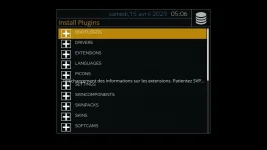
i'm using OpenVix 6 3 007 Release in my Zgemmah11s
i installed this skin from feeds, but i noticed a little bug
when i enter to plugin list then press green key to download/install new plugins, it shows "downloading information of extensions, please wait",
then the list of plugins appears but the message "downloading information of extensions, please wait" still there and doesn't disappear.
can you please fix it?

birdman
Moderator
It's been like this for some time (2-3 years?).Hello
i'm using OpenVix 6 3 007 Release in my Zgemmah11s
i installed this skin from feeds, but i noticed a little bug
when i enter to plugin list then press green key to download/install new plugins, it shows "downloading information of extensions, please wait",
then the list of plugins appears but the message "downloading information of extensions, please wait" still there and doesn't disappear.
can you please fix it?
I just live with it, but if anyone has any idea as to how to possibly fix it I'll try it.

Willo3092
ViX Beta Tester
This works for me. Just copy to /etc/enigma2/ and restart GUI.
View attachment skin_user_ViXBMC_1080.xml
View attachment skin_user_ViXBMC_1080.xml
birdman
Moderator
Thanks. I'll check this out and submit it once tested.
Willo3092
ViX Beta Tester
I don't know if the skin is still maintained and if anyone can update it on GitHub once tested?
The same settings also work on Bello and Confluence.
The same settings also work on Bello and Confluence.
Code:
	<!-- ## PLUGIN BROWSER ## -->

	<screen name="PluginBrowser" position="fill" flags="wfNoBorder" backgroundColor="transparent">
		<panel name="SetupMenuPanel2" />
		<panel name="SetupMenuMenuButton" />
		<panel name="SetupMenuPluginWindowIcon" />
		<widget name="list" position="420,205" size="1080,750" scrollbarMode="showOnDemand"/>
		<panel name="SetupMenuRedButtonSource2" />
		<panel name="SetupMenuGreenButtonSource2" />
	</screen>

	<screen name="PluginDownloadBrowser" position="fill" flags="wfNoBorder" backgroundColor="transparent">
		<panel name="SetupMenuPanel3" />
		<panel name="SetupMenuPlugin2WindowIcon" />
		<widget name="text" position="420,205" size="1080,750" zPosition="1" transparent="1" font="Regular;32" valign="center" halign="center"/>
		<widget name="list" position="420,205" size="1080,750" zPosition="3" transparent="0" scrollbarMode="showOnDemand"/>
	</screen>
abu baniaz
Moderator
The skin files had quite a lot of changes. Rossi has not been on the scene for a while, but anybody can submit changes.
Similar threads
R
- Replies
- 729
- Views
- 461K
U
- Replies
- 3
- Views
- 13K


