Superb quality and spec AB-Com PULSe 4K SE. Crazy offer! Only £99! FREE UK DELIVERY! 4K UHD, Enigma 2, Multiboot 4 images & more!...
Superb quality and spec AB-Com PULSe 4K Rev II Twin Satellite tuner only £149! FREE UK DELIVERY! 4K UHD, Enigma 2, SATA HDD facility, Multiboot 4 images & more!...

[VU+ Duo] Vu+ Duo reboots when I try to access any HDD

  • Thread starter Thread starter wubbster
  • Start date Start date
Sorry but dont wanna mess this up, next question is "do i want to restore plug ins"
 
You should not be getting those prompts if you did not reflash. Anyway, we are where we are.

Say "no" please
 
From your instructions after reboot(init 6) it asked if I wanted to restore and then plugins, i said no to both and now going thru a wizard where is it scanning, checking internet etc.
 
Everything ok with library button, channels etc, just no live pause or recording working. Rather than potentially messing it up, what should i be doing? Pause just gives me the "NO" symbol at top right, trying to record gives an error and asks if disk is full. I have 40gb internal, and 160gb external.
 
You have not done anything wrong.

Make sure your mounts are correct. i.e internal = hdd
In timeshift and also recording settings, select the drives you want to use.
Do the same for EPG, ie select the device you want to use.

Reason that it is saying disk is full is: I removed references to any storage devices in the settings file. It has defaulted to internal memory so that it does not crash becasue it has not found the device.
 
Ok cool, will sort in a bit. My wife is now watching bake off on Iplayer so will do it after. Thanks for all your help.
 
I am still getting the same "disk full" error. I am in
Menu-Setup-System-recording and playback
and then default movie location I press "ok" and then it is confusing. There was a default bookmark setup so removed and pressed "menu", then "switch to filelist", if i go back to "list of storage devices" I have 5 options (ST340014AS, External,pc,Internal flash and a second pc). I assumed External was my USB and Internal was internal HD, but neither worked when I selected them as short cuts. If I used Internal Flash it gives me HDD and USB options, no others give me this so I assume this is the correct one to select, but still giving me "disk full?" error.
 
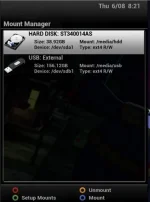
1. Post a screenshot of your mounts. (guide in signature)
Blue > Vix > Mount Manager

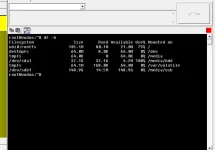
2. Telnet "df -h" and post back results.

We may end up reflashing.
 
I have an ET9000 and i had the same error today. I re-flashed without restore and it worked okay.

Is there something in the program that is making this happen?

FP.
 
Thanks for help, here are both captures. Was what I did yesterday not reflashing? :confused:
Capture.webpCapture2.webp
 
Your mount points seem fine.
.....Was what I did yesterday not reflashing? :confused:
Yes, (flashing using Image Manager) but it did not work.

I'd suggest you flash an image by USB. However, new image might be out soon so you would be would be repeating setting up process twice.
 
is there a need for all those images saved,curious if others have that many?

in setup mounts does your names match the size of locations as mine changed to recording to my 8gb usb stick?
 
@wubbster - your internal hard disk (/dev/sda1 mounted at /media/hdd) is full. Seems very small at 38GB - is this correct? Most timeshift, recording etc would default to this location and if it's genuinely full, then you are going to get crashes.
Your external USB disk is reporting 150GB - is this correct? Is this an actual external USB hard drive or a USB stick? It does not have anything on it.
 
@wubbster - your internal hard disk (/dev/sda1 mounted at /media/hdd) is full. Seems very small at 38GB - is this correct? Most timeshift, recording etc would default to this location and if it's genuinely full, then you are going to get crashes.
Your external USB disk is reporting 150GB - is this correct? Is this an actual external USB hard drive or a USB stick? It does not have anything on it.

It is a 40GB internal drive and appears to have little on it, shall i browse to it via an FTP and delete any video contents? And my external is a 160GB USB drive. I just used this for transferring movies etc via FTP to view, but I just stream now so maybe use 160GB as timeshift/recording drive??
 
Your internal drive is full - it doesn't appear to have "little" on it as you say. You could start by deleting some of the image backups you no longer need, although these would be only 50/60MB or thereabouts each. It's not really a big enough drive for storing recordings or much timeshift. But, if your menu settings say that your default timeshift / movie location is /media/hdd, and/or your EPG storage location is /media/hdd, then that is the source of some of your problems. If you have a permanent USB drive attached (does it have it's own power supply?), then you could set your default recording/timeshift/EPG location to /media/usb. There's no advantage in storing image backups on the internal hard disk if you could easily move them to the USB drive.
 
Your internal drive is full - it doesn't appear to have "little" on it as you say. You could start by deleting some of the image backups you no longer need, although these would be only 50/60MB or thereabouts each. It's not really a big enough drive for storing recordings or much timeshift. But, if your menu settings say that your default timeshift / movie location is /media/hdd, and/or your EPG storage location is /media/hdd, then that is the source of some of your problems. If you have a permanent USB drive attached (does it have it's own power supply?), then you could set your default recording/timeshift/EPG location to /media/usb. There's no advantage in storing image backups on the internal hard disk if you could easily move them to the USB drive.

Thanks for your reply. I Always used it as the source for recordings etc and never had any problems, and I have less on there now than ever. I have removed some back ups and it still have Dreamplex and XBMC which i no longer need. My external larger USB drive is not individually powered. The internal smaller drive was part of the purchase when i bought the box, I assume it does not have its own power source(if as straight forward as it would require plugging in then definitely it does not have its own power source).

I am sure I changed the location for recording to my external USB drive and still gave me the "disk full?" message. I will try again later though when the kids are in bed.

Thank you for your help.
 
No problem. The internal drive would be powered from the box, so not an issue other than the small capacity, which is unusual - you'd get about 20 hours of SD programmes on it. The external drive - is it a 2.5" drive (like a laptop drive) in an enclosure? Sometimes the power out on a USB socket is not enough to properly power a spinning drive, so if the enclosure has a power supply I would be inclined to use it. Otherwise, "point" everything at the external drive (or better still, swap it with the 40GB drive if your connectors are suitable and you feel comfortable doing it) and see how you get on.
 
No problem. The internal drive would be powered from the box, so not an issue other than the small capacity, which is unusual - you'd get about 20 hours of SD programmes on it. The external drive - is it a 2.5" drive (like a laptop drive) in an enclosure? Sometimes the power out on a USB socket is not enough to properly power a spinning drive, so if the enclosure has a power supply I would be inclined to use it. Otherwise, "point" everything at the external drive (or better still, swap it with the 40GB drive if your connectors are suitable and you feel comfortable doing it) and see how you get on.

The external is exactly like you said. I am going to point everything at the external other than timeshift and recording, does that sound ok? I have never even viewed the internal drive, assuming it is simple to remove I will swap them(and then point everything to 160 gb drive).

Can you confirm what the path will look like to the HDD and the internal drive for recording,timeshift etc? I am pretty sure I do these correctly but just thinking ahead.
 
The path to the internal drive can be viewed in the ViX menu Mounts Manager - it's usually /media/hdd
There's not much value in pointing "everything other than timeshift and recording" at the external drive (/media/usb) . Timeshift and recording are the biggest users of space and should be pointed at the external drive until you can do a clear out of the internal drive. The EPG would be fine on /media/hdd providing you have about 20MB free - which you don't as the df -h command you ran earlier shows only 4MB free!
Before you change anything, first off, delete any images/backups you don't need using Vix menu Image manager and Backup Manger. Then, in the media player, clear out any recordings you don't need from /media/hdd/movies (usual location for recordings). This will move them to the Trashcan. If you want to reclaim space you will have to go into the Trashcan and delete them again as normally they are kept there for a week before actual deletion. If you can clear enough space on the internal drive you may be able to stabilise your system, but you really need a bigger drive. Think in the region of 500GB as a minimum.
 

OpenViX Feeds Status

Back
Top