W
wubbster
Guest
Sorry but dont wanna mess this up, next question is "do i want to restore plug ins"


Yes, (flashing using Image Manager) but it did not work......Was what I did yesterday not reflashing?

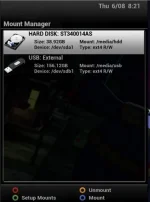
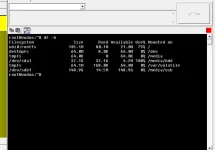
@wubbster - your internal hard disk (/dev/sda1 mounted at /media/hdd) is full. Seems very small at 38GB - is this correct? Most timeshift, recording etc would default to this location and if it's genuinely full, then you are going to get crashes.
Your external USB disk is reporting 150GB - is this correct? Is this an actual external USB hard drive or a USB stick? It does not have anything on it.
Your internal drive is full - it doesn't appear to have "little" on it as you say. You could start by deleting some of the image backups you no longer need, although these would be only 50/60MB or thereabouts each. It's not really a big enough drive for storing recordings or much timeshift. But, if your menu settings say that your default timeshift / movie location is /media/hdd, and/or your EPG storage location is /media/hdd, then that is the source of some of your problems. If you have a permanent USB drive attached (does it have it's own power supply?), then you could set your default recording/timeshift/EPG location to /media/usb. There's no advantage in storing image backups on the internal hard disk if you could easily move them to the USB drive.
No problem. The internal drive would be powered from the box, so not an issue other than the small capacity, which is unusual - you'd get about 20 hours of SD programmes on it. The external drive - is it a 2.5" drive (like a laptop drive) in an enclosure? Sometimes the power out on a USB socket is not enough to properly power a spinning drive, so if the enclosure has a power supply I would be inclined to use it. Otherwise, "point" everything at the external drive (or better still, swap it with the 40GB drive if your connectors are suitable and you feel comfortable doing it) and see how you get on.


