Superb quality and spec AB-Com PULSe 4K SE. Crazy offer! Only £99! FREE UK DELIVERY! 4K UHD, Enigma 2, Multiboot 4 images & more!...
Superb quality and spec AB-Com PULSe 4K Rev II Twin Satellite tuner only £149! FREE UK DELIVERY! 4K UHD, Enigma 2, SATA HDD facility, Multiboot 4 images & more!...

VU+ UNO help needed please

  • Thread starter Thread starter DeGea468
  • Start date Start date
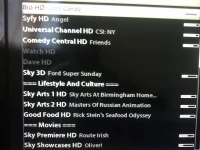
i have noticed those 3 channel are having scanning issues possibly down to 1N they have not changed frequency justthey dont scan i had to do a manual add

use my bouquets as they are in there
 
i have noticed those 3 channel are having scanning issues possibly down to 1N they have not changed frequency justthey dont scan i had to do a manual add

use my bouquets as they are in there

Glad i'm not the only one.. Have you manage to fix it then?.. If you mean your latest settings then i loaded them yesterday night but still have the issue.

I used http://www.world-of-satellite.com/s...eam-Enigma-2-HD-settings-for-28.2E-amp-UK-DTT

but in future i'll use http://www.world-of-satellite.com/showthread.php?8059-ViX-Team-Enigma-2-HD-settings-for-28.2E as i don't use the 'UK-DTT' part although i'm sure either is fine.

Edit: I'm going to load the non UK-DTT version.

Q, Do i need to clear the previous settings on the box before loading the new one? or can i just load it over the old one? which is what i did before
 
Last edited by a moderator:
my latest setings seem to work for mejust fine and i always load over the top of the old ones
 
Is there a way to 'reparse' or do i just re-download the epg data?
 
Are you sure you deleted the epg.dat while Enigma2 was killed (init 4)?
Yep i think i'm sure, I deleted the epg.dat file that's located on my USB stick as i changed the location. It was on the HDD before.

/media/usb/epg.dat

when you say "while Enigma2 was killed (init 4)" what exactly do you mean this?

I just deleted the epg.dat via the Filebrowser then i exit and press blue to bring up the extension list and then i pick CrossEPG Downloader to re-download.
 
If Enigma is alive, you can't delete epg-data, as it is in RAM and the file epg.dat will be re-written with that data on E2-restart.
So if the epg-data is corrupt/not correct, there's only one way to get rid of it: kill Enigma (telnet command "init 4"), delete the file and restart E2 (telnet command "init 3"). Once E2 is alive again, you can download new data.
 
If Enigma is alive, you can't delete epg-data, as it is in RAM and the file epg.dat will be re-written with that data on E2-restart.
So if the epg-data is corrupt/not correct, there's only one way to get rid of it: kill Enigma (telnet command "init 4"), delete the file and restart E2 (telnet command "init 3"). Once E2 is alive again, you can download new data.
Thank you for this i'll try it now, when i kill the enigma where do i locate the epg-data file to delete? do i ftp to delete?
 
Last edited by a moderator:
yes just FTP in as you normally would.
 
yes just FTP in as you normally would.
Oh so...
1, kill the enigma init 4
2, delete the epg.dat file like before (/media/usb/epg.dat)
3,re-start enigma init 3

Is that right? or is there a different epg file i need to delete?
 
no, that should be it.

try it and get back to us with the results if you can.

thanks.
 
Correct. Normally there only one, but another one could have been left behind somewhere. But the important one, is on the location you set yourself in the settings.
 
no, that should be it.

try it and get back to us with the results if you can.

thanks.

Correct. Normally there only one, but another one could have been left behind somewhere. But the important one, is on the location you set yourself in the settings.

Thank you both, I'll give it a try in an hour or so as i'm watching the football at the moment.. Hopefully it does fix the issue with channel details not showing the in the epg for the channels in question. I'll get back to you with how it went.

In the mean time i have another question(s) about the epg.

Q, How do i set the time along the top so that it increments by :00 and :30? like how it is on the sky epg.. like this...

12:00 - 12:30 - 13:00 - 13:30 - 14:00 - 14:30

at the moment its :45 and :15 like this

12:45 - 12:15 - 13:45 - 13:15 - 14:45 - 14:15

which is odd and a pain to see when programmes start and end its easier if its by :00 and :30.


Q, Also is there a way to change the format to 12 hours rather than 24 hour format? so it looks like this

12:00 - 12:30 - 1:00 - 1:30 - 2:00 - 2:30
 
I did the telnet init 4, delete then epg.dat and init 3 and it still doesn't work, however now it say "service unavailable, Check tuner configuration" before the channel would work.

i did a re-scan via 'automatic scan' but that didn't work either.. what should i do now? any suggestion?.. maybe a manual add for the two channels like silverfox0786 did?

Also any answers/suggestions to the two questions above would be appreciated.
 
But it did solve your "wrong EPG"issue?
Service not being available can't be related to that.
The initial issue was that when i bring up the epg there is no info for the channels Watch HD, Dave HD, France 24 (but i think France 24 along with NHK world isn't part of the sky channel line up anymore) But for Watch HD and Dave HD i could still view the channel and then some info would come up in the EPG for up to around 2 hours then the rest would be blank.

After doing the init 4, delete epg.dat and then init 3.

The issue with no info in the epg is still a problem and now i can't view the channels at all cause i get the "service unavailable, Check tuner configuration" message where as before although there was no info i could still view the channel now i can't

IMG-20111103-00116.webp

IMG-20111103-00118.webp
 

OpenViX Feeds Status

Back
Top