Superb quality and spec AB-Com PULSe 4K SE. Crazy offer! Only £99! FREE UK DELIVERY! 4K UHD, Enigma 2, Multiboot 4 images & more!...
Superb quality and spec AB-Com PULSe 4K Rev II Twin Satellite tuner only £149! FREE UK DELIVERY! 4K UHD, Enigma 2, SATA HDD facility, Multiboot 4 images & more!...

[GiGaBlue QUAD+ PLUS] Webif issue

Donkeyface

New member
Joined
Feb 23, 2014
Messages
101
Reaction score
1
Points
0
Went to turn quad+ this evening and box was locked up, after a manual reboot i cant access the webif.
All i get is this
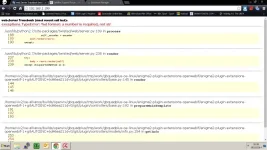
owebif.webp

I'm going to do a usb flash but wanted to know what has happened and can it be fixed without a reflash

Cheers
 
Went to turn quad+ this evening and box was locked up, after a manual reboot i cant access the webif.
All i get is this
View attachment 38609

I'm going to do a usb flash but wanted to know what has happened and can it be fixed without a reflash

Cheers


that's exactly the same problem i've had a couple of times this week, then i finally restarted both my Router and Box and all was good again :) just make sure it's the same IP address(as your Box) you're typing into your browser :D
 
The unit has a static IP so no issues there! I'm guessing its an issue with the Webif plugin, I will install the plugin again to see if its fixed it.
 
was an issue introduced around build 080 I think... there's a couple of issues already reported on this (including one from myself).
Just noticed an update flashing so assume this might be resolved now but will need to update/test to confirm.
 
Are ye using a language other than English on the box? No idea how a router restart could solve the issue. :confused:
 
Just English language.
Yeah router reboot won't do anything tbh!
From previous post it looks like there is an issue.
Will update tomorrow and report back.
Cheers
 
I had the same problem recently:
Definitely check whether the IP address of your box has changed. My box changed IP after installing Plex on my PC. Don't know whether that was the cause for certain.
 

OpenViX Feeds Status

Back
Top