Superb quality and spec AB-Com PULSe 4K SE. Crazy offer! Only £99! FREE UK DELIVERY! 4K UHD, Enigma 2, Multiboot 4 images & more!...
Superb quality and spec AB-Com PULSe 4K Rev II Twin Satellite tuner only £149! FREE UK DELIVERY! 4K UHD, Enigma 2, SATA HDD facility, Multiboot 4 images & more!...

[ET10x00] Webif not showing TV picture in screen capture

adm

Forum Supporter
Donated Member
Joined
Sep 9, 2014
Messages
1,767
Reaction score
18
Points
38
Location
Southend on Sea, UK
Box Xtrend ET10000
OpenVix version 6.5.001 and 6.5.002
Skin Simple Ten Eighty
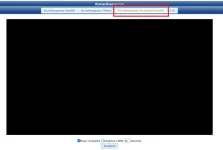
Webif interface settings = as per screenshot 1

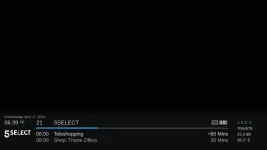
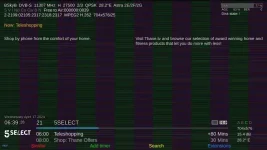
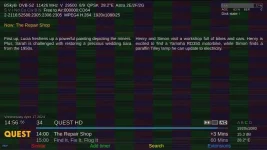
When selecting the screenshot in the web interface the TV video picture is always either blank (black screen) or is a vertical stripe pattern as shown in attached screen shots. The on screen graphics are always OK, it’s just the video that is missing or has been corrupted.

This problem exists on my box in both 6.5.001 and 6.5.002 using both Firefox and MS Edge as the laptop browser, and with selecting low or high resolution in screen capture. Reverting to version 6.4.011 and the screen capture is OK, both the TV video picture and the on screen graphics are displayed correctly.

Screenshot 1
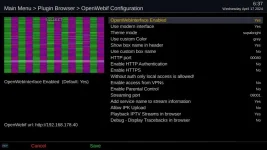
screen1.webp

Screenshots 2 and 3

screen2.webp

screen3.webp
 
What happens if you call it directly?

/usr/bin/grab
 
Box Xtrend ET10000
OpenVix version 6.5.001 and 6.5.002
Skin Simple Ten Eighty
Webif interface settings = as per screenshot 1

When selecting the screenshot in the web interface the TV video picture is always either blank (black screen) or is a vertical stripe pattern as shown in attached screen shots. The on screen graphics are always OK, it’s just the video that is missing or has been corrupted.

This problem exists on my box in both 6.5.001 and 6.5.002 using both Firefox and MS Edge as the laptop browser, and with selecting low or high resolution in screen capture. Reverting to version 6.4.011 and the screen capture is OK, both the TV video picture and the on screen graphics are displayed correctly.

Screenshot 1

I cannot reproduce that issue , is working for me
 
Hello,

I can reproduce it. When that is selected, you have a black screen.

OWI_screen_capture.webp
 
Hello,

I can reproduce it. When that is selected, you have a black screen.
I have just flashed latest OpenViX 6.5.002 picture attached.....
@Orlandox - this is from my Vu+ Uno4KSE - can you/have tried xour Uno4K???
 

Attachments

  • 1_0_19_2885_800_2_11A0000_0_0_0_20240417103309.webp
    1_0_19_2885_800_2_11A0000_0_0_0_20240417103309.webp
    50.7 KB · Views: 3
It works fine on my AX61, Vu+ Uno 4K se, Edision OS mio 4k plus, Zgemma H9 TWIN, Vu+ Uno 4K.

Doesn't work on Vu+ Solo4K.
 
I have just flashed latest OpenViX 6.5.002 picture attached.....
@Orlandox - this is from my Vu+ Uno4KSE - can you/have tried xour Uno4K???

Yes, my picture was from Vu+ Uno 4K SE with 6.5.002. Use modern interface = No or Yes, same result (only subtitles can be seen).
 
Last edited:
Works OK on Duo 4K with the options changed to those posted by @adm

Code:
root@vuduo4k:~# /usr/bin/grab
Grabbing 32bit Framebuffer ...
... Framebuffer-Size: 1920 x 1080
Grabbing Video ...
Merge Video with Framebuffer ...
Saving 24 bit /tmp/screenshot.bmp ...
... Done !
root@vuduo4k:~#
 
Tried the above on Vu+ Zero 4K

Code:
vusolo4k login: root
Password:
root@vusolo4k:~# /usr/bin/grab
Grabbing 32bit Framebuffer ...
... Framebuffer-Size: 1920 x 1080
Grabbing Video ...
Merge Video with Framebuffer ...
Saving 24 bit /tmp/screenshot.bmp ...
... Done !

Still got a blank screenshot in /tmp
 
Tried the above on Vu+ Zero 4K

Code:
vusolo4k login: root
Password:
root@vusolo4k:~# /usr/bin/grab
Grabbing 32bit Framebuffer ...
... Framebuffer-Size: 1920 x 1080
Grabbing Video ...
Merge Video with Framebuffer ...
Saving 24 bit /tmp/screenshot.bmp ...
... Done !

Still got a blank screenshot in /tmp

Is the webif picture also blank or corrupted?
 
Is the webif picture also blank or corrupted?

just blank, a black screen.

Will cloning the display to the front panel make a difference?

.... Yes it does. If I turn that setting off it works.
 
Last edited:
just blank, a black screen.

Will cloning the display to the front panel make a difference?

.... Yes it does. If I turn that setting off it works.

so issue again lcd4linux (or whatever that package is called) or unlikely Framebuffer .. size???
Works fine on my GBue4K with/without front panel display and VuUno4Kse... but I don't use that **** package!
 
Works OK on Duo 4K with the options changed to those posted by @adm

Code:
root@vuduo4k:~# /usr/bin/grab
Grabbing 32bit Framebuffer ...
... Framebuffer-Size: 1920 x 1080
Grabbing Video ...
Merge Video with Framebuffer ...
Saving 24 bit /tmp/screenshot.bmp ...
... Done !
root@vuduo4k:~#

With that screenshot.bmp is OK.

P.S. LCD4Linux is installed.
 
Box Xtrend ET10000
OpenVix version 6.5.001 and 6.5.002
Skin Simple Ten Eighty
Webif interface settings = as per screenshot 1

When selecting the screenshot in the web interface the TV video picture is always either blank (black screen) or is a vertical stripe pattern as shown in attached screen shots. The on screen graphics are always OK, it’s just the video that is missing or has been corrupted.

This problem exists on my box in both 6.5.001 and 6.5.002 using both Firefox and MS Edge as the laptop browser, and with selecting low or high resolution in screen capture. Reverting to version 6.4.011 and the screen capture is OK, both the TV video picture and the on screen graphics are displayed correctly.

Screenshot 1

I cannot reproduce that issue , is working for me

I've just tried again. Downloaded 6.5.002 and flashed (couch flash) with no restore of settings. I configured my network then scanned for Freesat channels and launched Webif. It still has the same problem in both the modern webif interface and the old interface.

Is this just a Xtrend ET10k problem? Bear in mind when reverting to version 6.4.011 it works OK so probably ruling out the PC.
 
What happens if you call it directly?

/usr/bin/grab

root@et10000:~# /usr/bin/grab
Grabbing 32bit Framebuffer ...
... Framebuffer-Size: 1920 x 1080
Grabbing Video ...
Mainmemory: <Memmapping failed>
Resizing Video to 1920 x 1080 ...
Merge Video with Framebuffer ...
Saving 24 bit /tmp/screenshot.bmp ...
... Done !
root@et10000:~#


screenshot.bmp from /tmp/ - Note: converted to .jpg on my PC as loading it here resulted in a warning about it being too large.

screenshot.webp
 
root@et10000:~# /usr/bin/grab
Grabbing 32bit Framebuffer ...
... Framebuffer-Size: 1920 x 1080
Grabbing Video ...
Mainmemory: <Memmapping failed>
Resizing Video to 1920 x 1080 ...
Merge Video with Framebuffer ...
Saving 24 bit /tmp/screenshot.bmp ...
... Done !
root@et10000:~#


screenshot.bmp from /tmp/ - Note: converted to .jpg on my PC as loading it here resulted in a warning about it being too large.

View attachment 66324
cannot remember if its possible on ET1000K, but are you using lcd4linux?
 
cannot remember if its possible on ET1000K, but are you using lcd4linux?

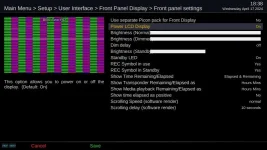
No. The Xtrend ET10k has a front panel 3 line dot matrix text/character display. The only adjustment that can be made are brightness and maybe the display of start/duration times of programmes or recordings.

The reference to "Power LCD Display" in settings just turns the front panel on or off

fp.webp
 
Last edited:
This problem exists on my box in both 6.5.001 and 6.5.002 using both Firefox and MS Edge as the laptop browser, and with selecting low or high resolution in screen capture. Reverting to version 6.4.011 and the screen capture is OK, both the

I also have Zgemma h9.s and can confirm this works OK with 6.5.002 using the same network, router, laptop. It's just my Xtrend Et10K that has the problem
 
I also have Zgemma h9.s and can confirm this works OK with 6.5.002 using the same network, router, laptop. It's just my Xtrend Et10K that has the problem

so can you copy /usr/bin/grab from the 6.4.11 image to PC and then back to the 6.5.002 image and see what happens??
You meed to stop the 6.5 image (init 4 in telnet session) and restart (init 3) before testing.
 

OpenViX Feeds Status

Back
Top