Superb quality and spec AB-Com PULSe 4K SE. Crazy offer! Only £99! FREE UK DELIVERY! 4K UHD, Enigma 2, Multiboot 4 images & more!...
Superb quality and spec AB-Com PULSe 4K Rev II Twin Satellite tuner only £149! FREE UK DELIVERY! 4K UHD, Enigma 2, SATA HDD facility, Multiboot 4 images & more!...

[ET10x00] Webif not showing TV picture in screen capture

so can you copy /usr/bin/grab from the 6.4.11 image to PC and then back to the 6.5.002 image and see what happens??
You meed to stop the 6.5 image (init 4 in telnet session) and restart (init 3) before testing.

Reinstated 6.4.011 from backup, telnet into box and issued init 4, ftp /usr/bin/grab from box to PC, init 3.
Reinstated 6.5.002 from backup, telnet into box and issued init 4, ftp grab from PC to /usr/bin/, grab overwrites what was on the box, init 3, box reboots

Then
Opened web interface and a screen grab

Xtrend ET10K now working as expected, both TV video and on screen graphics shown correctly in the screenshot
 
Reinstated 6.4.011 from backup, telnet into box and issued init 4, ftp /usr/bin/grab from box to PC, init 3.
Reinstated 6.5.002 from backup, telnet into box and issued init 4, ftp grab from PC to /usr/bin/, grab overwrites what was on the box, init 3, box reboots

Then
Opened web interface and a screen grab

Xtrend ET10K now working as expected, both TV video and on screen graphics shown correctly in the screenshot
Thanks for doing that……I powered up my xtrend et7500 with old image this morning expecting to have to do that, but latest release flashed and again worked fine.
So its absolutely box specific.
Will have another look at grab tomorrow.
 
Thanks for doing that……I powered up my xtrend et7500 with old image this morning expecting to have to do that, but latest release flashed and again worked fine.
So its absolutely box specific.
Will have another look at grab tomorrow.

The clue may be in the report of the manual grab?????

Screen capture not working (no TV video)

root@et10000:~# /usr/bin/grab
Grabbing 32bit Framebuffer ...
... Framebuffer-Size: 1920 x 1080
Grabbing Video ...
Mainmemory: <Memmapping failed>
Resizing Video to 1920 x 1080 ...
Merge Video with Framebuffer ...
Saving 24 bit /tmp/screenshot.bmp ...
... Done !

Screen capture working after /usr/bin/grab replaced

root@et10000:~# /usr/bin/grab
Grabbing 32bit Framebuffer ...
... Framebuffer-Size: 1920 x 1080
Grabbing Video ...
Merge Video with Framebuffer ...
Saving 24 bit /tmp/screenshot.bmp ...
... Done !
root@et10000:~#
 
Where does /usr/bin/grab come from? What recipe?
It's in the aio-grab package.

meta-oe-alliance/meta-oe/recipes-multimedia/aio-grab/aio-grab.bb

The last change to it was:

Code:
https://github.com/oe-alliance/aio-grab/commit/c54f61497483bd3f5d15020a193f03ad6d64d2a4

all to do with mmap() failure.
Perhaps this failing version pre-dates that (somehow?)?
 
Last edited:
It's in the aio-grab package.

meta-oe-alliance/meta-oe/recipes-multimedia/aio-grab/aio-grab.bb

The last change to it was:

Code:
https://github.com/oe-alliance/aio-grab/commit/c54f61497483bd3f5d15020a193f03ad6d64d2a4

If this change relates to the latest version then that's what I had with 6.5.001 and 6.5.002 and the version that failed. The change was to report Mainmemory: <Memmapping failed> rather than just returning "0". Mainmemory: <Memmapping failed> is what I got when manually instigating a grab in 6.5.002. Presumably the older version in 6.4.011 would have just returned "0" on a fault BUT the version of grab in 6.4.011 works for me when copied to 6.5.002 (no fault found).
 
So I am guessing that this is the change to 64bit time in OE-A 5.4 which caused issues with Crossepg.
Why ET10000 ? Maybe related to the old Mips kernel ?

If its related to the ET10000 kernel, its not going to be fixable.
 
@adm - On the ET10000 can you open a terminal session and type cat /proc/stb/info/chipset and post result back
 
@adm - On the ET10000 can you open a terminal session and type cat /proc/stb/info/chipset and post result back

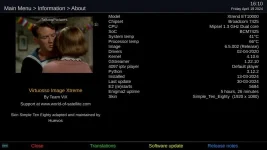
root@et10000:~# cat /proc/stb/info/chipset
bcm7425
root@et10000:~#

Also shown in the information screen

chip.webp
 
Tested my own build of the aio-grab with Broadcom CHIPSET 7424 SoC BCM7425

Still broken for me with just time flag, but it is fixed for me with this aio-grab bitbake. Must be one of the other flags or combination?

Code:
DESCRIPTION="AiO screenshot grabber"
MAINTAINER = "PLi team"
LICENSE = "GPL-2.0-only"
LIC_FILES_CHKSUM = "file://LICENSE;md5=751419260aa954499f7abaabaa882bbe"

DEPENDS = "jpeg libpng zlib"

inherit gitpkgv

TARGET_CC_ARCH:remove = "-D_LARGEFILE_SOURCE -D_FILE_OFFSET_BITS=64 -D_TIME_BITS=64"

PV = "1.0+git"
PKGV = "1.0+git${GITPKGV}"

SRC_URI="git://github.com/oe-alliance/aio-grab.git;protocol=https;branch=master"

S = "${WORKDIR}/git"

inherit autotools pkgconfig
 
Last edited:
Tested my own build with Broadcom 7424

Still broken for me with just time flag, but it is fixed for me with this aio-grab bitbake. Must be one of the other flags or combination?

Code:
DESCRIPTION="AiO screenshot grabber"
MAINTAINER = "PLi team"
LICENSE = "GPL-2.0-only"
LIC_FILES_CHKSUM = "file://LICENSE;md5=751419260aa954499f7abaabaa882bbe"

DEPENDS = "jpeg libpng zlib"

inherit gitpkgv

TARGET_CC_ARCH:remove = "-D_LARGEFILE_SOURCE -D_FILE_OFFSET_BITS=64 -D_TIME_BITS=64"

PV = "1.0+git"
PKGV = "1.0+git${GITPKGV}"

SRC_URI="git://github.com/oe-alliance/aio-grab.git;protocol=https;branch=master"

S = "${WORKDIR}/git"

inherit autotools pkgconfig
I guess largefile>>>> 64 bit
 
Tested my own build of the aio-grab with Broadcom CHIPSET 7424 SoC BCM7425

Still broken for me with just time flag, but it is fixed for me with this aio-grab bitbake. Must be one of the other flags or combination?

Code:
DESCRIPTION="AiO screenshot grabber"
MAINTAINER = "PLi team"
LICENSE = "GPL-2.0-only"
LIC_FILES_CHKSUM = "file://LICENSE;md5=751419260aa954499f7abaabaa882bbe"

DEPENDS = "jpeg libpng zlib"

inherit gitpkgv

TARGET_CC_ARCH:remove = "-D_LARGEFILE_SOURCE -D_FILE_OFFSET_BITS=64 -D_TIME_BITS=64"

PV = "1.0+git"
PKGV = "1.0+git${GITPKGV}"

SRC_URI="git://github.com/oe-alliance/aio-grab.git;protocol=https;branch=master"

S = "${WORKDIR}/git"

inherit autotools pkgconfig

I had a sanity check on this build …. Did you?
 
For me, it does not build with the other two flags on their own.. but passes without issue when just time flag or all other three flags are present. there is a warning that you need to add an additional INSANE_SKIP to the bitbake, as it is now uses the 32bit-time api and not the 64bit api from the build.

-D_TIME_BITS=64
-D_LARGEFILE_SOURCE -D_FILE_OFFSET_BITS=64 -D_TIME_BITS=64

WARNING: aio-grab-1.0+git-r0 do_package_qa: QA Issue: /usr/bin/grab uses 32-bit api 'ioctl'
Suppress with INSANE_SKIP = "32bit-time" [32bit-time]
 
I guess largefile>>>> 64 bit
Yes. Those have been the flags for 64-bit file size on 32-bit system for ~20 years. (64-bit systems don't need them, but adding them causes no problem, as it only sets what is already set).
Omitting them doesn't cause a problem unless you try to access a file >2GB, which aio-grab won't be doing.
 
It only uses struct timeval (the presumed culprit) if __sh__ is defined.

Might explain why my et8000 (also 32-bit, but defines __mips__ ) doesn't suffer this.
 
Last edited:

OpenViX Feeds Status

Back
Top