Superb quality and spec AB-Com PULSe 4K SE. Crazy offer! Only £129! FREE UK DELIVERY! 4K UHD, Enigma 2, Multiboot 4 images & more!...
Superb quality and spec AB-Com PULSe 4K Rev II Twin Satellite tuner only £179! FREE UK DELIVERY! 4K UHD, Enigma 2, SATA HDD facility, Multiboot 4 images & more!...

[VU+ Duo2] Wrong frequency displayed for DVB-C channels

amadeus99

Forum Supporter
Donated Member
Joined
Oct 7, 2014
Messages
56
Reaction score
0
Points
0
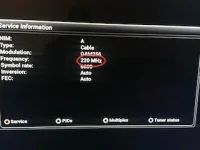
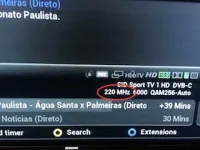
The latest 4.0 build 3 vix image shows wrong frequency for DVB-C channels. The real channel frequency is 219.5 MHz but vix rounds up and displays as 220 MHz, I noticed this issue on:
- second infobar
- service information
- bottom of channel list
 
How is someone going to confirm this? Can you provide details of these channels, provider details, lamedb file.

When was it last correct?
 
The values are rounded to nearest MHz. It does not make a difference whether you scan 219.5 MHz or 220 MHz.
 
The latest 4.0 build 3 vix image shows wrong frequency for DVB-C channels. The real channel frequency is 219.5 MHz but vix rounds up and displays as 220 MHz, I noticed this issue on:
- second infobar
- service information
- bottom of channel list
That value is rounded to the nearest integer. MHz is the smallest unit that can be entered in manual scan so why should we display a smaller unit than this?
 
Last edited:
Abu, on the last vix 3.2 build 037 the frequency was displayed without round up, that means that 219.5 MHz was displayed as 219. Since I remember vix image never displayed the correct frequency, maybe is because VU base image just support integer numbers for DVB-C frequencies. I have a list of other issues regarding DVB-C support, but lets take one at a time.

I attached my lamedb and a couple of photos as you requested.
 

Attachments

  • IMG_3178.webp
    IMG_3178.webp
    8.5 KB · Views: 106
  • IMG_3179.webp
    IMG_3179.webp
    13.3 KB · Views: 108
  • lamedb.zip
    lamedb.zip
    5.2 KB · Views: 1
Huevos, probably because you are displaying wrong information...
 
Abu, on the last vix 3.2 build 037 the frequency was displayed without round up, that means that 219.5 MHz was displayed as 219. Since I remember vix image never displayed the correct frequency, maybe is because VU base image just support integer numbers for DVB-C frequencies.
What is the point displaying a smaller figure than can be entered via manual scan?
 
Are you saying that the VIX team decided to display wrong information to the end users, because of a stupid limitation introduced by VU on the manual service search?
 
Are you saying that the VIX team decided to display wrong information to the end users
It is not "wrong", it is rounded to the nearest MHz. What is your need for a greater level of precision than the receiver can detect?
 
What are you talking about? What precision? The receiver works with the right precision in Hz, as you can check on lamedb.

What you mean is that the "smart" development team at VU made a huge mistake by allowing only integer MHz values for DVB-C channels, and because of that you and all other teams that depend on VU base image can't do much about it.

Don't waste your time convincing me that round up a frequency is a minor problem and the right thing to do. Focus your efforts asking VU to do a proper DVB-C support on their boxes.
 
What are you talking about? What precision? The receiver works with the right precision in Hz, as you can check on lamedb.

What you mean is that the "smart" development team at VU made a huge mistake by allowing only integer MHz values for DVB-C channels, and because of that you and all other teams that depend on VU base image can't do much about it.

Don't waste your time convincing me that round up a frequency is a minor problem and the right thing to do. Focus your efforts asking VU to do a proper DVB-C support on their boxes.

Perhaps you should post your "requirements" to VU+ , don,t blame the pig in the middle :) ... The blame lies with VU+ so get your pen out and do some thing positive:)
 
Abu, on the last vix 3.2 build 037 the frequency was displayed without round up, that means that 219.5 MHz was displayed as 219.
So that's a round-off as well!
Anyway: for the info to be displayed you can choose between the data that's in the lamedb and the data that's provided by the tuner. Both can (and often are) different, because of the accuracy limitation of the tuners. The very same applies to satellite tuners.


PS: No need for such a tone. We do not 'invent' or make up anything in this area, but we are depending on the hardware.
 
Hi,
why do you need 0.xMHz? Each frequency has a bandwidth which is I think 8MHz and they use PLL to fix the signal.

ciao
 
What are you talking about? What precision? The receiver works with the right precision in Hz, as you can check on lamedb.
Open "Manual Scan". The smallest frequency unit that can be entered is MHz. That is why this value is truncated to the nearest MHz in the skin and info screens.

Previously "219" was displayed. That is because Python in-built rounding is always towards negative infinity. Now "220" is displayed. This is because Abu asked for the value to be changed to reflect conventional rounding.

Values in lamedb, satellites.xml, etc. are false precision, and far beyond what the hardware is capable of differentiating.
 
Putting aside the accuracy debate.

Is it not possible to enter a rational number when you know it. This is a programming limitation in the image.


EDIT: I had asked for rounding to be done to the nearest MHz. If we can adapt the code to display rational numbers, then that would be an improvement in my view.
 
Last edited:
Is it not possible to enter a rational number when you know it. This is a programming limitation in the image.
I can't see the "rational" of this.

No, it is not a limitation of the software. The software is capable of doing maths to many decimal places. But to the hardware all those decimal places are meaningless. For example if I want to scan 10818V I can input 10822V in manual scan and it will find the transponder no problem. And in cases where the transponders are extremely close together the STB cannot decide which is on what frequency and tunes either on subsequent zaps.
 
the rationale is simple. I know the frequency to be scanned is 383.750. This is what the broadcaster uses. Surely I should be able to enter this value.

We are discussing what user can input and see.
 
I still don't get it. Why display a value that cannot be entered in manual scan?
 

OpenViX Feeds Status

Back
Top