Superb quality and spec AB-Com PULSe 4K SE. Crazy offer! Only £129! FREE UK DELIVERY! 4K UHD, Enigma 2, Multiboot 4 images & more!...
Superb quality and spec AB-Com PULSe 4K Rev II Twin Satellite tuner only £179! FREE UK DELIVERY! 4K UHD, Enigma 2, SATA HDD facility, Multiboot 4 images & more!...

XPEED LX2 DVB-C advice please

Spangles

Forum Supporter
Donated Member
Joined
Nov 29, 2014
Messages
36
Reaction score
0
Points
0
Hi, I just purchased an XPEED LX2 with the OpenVix image preflashed. I booted up the box and it connected to the internet and updated. When I try to configure the tuner to DVBC it says nothing connected even though I've connected to both the TV Ariel socket and also the Tuner A socket both with different connectors.

There is a configuration menu with loads of options like ID and Frequency etc but I have no idea what it all means. I've searched for guides but I can't find any so I was hoping maybe someone could point me in the right direction please?

Thanks
 
Hi spangles, I'm a newbie to enigma myself and struggled with the Xpeed LX2 in the early days of ownership, however doesn't DVBC indicate a Cable receiver ? if that is the case I have no knowledge of cable as my LX2 is a Sat /Terrestrial unit
which automatically determines what the installed tuners are- Seen in -Main Menu -Setup-Service Searching-Tuner Configuration- (A DVB-S2 & B DVB-T/T2 ) with no means of changing as it would not be physically possible. I think:confused:
 
Hi roybach, thanks for replying. The problem I have right now is I didn't buy another HDMI cable so I can't use my computer and the box at the same time. I can't remember exactly but in the Tuner Configuration menu there is an option that lest you switch the T2 I think to DVBC. I'm quite sure yours will also have this. I don't think I used the OpenVix menu to get to that bit, I think it was in the actual box's system menu?
 
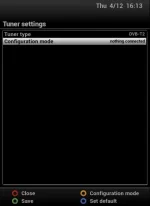
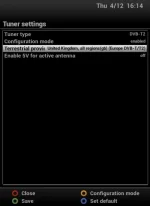
They are switchbale tuners, i.e you can switch configuration of them. Scroll down to the entry you want to change and press left right.

Tuner type: Choose whether you want to use as a Terrestrial or Cable tuner
Configuration: choose between "Nothing connected" and "enabled"

Depending on whther you have set it as Terrestrial or Cable more options will be shown. Choose your location. Picture here is for UK terrestrial.

Be sure to try ABM for obtaining/making channel data.
 

Attachments

  • nothing connected.webp
    nothing connected.webp
    7.4 KB · Views: 21
  • UK.webp
    UK.webp
    10.8 KB · Views: 22
Hi again, Had a quick look at mine and yes as you suggested there is a menu to do what you require. Tuner Configuration - (Select Tuner "OK" ) scroll down the drop down menu to "Configuration Mode" This is where you saw "nothing connected" and using the left/right buttons select "Enabled", then down to the next option "Terrestrial Provider" and again using the left/right buttons scroll through the many options given (and there are quite a few) until you see the required .
option that you need. lets hope we have cracked it .:D
abu baniaz beat me to it :eek:
 
Hi guys, thanks again for replying. I did manage to get the DVBC enabled but when I chose Automatic Scan it came back with an Error "Scan didn't start". I think it said that. I will have to try again tomorrow. Fingers crossed. :thumbsup:
 
Hi Abu, thanks for your advice. I got it up and running and seen a list of channels but now I have a different problem. When I first ran a search and clicked on a channel it just gave an error which was fine but I could look at the EPG after that error was shown. Then I did a Manual Search which came up with every channel I think but when I clicked on one I got the usual error message but when it goes away I get a No Signal error on my TV which means there is no signal coming from the LX2. The only way I could get OpenVix back up again was to reboot after disconnecting the Cable.

Have you heard of this error before?
 

OpenViX Feeds Status

Back
Top