
Superb quality and spec AB-Com PULSe 4K SE. Crazy offer! Only £99! FREE UK DELIVERY! 4K UHD, Enigma 2, Multiboot 4 images & more!...
Superb quality and spec AB-Com PULSe 4K Rev II Twin Satellite tuner only £149! FREE UK DELIVERY! 4K UHD, Enigma 2, SATA HDD facility, Multiboot 4 images & more!...
You are using an out of date browser. It may not display this or other websites correctly.
You should upgrade or use an alternative browser.
You should upgrade or use an alternative browser.
ZgemmaH17
- Thread starter SirOsis
- Start date


Code:
/usr/lib/enigma2/python/Plugins/SystemPlugins/AutoBouquetsMaker/providers/sat_282_freesat.xmlIn that file change "fec_inner" to "2", ftp file back to the box, restart, scan Freesat UK.
Autobouquets is the wrong plugin. Follow my instructions above.Thanks,I'll try that.

Any reason why only the H17 has this issue?Code:/usr/lib/enigma2/python/Plugins/SystemPlugins/AutoBouquetsMaker/providers/sat_282_freesat.xml
In that file change "fec_inner" to "2", ftp file back to the box, restart, scan Freesat UK.
Why that work with Sky UK FTA too?Code:/usr/lib/enigma2/python/Plugins/SystemPlugins/AutoBouquetsMaker/providers/sat_282_freesat.xml
In that file change "fec_inner" to "2", ftp file back to the box, restart, scan Freesat UK.
Just changed the same value on SKY UK ,that worked fine too.Why that work with Sky UK FTA too?
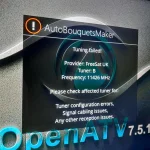

why does that say OpenATV ?? Thought you were loading OpenViX image?Good evening.
The image flashes fine but I'm getting a fail on AutobouquetsMaker when I try to scan unfortunately.
From filezilla the fec_inner" value has reverted to 0

abu baniaz
Moderator
In ABM, there is an option to update provider files. Please use that and it will fetch the updated ABM provider files.
The provider files were updated yesterday:
Best you boot in Vix slot for testing purposes
The provider files were updated yesterday:
Rich (BB code):
https://github.com/oe-alliance/AutoBouquetsMaker/commit/afe94d92986253e8c59ed243e148bdb4c6b85cf3Best you boot in Vix slot for testing purposes
You were supposed to flash the image I linked above. Your screenshot is not openvix. What procedure did you use to flash it? Maybe you are in the wrong slot.Good evening.
The image flashes fine but I'm getting a fail on AutobouquetsMaker when I try to scan unfortunately.
From filezilla the fec_inner" value has reverted to 0
why does that say OpenATV ?? Thought you were loading OpenViX image?
I downloaded the image you provided Huevos and did a clean install via usb and reset while powering on the box.The display showed USB followed by FLSH.You were supposed to flash the image I linked above. Your screenshot is not openvix. What procedure did you use to flash it? Maybe you are in the wrong slot.
Not sure why it's got OpenATV,obviously I've gone wrong somewhere.
Last edited:
Either you booted to a different slot than you flashed or the USB flash process didn't happen. If the flash was successful it would boot to the install wizard.
Can you tell us the flashing procedure used please.
Can you tell us the flashing procedure used please.
The downloaded filename should be: openvix-6.7.013.002.developer-zgemmah17combo_multi.zip
You need to open that zip file and move the contents to the root of the USB.
Whatever was on the USB must have been openatv.
You need to open that zip file and move the contents to the root of the USB.
Whatever was on the USB must have been openatv.
Yes,thought I had done that.The downloaded filename should be: openvix-6.7.013.002.developer-zgemmah17combo_multi.zip
You need to open that zip file and move the contents to the root of the USB.
Whatever was on the USB must have been openatv.
I'll try again.
Strange.
The display changes from BOOT to FLSH for a split second and back to BOOT again.
It then goes to OpenATV and the install wizard.
I've tried with different usb's(8gb and 2gb) but same result.
Anyway I can install via Putty or Filezilla?
The display changes from BOOT to FLSH for a split second and back to BOOT again.
It then goes to OpenATV and the install wizard.
I've tried with different usb's(8gb and 2gb) but same result.
Anyway I can install via Putty or Filezilla?
Similar threads

- Replies
- 0
- Views
- 3K

- Replies
- 0
- Views
- 589
- Replies
- 4
- Views
- 263