Superb quality and spec AB-Com PULSe 4K SE. Crazy offer! Only £129! FREE UK DELIVERY! 4K UHD, Enigma 2, Multiboot 4 images & more!...
Superb quality and spec AB-Com PULSe 4K Rev II Twin Satellite tuner only £179! FREE UK DELIVERY! 4K UHD, Enigma 2, SATA HDD facility, Multiboot 4 images & more!...

[VU+ Duo] System Crash (Black Screen with Vix error) But no error log produced??

mcquaim

ViX Beta Tester ,
Joined
Dec 6, 2010
Messages
2,708
Reaction score
15
Points
0
Hi there,

I have had a few crashes over the last few days (Mostly browsing the EPG with Zap's etc.) so last night I decided I was going to submit the log to the lads for once. However, when I when into the logs manager there were none there at all.

I checked the settings and the logs seem to be enabled and the location matches so not sure what is happening here.

Anyone come across this before? :confused:

Cheers,
Mac
 
Same here 2or3 times a day

The crashing or the lack of logs?

Mine wouldn't crash that much but it only gets used for a few hours every eve after work so not being exposed as much as most other boxes I presume...
 
have you looked into the logs manager ?
menu> setup> system> logs> logs manager.
 
Hi pheonix, yeah that is where I was looking last night and it wasn't listing anything..

Everything looked fine in the Menu-->Setup-->System-->Logs-->Settings menu too, strange one.

I assume if I do get one of those Vix screens that I should get a crash log?
 
you should yes. where do you have it set to save them ?.
 
Whatever the default is, from memory I think it said home\root\logs ??
 
yeah it should be home/root/logs.

have you looked on the box it self to see if there there but not showing in the logs manager ?.
also have you tried setting them to say a usb stick ?. this is where i set mine to.
 
have you looked on the box it self to see if there there but not showing in the logs manager ?.
also have you tried setting them to say a usb stick ?. this is where i set mine to.

I hadn't thought of that, I will give that a lash this evening.

Thanks for the help pheonix :thumbsup:
 
Hi pheonix,

I checked the /home/root/logs/ directory abd no sign of any logs. I changed the directory to /media/usb/logs/ and recreated the crash and it still didn't produce any logs.

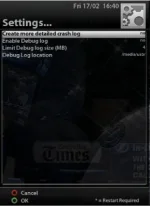
Is the below settings correct?
Logs_Settings.webp

The issue seems to be around skipping a day or so forward in the EPG using the > key, then zapping a channel and when I exit I'm getting a system crash.
 
Hi pheonix,

I checked the /home/root/logs/ directory abd no sign of any logs. I changed the directory to /media/usb/logs/ and recreated the crash and it still didn't produce any logs.

Is the below settings correct?
View attachment 14872

The issue seems to be around skipping a day or so forward in the EPG using the > key, then zapping a channel and when I exit I'm getting a system crash.


there is bug in the current version if the 'Debug Log" is disabled crash get deleted on gui restart, sorry fixed in coming updates, for now just turn on the debug logs.
 
Cheers Andy, I'll turn on the debug logs for now and send the crash log!
 

OpenViX Feeds Status

Back
Top