Superb quality and spec AB-Com PULSe 4K SE. Crazy offer! Only £99! FREE UK DELIVERY! 4K UHD, Enigma 2, Multiboot 4 images & more!...
Superb quality and spec AB-Com PULSe 4K Rev II Twin Satellite tuner only £149! FREE UK DELIVERY! 4K UHD, Enigma 2, SATA HDD facility, Multiboot 4 images & more!...

[GiGaBlue QUAD] Is it possible to add gigabit USB adapter support?

  • Thread starter Thread starter Darrellr
  • Start date Start date
Hi,

can you give the exact name/type of the adapter? Have you tested both? Which one is faster?

ciao

I tested the Digitus DN-10150 (SMSC LAN7500 USB2 chipset) and the Digitus DN-3023 (ASIX ax88179 USB3 chipset) and got similar read performance of ~ 33mB/s. However, the write speeds of the DN-3023 were 20% better @ ~ 31.5 mB/s.

I also had a problem with OSCAM whilst connected via the LAN7500 chipset device
 
Last edited by a moderator:
Hi,
thanks. Just for fun testing new things I ordered a DN-3023. I ordered from amazon and in the same order 3 rolls of chips so it will be even more fun:-)

ciao


guy's bare in mind atm the SMSC LAN7500 USB2 chipset, is only supported on the et's, Vu's and Gbquad, other will follow, but with all the Sourceforge issues has slowed me down, however the ASIX ax88179 USB3 chipset, should be supported on all boxes.

i have just order both devices to test.

http://www.amazon.co.uk/gp/product/B003VSTDFG/ref=ox_sc_act_title_2?ie=UTF8&psc=1&smid=A16DOJNYBMLIQ3
http://www.amazon.co.uk/gp/product/B007U5MGDC/ref=ox_sc_act_title_3?ie=UTF8&psc=1&smid=AH32YJP281GBN
 
I can't see version 675 on the OpenViX download page for the Quad so I assume it didn't happen last night?

I'll keep an eye out.

When it does I guess you want me to clean install and then execute the two feed install commands via tenet - or will they be added to the Plugins menu?
 
i have just order both devices to test.

[/COLOR]http://www.amazon.co.uk/gp/product/B003VSTDFG/ref=ox_sc_act_title_2?ie=UTF8&psc=1&smid=A16DOJNYBMLIQ3
http://www.amazon.co.uk/gp/product/B007U5MGDC/ref=ox_sc_act_title_3?ie=UTF8&psc=1&smid=AH32YJP281GBN

Just to be clear Andy, the first device in your list is an AXIS ax88178 chipset, not the ax88179. They are different in architecture and require different drivers. The-8 is USB2 whilst the -9 is usb3.

[The] driver for ASIX's AX88179 family of USB 3.0/2.0 to gigabit ethernet adapters [is] based on the AX88xxx driver but the usb commands used to access registers for AX88179 are completely different.
 
You can do an online update to build 677.

Ok - so the following steps:

1. clean install 668
2. Software Update menu option to 677
3 Either telnet and execute package feed installs or use plugins menu (which?)
4. Report back if succesfull or not.

Correct?
 
Ok - so the following steps:

1. clean install 668
2. Software Update menu option to 677
3 Either telnet and execute package feed installs or use plugins menu (which?)
4. Report back if succesfull or not.

Correct?


yes, driver's can be installed from feeds.

or used attached image.
 

Attachments

Just to be clear Andy, the first device in your list is an AXIS ax88178 chipset, not the ax88179. They are different in architecture and require different drivers. The-8 is USB2 whilst the -9 is usb3.


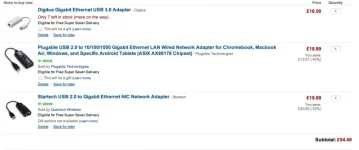
ok here is what i will order then this ok ?
 

Attachments

  • Screen Shot 2013-06-04 at 13.51.27.webp
    Screen Shot 2013-06-04 at 13.51.27.webp
    23.5 KB · Views: 14
Installed 677 from your file, configured and then ran the two package installs:

Code:
Welcome to OpenViX for gbquad
openvix 3.0 gbquad


gbquad login: root
root@gbquad:~# opkg  install kernel-module-smsc75xx
Installing kernel-module-smsc75xx (3.3.6-r0.2) to root...
Downloading http://enigma2.world-of-satellite.com/feeds/3.0/gbquad/gbquad/kernel
-module-smsc75xx_3.3.6-r0.2_gbquad.ipk.
Installing kernel-module-usbnet (3.3.6-r0.2) to root...
Downloading http://enigma2.world-of-satellite.com/feeds/3.0/gbquad/gbquad/kernel
-module-usbnet_3.3.6-r0.2_gbquad.ipk.
Configuring kernel-module-usbnet.
Configuring kernel-module-smsc75xx.
root@gbquad:~# opkg  install ax88179-178a
Installing ax88179-178a (1.4.0-r0.0) to root...
Downloading http://enigma2.world-of-satellite.com/feeds/3.0/gbquad/gbquad/ax8817
9-178a_1.4.0-r0.0_gbquad.ipk.
Configuring ax88179-178a.
root@gbquad:~#

Connected the adapters, rebooted and all okay. I'm currently using the USB3 adapter full time. Would be useful if we could name the adapters instead of them being "LAN Connection", "LAN Connection 2", "LAN Connection 3".
 
Installed 677 from your file, configured and then ran the two package installs:

Code:
Welcome to OpenViX for gbquad
openvix 3.0 gbquad


gbquad login: root
root@gbquad:~# opkg  install kernel-module-smsc75xx
Installing kernel-module-smsc75xx (3.3.6-r0.2) to root...
Downloading http://enigma2.world-of-satellite.com/feeds/3.0/gbquad/gbquad/kernel
-module-smsc75xx_3.3.6-r0.2_gbquad.ipk.
Installing kernel-module-usbnet (3.3.6-r0.2) to root...
Downloading http://enigma2.world-of-satellite.com/feeds/3.0/gbquad/gbquad/kernel
-module-usbnet_3.3.6-r0.2_gbquad.ipk.
Configuring kernel-module-usbnet.
Configuring kernel-module-smsc75xx.
root@gbquad:~# opkg  install ax88179-178a
Installing ax88179-178a (1.4.0-r0.0) to root...
Downloading http://enigma2.world-of-satellite.com/feeds/3.0/gbquad/gbquad/ax8817
9-178a_1.4.0-r0.0_gbquad.ipk.
Configuring ax88179-178a.
root@gbquad:~#

Connected the adapters, rebooted and all okay. I'm currently using the USB3 adapter full time. Would be useful if we could name the adapters instead of them being "LAN Connection", "LAN Connection 2", "LAN Connection 3".

the drivers should be in PluginBrowser too in Drivers section.
 
the drivers should be in PluginBrowser too in Drivers section.

Confirmed. (Although I had to allow unstable option to see plugins.)

Driver Log output:

Code:
NET: Registered protocol family 10
ASIX USB Ethernet Adapter:v1.4.0 21:23:30 Jun  3 2013
		http://www.asix.com.tw
ax88179_178a 2-1:1.0: (unregistered net_device): mtu 1500
ax88179_178a 2-1:1.0: eth1: register 'ax88179_178a' at usb-ehci_hcd-1, ASIX AX88179 USB 3.0 Gigibit Ethernet, xx:xx:xx:xx:xx:xx [Edit MAC removed]
usbcore: registered new interface driver ax88179_178a
ADDRCONF(NETDEV_UP): eth1: link is not ready
ax88179_178a 2-1:1.0: eth1: ax88179_178a - Link status is: 1
ax88179_178a 2-1:1.0: eth1: Write medium type: 0x013f
ADDRCONF(NETDEV_CHANGE): eth1: link becomes ready
ax88179_178a 2-1:1.0: [B]eth1: link up, 1000Mbps, full-duplex,[/B] lpa 0xCDE1
eth1: no IPv6 routers present
 
Last edited by a moderator:
Installed 677 from your file, configured and then ran the two package installs:

Code:
Welcome to OpenViX for gbquad
openvix 3.0 gbquad


gbquad login: root
root@gbquad:~# opkg  install kernel-module-smsc75xx
Installing kernel-module-smsc75xx (3.3.6-r0.2) to root...
Downloading http://enigma2.world-of-satellite.com/feeds/3.0/gbquad/gbquad/kernel
-module-smsc75xx_3.3.6-r0.2_gbquad.ipk.
Installing kernel-module-usbnet (3.3.6-r0.2) to root...
Downloading http://enigma2.world-of-satellite.com/feeds/3.0/gbquad/gbquad/kernel
-module-usbnet_3.3.6-r0.2_gbquad.ipk.
Configuring kernel-module-usbnet.
Configuring kernel-module-smsc75xx.
root@gbquad:~# opkg  install ax88179-178a
Installing ax88179-178a (1.4.0-r0.0) to root...
Downloading http://enigma2.world-of-satellite.com/feeds/3.0/gbquad/gbquad/ax8817
9-178a_1.4.0-r0.0_gbquad.ipk.
Configuring ax88179-178a.
root@gbquad:~#

Connected the adapters, rebooted and all okay. I'm currently using the USB3 adapter full time. Would be useful if we could name the adapters instead of them being "LAN Connection", "LAN Connection 2", "LAN Connection 3".

Just upgraded to image 715 and the ASIX88179 USB3 device is no longer recognised. I've reinstalled the plugin but still no joy. Is this a kernel incompatibility issue or a Darrell-is-an-idiot issue
 
I uninstalled plugin, did an opkg remove and then opkg install and now all working
 

OpenViX Feeds Status

Back
Top