Superb quality and spec AB-Com PULSe 4K SE. Crazy offer! Only £99! FREE UK DELIVERY! 4K UHD, Enigma 2, Multiboot 4 images & more!...
Superb quality and spec AB-Com PULSe 4K Rev II Twin Satellite tuner only £149! FREE UK DELIVERY! 4K UHD, Enigma 2, SATA HDD facility, Multiboot 4 images & more!...

[VU+ Duo] Swap File / USB Mount

  • Thread starter Thread starter evesham
  • Start date Start date
E

evesham

Guest
Hi all, since doing fresh installs of both Zeus previously and now Helios, I am having a lot of trouble using the USB 96MB swap file activated at restart.

I have used the same Sandisk 8GB for 2 years with no problems, so I tried using a Kingston just in case but this has also given the same problem.

Basically on cold boot i.e plug switch on, the USB mounts as /dev/sda1 at a size of 500GB instead of 16GB and relegates my WD 500GB to /dev/sdb1. This renders the swap file inactive and the Picons/epg data are not accessible. (IIRC both usb drives were formatted as FAT32 in a PC then initialized in the Vix menu as normal.)

The drives are all mapped and mounted correctly (media/hdd as /dev/sda1 and media/usb as /dev/sdb1) and this only happens sometimes, other times it works perfectly.

Anyone else experiencing this or had similar problems?

Thanks for looking.
 
Yup - exact same issue for me on my vu+ duo. I only noticed it after the Helios update, but it may always have been there in Zeus too.

Sent from my Nexus 10 using Tapatalk
 
phew, looks like a few of us are having issues with it. Now my box is also sometimes hanging at *Starting* until I remove the USB stick.
Worked flawlessly on all openvix 3.0 versions but since Zeus had nothing but trouble...hopefully the whizzkids can fix this as the swap file is a much needed utility on the Duo
 
The"starting" issue has nothing to do with Zeus or Helios, it is a known issue with some of these boxes, unfortunately I have 2 which often have this occurrence on reboot, that is why if I can help it I never fully power down the box, I only restart gui and keep in standby. Which seems to alleviate the problem for myself.

Sent from my GT-I9195 using Tapatalk
 
I can't afford 24 watts of power running 24/7 micky, there's a recession on :p Every night I always Deep standby and turn off at the plug.

no seriously, I cannot remember any starting issues ever before, the Duo has been excellent.
Debug logs are enabled but last night and today it either wont load at all or when it does load there's no USB stick mounted. So I mount it and it works perfectly till next reboot.

I notice your swap file is 256mb and on your Hard drives, has yours been ok since on Helios?
 
I'm not at Helios yet still on Zeus, just i know it is an old fault with certain receivers. (In stand by it only pulls less than a couple of watts as far as I'm aware) ;)
As I say once you've got it, it will always sporadically do it with a usb connected, only way I can find round issue is to, either, not use usb or don't deep standby. Choice is yours!

My swap on hdd and cache flush plugin helps my boxes run really smooth and very responsive. (Very rarely spinning Vix).

Sent from my GT-I9195 using Tapatalk
 
thanks guys, think I will try putting the swap file on my WD hard drive and see how it goes later.

like u both say Deep Standby is less than 1W, I ain't that tight :)
 
Since my last post I have moved the Swap File to the Hard Drive and updated to Helios 010.
Now a constant problem is the box stays on starting. I remove the USB from the back, the box loads as normal.
The stick then mounts as normal once plugged back in after boot.
Anybody else experiencing similar start up problems?

Thanks
 
Yes mentioned earlier it is a common fault with some duo. To get round it I do not ever send my box to deep stand by if I can help it. My power timers are only restart gui (this resets stb timer clock so repeated auto scans run) and normal standby.

Sent from my GT-I9195 using Tapatalk
 
thanks micky, I think its definitely a driver problem in the Zeus/Helios versions as I did not have 1 problem ever on openvix 3.0.

I hope the team can solve the problem as its quite annoying
 
I think you just got lucky with previous images, as it is a fault that appears not just with Vix.

Sent from my GT-I9195 using Tapatalk
 
I'm on a Solo box and had this issue every time box woke from deep standby.
I googled "add swap file vu solo" and there is a guide on how to create manually then add FSTAB start up.
Since I did this I have never had this issue. In ViX GUI the "enable at start up" is never ticked but FSTAB does the job instead.
100% fix for me.
 
thanks dave looked into this today, I've managed to follow the guides to manually setup and activate the 128mb swap file on the usb.
the part I'm stuck on is the fstab to manually autostart the swap.
I have added the following line to fstab and nothing happens on restart.
/media/usb/swapfile swap swap defaults 0 0

I also thought maybe it needs the UUID so i tried adding the line
UUID=8dfbe332-fdb5-4f45-b680-9049d7a898b0 /media/usb/swapfile swap swap defaults 0 0

but still no joy. Any suggestions please?
Thanks for the help
 
my fstab swap entry is like this

Code:
/media/usb/swapfile  swap                 swap       defaults              0 0

Does the command to start swap work successfully ?

Code:
swapon /media/usb/swapfile

my full fstab looks like this

Code:
rootfs               /                    auto       defaults              1  1
proc                 /proc                proc       defaults              0  0
devpts               /dev/pts             devpts     mode=0620,gid=5       0  0
usbdevfs             /proc/bus/usb        usbdevfs   noauto                0  0
tmpfs                /var/volatile        tmpfs      defaults              0  0
usbfs                /proc/bus/usb        usbfs      defaults              0  0
/media/usb/swapfile  swap                 swap       defaults              0 0
//192.168.0.27/E	/media/net/E	cifs	user=vu,pass=REMOVED,_netdev,rw,iocharset=utf8	0 0
//192.168.0.27/D	/media/net/D	cifs	user=vu,pass=REMOVED,_netdev,rw,iocharset=utf8	0 0

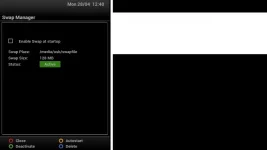
GUI looks like this

1zvbbed.webp
 
Last edited:
thanks dave, much appreciated, I shall have another go at it when i'm back home later
 
Doh spoke to soon, its at it again. I don't think its anything to do with the swap file itself anymore, I think its something to do with when the system mounts the USB at start up
 
Yep, i,ve got a similar prob, very time i boot up usb is showing as 500gb hdd, same as my hdd, and i have no picons, if i remove usb and re-fit it mounts properly and i have picons back! slightly annoying but no big drama
 

OpenViX Feeds Status

Back
Top