Superb quality and spec AB-Com PULSe 4K SE. Crazy offer! Only £129! FREE UK DELIVERY! 4K UHD, Enigma 2, Multiboot 4 images & more!...
Superb quality and spec AB-Com PULSe 4K Rev II Twin Satellite tuner only £179! FREE UK DELIVERY! 4K UHD, Enigma 2, SATA HDD facility, Multiboot 4 images & more!...

[VU+ Solo] Where is the trash can?

femilovechild

New member
Joined
Jul 27, 2013
Messages
43
Reaction score
0
Points
0
Can someone please point me to the location of the trash can in the menu? When I record a program and then want to delete it, I get this message "Cannot move to trash can. None type object has no attribute endswith". Any help will be appreciated
 
I have mine on hard drive? I can access it by pressing the file button ( the one you use to access recordings) on my remote.
 
It's an external hard disk. I created an ext4 drive on my computer and mounted it on the solo
 
Okay, I re-initialised the disk through the solo menu, and all the folders were gone. So, I have recreated the folders 'movie' and 'timeshift'. Is there other folders I need to create because the trash can is still not available. I still get the error message when I try to delete a recorded program.

Thanks
 
You should not need to create them, they should be created automatically. Have you any other storage devices connected?
 
You should not need to create them, they should be created automatically.
Exactly! And that was part of my reason to ask to initialise the HDD (the other is that the correct format with the correct parameters would be used for the file system).
 
yes. I use a 2gb flash drive mounted as /usr by the flashexpander plugin, also for swap. the 500gb hard drive is mounted as /hdd and i've got epg, recording, and timeshift pointing to it.
 
Ahh, you use flashexpander! Are you sure you know exactly how to use that? As this may be part of your issue.
Why do you need it? Do you have too many plugins installed?
 
Hi, If anyone can also help me with this issue seems like I also don't have the "Trash Can" or Trash/Delete folder in media/hdd only have 3 folders: movie,timeshift & lost + found. Also I did initialize my hdd.
 
Hi, If anyone can also help me with this issue seems like I also don't have the "Trash Can" or Trash/Delete folder in media/hdd only have 3 folders: movie,timeshift & lost + found. Also I did initialize my hdd.
And you have the trashcan enabled in your settings? If so: what happens when you delete (red button) a recording from the recordings list?
 
And you have the trashcan enabled in your settings? If so: what happens when you delete (red button) a recording from the recordings list?

trashcan enabled in your settings? hmmmm :confused: didn't know you have to enable it how do you do it?
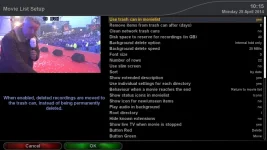
 
I think it is in recording settings; might also be in the recordings list context menu.
When enabled you don't get the 'are you sure' question on deleting a file (as it can easily be recovered from the trashcan).
 
I think it is in recording settings; might also be in the recordings list context menu.
When enabled you don't get the 'are you sure' question on deleting a file (as it can easily be recovered from the trashcan).

I cannot find any trash can or delete recordings options in recording settings or any where else in setup. I have tried deleting a recording and I get the following message:

Cannot move to trash can
'NoneType' object has no attribute 'endswith'

For the above message I get 2 options Yes or No when I click yes the recording does disappear? which is weird since I do not have a trash/delete folder in my hdd so where does the recording go? I mean I should not be getting the above message when I press delete via red button am sure that message means something.
 
Here's a picture below of the message I get when I press the delete button in media/hdd/movies to delete a recording

View attachment 34285
Can you please upload debuglogs (enable them and reboot box to get them going).
And does your box have write access on that location (which location is it)? Otherwise no trascan can be created/used.
 
Last edited:
Like shadowman said, I have initialised the drive via the solo box and the folders were not created. Only lost & found was created. I also cannot see any option for trash can in the recording option. I will try and get some debug logs when I get home
 

OpenViX Feeds Status

Back
Top