Superb quality and spec AB-Com PULSe 4K SE. Crazy offer! Only £99! FREE UK DELIVERY! 4K UHD, Enigma 2, Multiboot 4 images & more!...
Superb quality and spec AB-Com PULSe 4K Rev II Twin Satellite tuner only £149! FREE UK DELIVERY! 4K UHD, Enigma 2, SATA HDD facility, Multiboot 4 images & more!...

OpenVix Blue-HD

  • Thread starter Thread starter rossi2000
  • Start date Start date
Status
Not open for further replies.
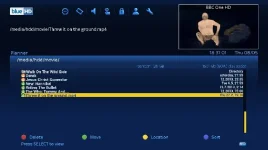
not sure if its just me but when i view file list in recordings i has the "Y" missing from yesterday... :confused:
 
You might need to adjust rows as fine here but same as you before reducing number of rows

Sent from my SM-N9005 using Tapatalk
 
Got a problem with timers list, middle row is missing date and overlapped with sat position
5y7enudu.jpg


Sent from my SM-N9005 using Tapatalk
 
will add to the to-do list.
not much on the list though, we are working on Red-HD atm.
 
Hi will this skin work on other images ie (Dreambox) Nemesis or is it only for the VU boxes.
Thanks
 
Hi just looking for a new image did not realise that Vix did an image for the dreambox I have a genuine DM500HD where would i find this image.
Thanks:)
 
Hi just looking for a new image did not realise that Vix did an image for the dreambox I have a genuine DM500HD where would i find this image.
Thanks:)

We don't but our sister image team OpenATV do provide dreambox images that are the closest you will find to ViX on a DM.

Sent from my GT-I9300 using Tapatalk
 
Hi mate any update on moving that rewind/fast forward icon to the bottom left?
 
not yet,we are still deciding on whether to move it and if so where would be a good place.
the left of the infobar was just an idea.

leave it with us, i actually think the existing location is the wrong place otherwise original sly box users would encounter the same thing.
 
Heya mate,

LOVE it. Nothing more can be said to be honest. My feeble attempt was fruitless! :) For new users to the skin and V3, it might be a good idea to tell users the optimum settings to use on the first post e.g. number of rows, font size etc. Also, I see the name of the font is "SkyFinalRegular.ttf". If not it's an excellent copy. Is yours the exact one Sky use because if not I have their official font if you want it.
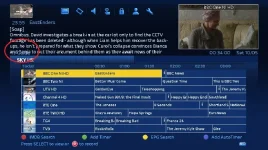
One final thing, sorry to be a nuisance, but on mine there is text cut off.

grab.webp

I've also created a different boot logo which is attached in the ZIP folder.
 

Attachments

I'm sure Rossi will look into why that's doing that with the overlaying text. I've not come across that. You can also go to graphic mode on the epg which is cleaner than the text mode your currently in.

The font is sky's official 2014 font. It comes in three thicknesses which I acquired by my own handywork :-)

Sky have a separate custom epg font which is identical to the fonts we use, apart from the lower case "g"
 
Last edited:
apologies if already mentioned although I couldn't find when searched... you know when you go into a bouquet and see the preview window displaying the channel in the top right... when I scroll down through the channels to preview sometimes there is too much text (mini synopsis for now & next) under the preview window. Is there anything I can do to fit all the text in here? sometimes the synopsis is short & thats fine, but more often or not it gets cut off as it's too long?

Not the end of the world etc. and takes nothing away from the excellent skin... would just be nice to be able to control the info size or scroll option to enable the whole synopsis to be read.

Cheers
 
...... it might be a good idea to tell users the optimum settings to use on the first post e.g. number of rows, font size etc.....

Fantastic job rossi2000 and the whole team. Love it also. Above would be helpful for optimising. Thanks again for the hard and obviously attention to detail work.
 
Heya mate,

LOVE it. Nothing more can be said to be honest. My feeble attempt was fruitless! :) For new users to the skin and V3, it might be a good idea to tell users the optimum settings to use on the first post e.g. number of rows, font size etc. Also, I see the name of the font is "SkyFinalRegular.ttf". If not it's an excellent copy. Is yours the exact one Sky use because if not I have their official font if you want it.

One final thing, sorry to be a nuisance, but on mine there is text cut off.

View attachment 34557

I've also created a different boot logo which is attached in the ZIP folder.


ye our fonts are the original sky ones now.

ive checked your screenshot thanks, i will tweak that later on, ive obviously not adjusted that since putting the writing "TV Guide" there.

ta
 
apologies if already mentioned although I couldn't find when searched... you know when you go into a bouquet and see the preview window displaying the channel in the top right... when I scroll down through the channels to preview sometimes there is too much text (mini synopsis for now & next) under the preview window. Is there anything I can do to fit all the text in here? sometimes the synopsis is short & thats fine, but more often or not it gets cut off as it's too long?

Not the end of the world etc. and takes nothing away from the excellent skin... would just be nice to be able to control the info size or scroll option to enable the whole synopsis to be read.

Cheers


please post a screenshot it enables us to see exactly what you mean. as per the screenshot posted above to see a problem.
 
Status
Not open for further replies.

OpenViX Feeds Status

Back
Top