Superb quality and spec AB-Com PULSe 4K SE. Crazy offer! Only £99! FREE UK DELIVERY! 4K UHD, Enigma 2, Multiboot 4 images & more!...
Superb quality and spec AB-Com PULSe 4K Rev II Twin Satellite tuner only £149! FREE UK DELIVERY! 4K UHD, Enigma 2, SATA HDD facility, Multiboot 4 images & more!...

[GiGaBlue QUAD] [NOT QUAD+] recording problem

  • Thread starter Thread starter Ojustaboo
  • Start date Start date
This is all using openmips-4.2-gbquad-20140921_usb

which I believe is the same as the ones you guys have tried ?

So for me, the same problems there regardless of ViX or Openmips.

The link that Scicilian posted (http://image.openmips.com/4.2-DEV/index.php?open=gbquad) and the image that i downloaded is dated 6th sept (openmips-4.2-gbquad-20140906_usb)..I can't see that image on their website anymore...the link takes you to the recent nightly builds, I can't imagine that the most recent build is different to my one from the 6th sept (as far as our problem is concerned)
I have noticed though that on my box..Information-About....It says Last upgrade 2014-09-22 20:53:53..I haven't done any manual upgrades since i installed the image from the 6th sept..So it might have done it automatically...Time for another over night test
 
Direct link to the bug reporting sub forum

HTML:
http://www.gigablue-support.com/index.php?page=Board&boardID=264

It is not only the reboots but USB tuners needs fixing

Posted a bug report there on Sunday, said awaiting mod approval.

Posted my Youtube post there yesterday, explaining while it's a ViX image on the youtube clip, the problem only started when I upgraded their bootloader, (pointing them to this thread both times), again awaiting mod approval.

Today neither of them have appeared yet and looking at my profile I have zero posts.
 
Put a fan in earlier.

Have recorded a minimum of 3 things continuously while watching something else since 15:30pm

Twice the pre-recorded program I was watching ended, and each time I re-imported the epg and this worked 100% fine.

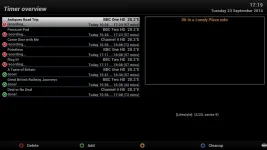
It's now 17:18 pm and zero problems as you can see, 5 things currently recording while watching a MKV.

This is all on ViX build 37

4097_0_0_0_0_0_0_0_0_0.webp
 
Put a fan in earlier.

Have recorded a minimum of 3 things continuously while watching something else since 15:30pm

Twice the pre-recorded program I was watching ended, and each time I re-imported the epg and this worked 100% fine.

It's now 17:18 pm and zero problems as you can see, 5 things currently recording while watching a MKV.

This is all on ViX build 37

View attachment 37233

That sounds good
Where did you get the fan from?...I have one in a old sky hd box, wonder if i could use that
Was it easy to fit? I take it the fan is on all the time?
 
Could be worth a try if it is a cure, but might be coincidental

Sent from my GT-I9100 using Tapatalk
 
Could be worth a try if it is a cure, but might be coincidental

Sent from my GT-I9100 using Tapatalk
It works with a fan..My test with a desk fan over the receiver worked and kept the 'fake' temp down and therefor could use as normal
 
That sounds good
Where did you get the fan from?...I have one in a old sky hd box, wonder if i could use that
Was it easy to fit? I take it the fan is on all the time?


Hehe I butchered my lid. Cut a big circle out of it and installed this

Code:
http://www.ebuyer.com/624099-scythe-kaze-jyu-slim-100mm-2000rpm-case-hdd-fan-kaze-jyu-slim-2000
as it was nice and slim.

I cut an old USB cable in half, red is +5v, black is ground and soldered on a connector (that came with the fan) for it's power.

I simply removed the Tuner 4 cover and routed the cable out of that and plugged into a rear USB port so it's going at just under 1/2 speed which is ample, and I can't hear it at all (on all the time).

Don't laugh, I'll tart it up when I have time and make it look a lot better.

20140923_164229.webp

Didn't take a close up earlier, now too dark so had to use a torch hence it looks worse than it actually looks in pic below

20140923_184058.webp


Could be worth a try if it is a cure, but might be coincidental

No, it's fixed. I tested this all over the weekend when it first happened, there's my youtube clip earlier on this page etc, it's a temp related problem, well it's a driver problem that's reporting a too higher temp, but putting in a fan keeps it cool enough not to reboot and solved the problem once and for all. ANother poster in this thread put a fan in and it fixed his too.

Now been on for 3 hrs recording at least 3 things while watching another and also FTPing a crap load of MKV files to the movie folder.

Not one slight glitch
 
That's interesting...Well if it works it works
I wonder if i could do the same then but without cutting a hole in the lid..Like if i use the fan out of a sky hd box, cut the cable on the fan and stick a usb connector on it and just place the fan on the receiver, after all this is what i did in my test but obviously won't be as powerful, might have a look later
Can i ask what you have on your tv stand to the right of the gigablue?
 
Is it! looks nothing like my playstation 2 lol and i used to be up on technology...looks good, must get one
 
Yep a PS4.

I got this fan as it was the only one avaiable for next day delivery that was thin enough to fit properly on ebuyer, they had smaller ones but I would have to wait another day and I want my box working now :)

I was just going to fit the fan to the lid and drill a few extra air holes due to the fans size.

I wondered about the best way of connecting it, and googled "quad fan", I came across this German post (need to be registered to see pic) where he has fitted exactly the same fan as I have (well same make and size, mines slightly more powerful but still completely silent) and he had cut a hole in his lid so I copied him (have a workshop full of woodworking and metalworking tools)

Code:
http://www.gigablue-support.org/gigablueforum/board25-gigablue-quad/board32-sonstiges/p33111-temperatur-des-prozessors-einer-quad-da-kein-l%C3%BCfter-verbaut-ist/#post33111

This guy is also using the same fan and gave me the idea of using the USB for power

It's still recording 3 things fine, not a single glitch since 15:30, that's 4 hrs. Now going to stop and presume it's fixed :)

Code:
http://www.gigablue-support.org/gigablueforum/board25-gigablue-quad/board32-sonstiges/p19400-temperatur-des-prozessors-einer-quad-da-kein-l%C3%BCfter-verbaut-ist/#post19400
 
Good stuff - I installed a 120mm fan in a PC - based system some time ago. Like the E2 STB's it was a fanless system, but I found that the temps went over the mid - 80's, so I felt that a fan was appropriate. I installed a PC fan and used a 5V connection so it ran at a slow RPM. I think you have gone down the right road in this case Ojustaboo.
 
I take it the fan is on all the time?

When you said this yesterday, I thought you were talking about while the Quad is up and running.

The only slightly bad thing about using the usb port is even on standby, it has power, hence fan is on 24/7.

Unplugging the USB isn't really going to be practical, so unless I can find an option that cuts the power to the USB on standby, it will have to remain on.

Not a problem as cant hear it, thinking more of the fan wearing out.

Deep standby would solve it but I have my daily epg import at 6am
 
Last edited:
So here is the next challenge, to get an internal fan that fits without modifying the lid and switches off on stby. Has Ojustaboo finally cracked this problem. Would be interesting to here a few other that have tried the same thing. would love to get back to Vix again. The Openmips is a good image but for me the EPG selections let it down and as posted before Vix has cracked this part of the image.
 
Well, that is easy to fix: set a wakup-timer before the import time and a deep-timer 15 minutes afterwards.

Just thought of a problem with the fan being off in normal standby (if it was possible), if I have say 3 things set up to record on the timer, the fan would need to be on while recording.
 
But would that be affected with a 15 min stoppage of the fan? The heat cycle you have tested seems to be fairly gradual. Just a thought

Sent from my GT-I9100 using Tapatalk
 
Code:
http://www.gigablue-support.org/gigablueforum/board25-gigablue-quad/board32-sonstiges/p33111-temperatur-des-prozessors-einer-quad-da-kein-l%C3%BCfter-verbaut-ist/#post33111

This guy is also using the same fan and gave me the idea of using the USB for power

It's still recording 3 things fine, not a single glitch since 15:30, that's 4 hrs. Now going to stop and presume it's fixed :)

Code:
http://www.gigablue-support.org/gigablueforum/board25-gigablue-quad/board32-sonstiges/p19400-temperatur-des-prozessors-einer-quad-da-kein-l%C3%BCfter-verbaut-ist/#post19400

Hi. From the pictures on the forum it looks as though he has wired the power internally and not used an external connection to a USB plug. Is that correct, it would be a neater installation.
 
In post 105, where he's cut the same hole as me, you can see the yellow/red/black fan cable coming out of the back, just to the left of the left hand satellite cable, then between the two satellite cables, he's plugged in a black and red cable to the fan cable that then goes to the USB port.

But he updated it to internal in the following pics and also has a temp sensor installed (didn't notice those yesterday, thanks)

Code:
http://www.gigablue-support.org/gigablueforum/board25-gigablue-quad/board32-sonstiges/p34152-temperatur-des-prozessors-einer-quad-da-kein-l%C3%BCfter-verbaut-ist/#post34152

I wonder if that solves the problem of the fan being on in standby. I've asked in that thread, will let you know if he replies.

On a similar note, does anyone know if the internal HD power is cut while on standby please?, if so I could splice into that
 
I've managed to hunt out the fan controller he's using, wonder if I can find similar in UK to save on 10 Euro postage

Code:
http://www.pollin.de/shop/dt/NjU3OTgxOTk-/Bausaetze_Module/Bausaetze/Bausatz_PC_Lueftersteuerung.html
 

OpenViX Feeds Status

Back
Top