Superb quality and spec AB-Com PULSe 4K SE. Crazy offer! Only £99! FREE UK DELIVERY! 4K UHD, Enigma 2, Multiboot 4 images & more!...
Superb quality and spec AB-Com PULSe 4K Rev II Twin Satellite tuner only £149! FREE UK DELIVERY! 4K UHD, Enigma 2, SATA HDD facility, Multiboot 4 images & more!...

OpenVix Blue-HD

  • Thread starter Thread starter rossi2000
  • Start date Start date
Status
Not open for further replies.
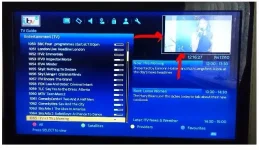
I have tried this theme today and totally blown away. Its a fantastic theme. Thank you guys for the hard work. I have one minor issue. I get a black boarder around the small channel preview. See the attached photo.

image.webp

I can go to position set up and move everything up and right to get rid of the boarders. But the i create boarders around the whole epg display.

Is there any way to move the channel preview to fit perfectly around the white box even if this means editing some files.
 
Is there any way to move the channel preview to fit perfectly around the white box even if this means editing some files.

This is a result of having overscan enabled on your TV.
 
Ive always been a massive fan of this Blue-HD skin :)

Having installed OpenVIX HD image (059) on Gigablue Quad Plus - Blue-HD isnt showing in the download feeds anymore :(

I wouldn't have thought that it should have made a difference, but will this skin ever make it onto the OpenVIX HD image feeds?

Ive reverted back to the non HD version of VIX image for now, thats how important your skin is :)

Thanks again.
 
i dont think it will get made in HD in the near future. ALL the graphics need to be re-made.
it will have to stay @ 720p on normal image :)
 
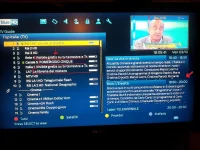
hello, I have a Gigablue 800see and I downloaded this skin that I really like. It 'been done a nice job. However, I wanted to point out that when you click "info"
missing info in these items:
1) Rod progression event (such as in the skin RED) on "info" button
2) resolution channel)
3) the channel list info events are broken as you can see in the picture
4) The event name next to the channel in the list is a color that blends with the channel list.
20141003_180602.webp


I hope I have done something to please, and thank you for your work!
 
what row settings etc do i need to change to have this skin optimized for perfect viewing.
 
hi I have been using this skin for about a month now and I'm absolutely loving it.

I'm just looking for some hints and tips on a couple of things.

1. sky numbers. on the epg is it possible to get the numbers displayed when on the epg? I noticed that they are numbered on the page if you press the down button. also on the first page of this thread a picture show the numbers on the small blue banner at the bottom of the screen. how do I get these on.

2. when you are on the epg and press select to preview another channel. if you then press back up it reverts to the original channel. is it possible to prevent this.

thank
Rich
 
hi I have been using this skin for about a month now and I'm absolutely loving it.

I'm just looking for some hints and tips on a couple of things.

1. sky numbers. on the epg is it possible to get the numbers displayed when on the epg? I noticed that they are numbered on the page if you press the down button. also on the first page of this thread a picture show the numbers on the small blue banner at the bottom of the screen. how do I get these on.

2. when you are on the epg and press select to preview another channel. if you then press back up it reverts to the original channel. is it possible to prevent this.

thank
Rich


Yes if you DL 28.2 Autobouquests and go into the plugins and select AB and once you're in, Set your region, press menu and make sure channels numbers is ticked and go down hide PLI placeholders and tick do a scan and after that your numbers will show.
 
Just installed this skin and have to say what great work it is. One minor query. I have just installed latest TS Media 7.94 and the interface is very small.it is usable but would prefer it to be bigger. I have looked in settings but cannot find anything

regards
also noticed Media Portal is same
 
Last edited:
im having a problem when i press the ok button when watching box theres a green arrow in a circle flashing as if its downloading something what is it also wasnt there a couple off days ago
 
im having a problem when i press the ok button when watching box theres a green arrow in a circle flashing as if its downloading something what is it also wasnt there a couple off days ago
Online update available icon.
 
image update which will include any necessary skin updates, plugin updates
 
Just installed this skin and have to say what great work it is. One minor query. I have just installed latest TS Media 7.94 and the interface is very small.it is usable but would prefer it to be bigger. I have looked in settings but cannot find anything

regards
also noticed Media Portal is same

same here with ts and xbmc ¼ screen in top left corner vid plays full screen . i've been trying to sort mine on solo² and Duo² thought i had a setting wrong
 
Last edited:
Status
Not open for further replies.

OpenViX Feeds Status

Back
Top