Superb quality and spec AB-Com PULSe 4K SE. Crazy offer! Only £99! FREE UK DELIVERY! 4K UHD, Enigma 2, Multiboot 4 images & more!...
Superb quality and spec AB-Com PULSe 4K Rev II Twin Satellite tuner only £149! FREE UK DELIVERY! 4K UHD, Enigma 2, SATA HDD facility, Multiboot 4 images & more!...

[VU+ Solo2] Sundtek DVB-C USB getting 0 channels when searching

  • Thread starter Thread starter rubbabullets1
  • Start date Start date
Abu at work tonight will give it a go tomorrow night when I wake up. The thread mentions an active channel which I cant get at the moment or am I miss reading that?
 
Abu tried with those settings exactly the same. As soon as i do a complete manual scan it comes up with " nothing to scan! Please setup your tuner settings before you start a service scan"
 
If you tried my settings and they don't work maybe you just have a bog standard splitter and not an isolater type, I seem to remember Scicillian had some probs but then added a correct frequency isolator and it all popped to life.
 
Ah interesting do you remember what it was he got? My cable knowledge is poor so not sure what one of these are. Google didnt throw much up.
 
Let's take a different approach. Set your tuner as terrestrial and connect it to an aerial. Do a scan, do you pickup the freeview channels?

If not, sundtek are quite good at helping their product users by skype
 
Its possible your signal is too strong, get yourself a new splitter @3Db insertion loss and get a 6Db attenuator, make sure you have 2 good patch leads one from splitter to Sundtek and one to your Router, try it with just the splitter at first, if nothing then try it with the 6Db attenuator as well

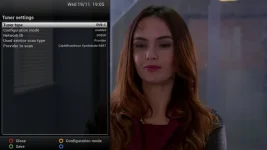
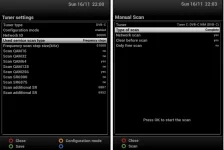
Make sure you can see the tuner in Tuner setup then in tuner config set your network id to your 00013 set all options to yes for QAM, SR6900 and SR6875, set Scan additional SR to 6887 and 6952, once done save the config with the green button.

now do a manual cable scan and see what happens
 
Will get my hand on one, dont happen to know which one. Looked at gleebay but theres so many
 
When I try this Maxwell I get the error please configure tuner but I have... Wont do a complete manual scan with those settings. Dont understand... Im thinking The tuner is faulty? I get DVB-T though???


Its possible your signal is too strong, get yourself a new splitter @3Db insertion loss and get a 6Db attenuator, make sure you have 2 good patch leads one from splitter to Sundtek and one to your Router, try it with just the splitter at first, if nothing then try it with the 6Db attenuator as well

Make sure you can see the tuner in Tuner setup then in tuner config set your network id to your 00013 set all options to yes for QAM, SR6900 and SR6875, set Scan additional SR to 6887 and 6952, once done save the config with the green button.

now do a manual cable scan and see what happens
 
I've told you how to do manual scan with these tuners, they react differently than internal tuners, I think you need to try your original box on the cable and see if you are at least getting the 4 free channels (you don't need a full sub for bbc1 ITV bbc2 and ch4). You will also be able to get the correct net Id from your original box.
 
Will have to check the loft but I am 100% sure Virgin took the tivo box when I went to broadband only.... Been living with crappy stuttered signal on the old TV since. Ive done your way of scanning and still nothing :(


I've told you how to do manual scan with these tuners, they react differently than internal tuners, I think you need to try your original box on the cable and see if you are at least getting the 4 free channels (you don't need a full sub for bbc1 ITV bbc2 and ch4). You will also be able to get the correct net Id from your original box.
 
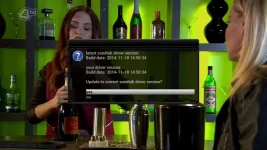
Have you downloaded the Sundtek Controller Plugin and DID IT install the driver?
When you run the plugin set it to expert mode and tick the auto start.
 
It updated the driver today as when I started tuner it installed something then started it,. I can configure the tuner fine in settings just nothing at all when I scan, Feels like there is no signal what so ever...
 
In your tuner setting change
User Service Scan Type to Provider
Network ID to 00020 or whatever yours is
The change the service provider to whoever you use ???
Then try manual scan
 
NetID is 20 I have confirmed this with my neighbour
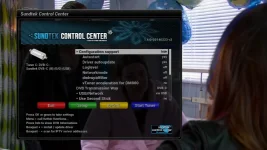

In your tuner setting change
User Service Scan Type to Provider
Network ID to 00020 or whatever yours is
The change the service provider to whoever you use ???
Then try manual scan
 

OpenViX Feeds Status

Back
Top