Superb quality and spec AB-Com PULSe 4K SE. Crazy offer! Only £99! FREE UK DELIVERY! 4K UHD, Enigma 2, Multiboot 4 images & more!...
Superb quality and spec AB-Com PULSe 4K Rev II Twin Satellite tuner only £149! FREE UK DELIVERY! 4K UHD, Enigma 2, SATA HDD facility, Multiboot 4 images & more!...

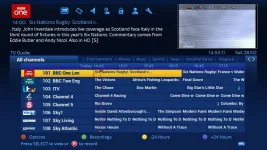
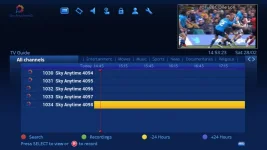
Some ideas to improve the Graphical EPG screen

Going back to the original idea of having access to the recordings via the red button etc is this sonething that can be agreed upon for the Vix image or are we going to get into modding python files which could end up with broken images .
 
Going back to the original idea of having access to the recordings via the red button etc is this sonething that can be agreed upon for the Vix image or are we going to get into modding python files which could end up with broken images .
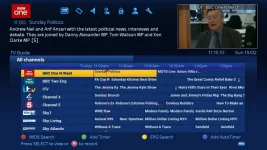
Although my Solo2 has a dedicated EPG button I use Button Setup (within menus) to assign graphical mutliEPG (I think it's called) to the red button.

Could it not be possible to allow more control over what the coloured buttons do whilst displaying the EPG from within a new menu system or incorporated within Button Setup menu?

This would allow full control over all 4 buttons.

Obviously this, ideally, would need to be incorporated into the image itself rather than having to keep modding files.

This is just my thought.
 
The changes I made are to do with the relevant python file and not the keymap.xml. But if you can code then its just a case of copying and pasting the relevant code into your relevant python file - assuming a new image doesnt change the structure of the file. If you are not keen on coding then I can send you my file with instructions on how to get it working. Im not sure if I should mess about with the keymap.xml file seeing as I have got it to work by hard coding within a python file. Is this a bad thing?
I have experience with coding but not python (more VB and VBA) but I noticed the structure of python is a little similar to that of VB/VBA.

If you can point me in the direction of which file (and where it's stored) I need to edit and I shall take a look and see if I can work it out.

I realise any update will overwrite this file or files but I shall just keep a copy of file(s) on my laptop and copy it back again after an update.
 
The colour buttons can be programmed and labelled in the EpgSelection.py file. If you want the buttons to be different for just the graphical EPG and remain same for other EPGs then just add an If statement to check if self.type ==EPG_TYPE_GRAPH and add the new button mapping code within that statement (linking each button action to the relevant method). If you need more help then just give me a shout.

If I am home this weekend then I will share my code/file for everyone to use. I have managed to make the following changes:

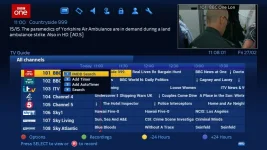
Red button: popup with extra options such as IMDb serch, EPG serch, add timer/auto timer
Green button: shows recordings (movie list)
Green button long press: shows timer list
Yellow button: -24hrs
Blue button: +24hrs
Ch+: page up
Ch-: page down.
 
Last edited by a moderator:
I changed mine as well. I've got it as:-

Red +24hrs
Green -24hrs
Yellow Timer
Blue AutoTimer (default anyhow I'm sure it was)

I weren't sure on what to do to change Ch+/- to page up/down (respectively)

Slightly off-topic but i'm wanting to add channel numbers when viewing graphical epg. So instead of it reading [picon] BBC One N West......, it reads [picon] 101 BBC One N West...... I couldn't see this being in the same file as coloured buttons.

EPGChannelNumbers.webp
 
Last edited:
You cannot select a chanenl using numbers from EPG, this is why numbers were not catered for in the EPG screens as far as I can work out.

Lraizer's AB 28.2 attaches number to name, so that could be a work around.
 
The colour buttons can be programmed and labelled in the EpgSelection.py file. If you want the buttons to be different for just the graphical EPG and remain same for other EPGs then just add an If statement to check if self.type ==EPG_TYPE_GRAPH and add the new button mapping code within that statement (linking each button action to the relevant method). If you need more help then just give me a shout.

If I am home this weekend then I will share my code/file for everyone to use. I have managed to make the following changes:

Red button: popup with extra options such as IMDb serch, EPG serch, add timer/auto timer
Green button: shows recordings (movie list)
Green button long press: shows timer list
Yellow button: -24hrs
Blue button: +24hrs
Ch+: page up
Ch-: page down.


can you show a screenshot of the red button function?
 
can you show a screenshot of the red button function?

I just took this screenshot right now showing the red button being pressed on the first event on BBC One

1_0_1_189D_7FD_2_11A0000_0_0_0.webp

Edit: I had to add a new element to your skin by the way so it was not just modifying the .py file
 
You cannot select a chanenl using numbers from EPG, this is why numbers were not catered for in the EPG screens as far as I can work out...
I didn't want to select a channel from EPG just display the channel number before the channel name. Like matt007 has done (below).


View attachment 40803

Edit: I had to add a new element to your skin by the way so it was not just modifying the .py file
Thanks for this matt007. I want channel number before channel name like that. Could you maybe upload the .pyo file(s) you've modified for these features and I shall implement it.

Thanks again.
 
upload what u got, and we can prob add this to the main image with some discussion from other beta testers etc.
but looks very good.

will your red button function append any extra plugins to the list like TMDB? if the user has them installed
 
upload what u got, and we can prob add this to the main image with some discussion from other beta testers etc.
but looks very good.

will your red button function append any extra plugins to the list like TMDB? if the user has them installed
Just a thought if this info, if implemented, could be taken from a customised/settings type (xml) file. Options available being able to be chosen from within menu button setup (maybe)?

Just a thought, that's all.
 
Hi all,

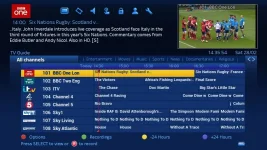
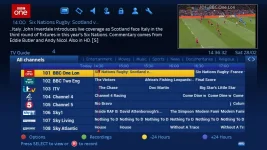
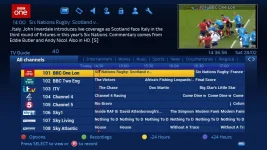
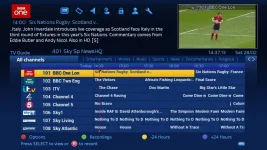
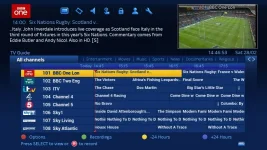
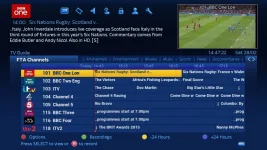
I have managed to modify the graphical epg screen to add features I feel would improve the user experience. As well as modifying the colour and channel +/- buttons as mentioned in earlier posts, I have also added a search number feature (allows you to enter a number to find a channel), a list of your bouquets which you can flip through and finally channel numbers that stay consistent despite whatever bouquet you are on. To elaborate on the last feature, I have assumed that the first bouquet for everyone is "All Channels" which has the desired numbers. Subsequent bouquets have channels whose numbers now match the relevant numbers from the "All Channels" bouquet.

Below are some screenshots showing the search number feature in action:

1.webp2.webp3.webp4.webp5.webp

The following screenshots show how the channel numbers remain the same despite what bouquet you are in:

n1.webpn2.webp

I know certain bouquet providers change the channel names to include a number prefix which means that it achieves the effect as my tweak. However my tweak will allow you to have consistent channel numbers which do not rely on people changing the names of 100s of channels.

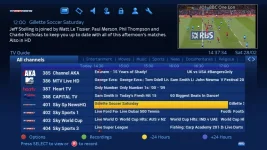
Also, in relation to the red option button. I have added a nifty feature where if the event is empty then instead of the red button bringing up an options menu, it changes to a search function. This is because the option menu contains options such as timer, auto timer etc and this is pointless if the event is empty. This can be seen in the below screenshots:

o1.webpo2.webp

Before I release the files for people to use I was wondering if I can get a few people to test this for me. I am quite new to the Enigma2 scene, have only had my box for a few weeks so feel like I need a few experienced users to test this for me.
 
Last edited by a moderator:
EPG screen usually opens the bouquet from which the channel was last selected.

Post the files here as that will be best coverage for it, include the fie locations for ease of use. Uploading .py is not a good idea as they recompile on restart, so best to upload .pyos instead
 
Last edited:
This is awesome guys, can't wait to try it out.
 
@matt007, thank you very much for this.

I would prefer source code (ie .py) though for two reasons:-

1. So I can learn more about python and how you did it
2. I may see if I can re-order the options from red button. ie putting most likely used options first like "set timer", "set autotimer" and then least used like imdb, etc.

Would I be correct in thinking that although I mostly use blue hd skin, this feature isn't skin dependent?
 
@matt007, thank you very much for this.

I would prefer source code (ie .py) though for two reasons:-

1. So I can learn more about python and how you did it
2. I may see if I can re-order the options from red button. ie putting most likely used options first like "set timer", "set autotimer" and then least used like imdb, etc.

Would I be correct in thinking that although I mostly use blue hd skin, this feature isn't skin dependent?

Me too.
I think you can delete the py file once it has rebooted and updated the pyo file.
 
Me too.
I think you can delete the py file once it has rebooted and updated the pyo file.
You can, yes.

I don't have an "All Channels", so is that optional?
I guess that is something that would have to be tested and maybe even coded for.

I use All Channels as I find it easier and have the normal sectional bouquets as well but not HD or FTA bouquets.
 
Last edited:

OpenViX Feeds Status

Back
Top