Superb quality and spec AB-Com PULSe 4K SE. Crazy offer! Only £99! FREE UK DELIVERY! 4K UHD, Enigma 2, Multiboot 4 images & more!...
Superb quality and spec AB-Com PULSe 4K Rev II Twin Satellite tuner only £149! FREE UK DELIVERY! 4K UHD, Enigma 2, SATA HDD facility, Multiboot 4 images & more!...

OpenVix Blue-HD

  • Thread starter Thread starter rossi2000
  • Start date Start date
Status
Not open for further replies.
All,

When switching skins/ restarting GUI on my zero I get the Sly HD paused logo with the blue loading circle. Is there anyway I can replacethe hades image that appears when booting the box with this? Is the Hades image at the start a bootlogo? I have attached the image I mean below.

Any help would be greatly appreciated.

View attachment 43031

Basically find the file that shows that pic during reboots (I can't remember where it is), make a copy of it and turn it into a bootlogo using a bootlogo maker, place it in bootlogo folder.

needs to be a .mvi file in folder usr/share, called backdrop.mvi and bootlogo.mvi

softwae is dream logo generator or TMPGEnc

Like I said I can't remember where the reboot pic file is on the box, perhaps under skin somewhere.
 
Such a shame we wont be seeing 1080.
Would make my box complete
If not having a 1080 skin would make your box complete, you're not using your E2 box/functionality/network/connected devices and so on... properly.
 
Hi,

I'm running Blue HD Skin on VIX which I love. However one thing I would really like to change is that when I choose channel up/down it brings up mini epg and I have to then select the channel and zap to it.
Where can I change this only I'm used to using a BH image and channel up/down did exactly that change the channel up or down with one key press

Thanks
 
Hi,

I'm running Blue HD Skin on VIX which I love. However one thing I would really like to change is that when I choose channel up/down it brings up mini epg and I have to then select the channel and zap to it.
Where can I change this only I'm used to using a BH image and channel up/down did exactly that change the channel up or down with one key press

Thanks

What box are you using? CH+/CH- should do just that, change channels by default.
You can use button setup to change if needs be.
Menu > Setup -> System -> User Interface -> Button setup
 
Rossi, is there anyway you can code this skin so the default number of rows is 10 rather 20 but just for this Skin?

I say within this skin as I can imagine some skins may need different values in this field!!

Thanks
 
there is, but people just change to what they want, so its useless.
and i think the default value should be 11 or 12.
 
there is, but people just change to what they want, so its useless.
and i think the default value should be 11 or 12.
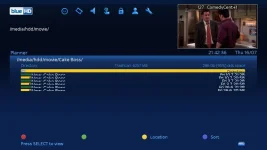
For this skin, the default is actually 20 (not sure if it's this default across all skins or just this one).

Whilst it's on 20, you can't really see anything in movies list (see pic):
MoviesListRowat20.webp

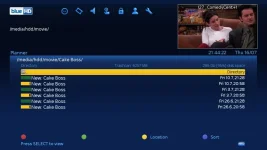
But when it's on say 11 as you mentioned, everything is listed normally:
MoviesListat11.webp

Could you possibly look at changing the default number of rows to 11 for this Skin when you manage to find time?

Thanks
 
For this skin, the default is actually 20 (not sure if it's this default across all skins or just this one).

Whilst it's on 20, you can't really see anything in movies list (see pic):
View attachment 43778

But when it's on say 11 as you mentioned, everything is listed normally:
View attachment 43779

Could you possibly look at changing the default number of rows to 11 for this Skin when you manage to find time?

Thanks

Got to ask.....do you sort your movies into folders or is there some way of automating this?
 
Got to ask.....do you sort your movies into folders or is there some way of automating this?
I manually sorted them but you can group recordings into certain folders in a automated way. See this thread.
 
What box are you using? CH+/CH- should do just that, change channels by default.
You can use button setup to change if needs be.
Menu > Setup -> System -> User Interface -> Button setup
I have also noticed this and is a right pain when you hit the remote key for channels it allways shows on the first satellite on your list...? hmm
also the radio skin need changing
 
Can you send a link please! sorry, new to this but i cant find feeds.....Thanks looks awesome..
 
Menu > Plugins. But if you are on an older version of ViX you will need to update.


Sent from my iPhone using Tapatalk
 
I not a great lover of picons buddy, but I did like yours and still have the action file somewhere for them. I'd try the mk picon set or one of the ocram sets, they are the most thoroughly updated sets available and come in both SNP and SRP versions without needing to do the conversion your self. Also depending on your image try one of the newer skins, I just think the sky and Virgin styled skins don't look rite with picons.
 
Status
Not open for further replies.

OpenViX Feeds Status

Back
Top