Superb quality and spec AB-Com PULSe 4K SE. Crazy offer! Only £129! FREE UK DELIVERY! 4K UHD, Enigma 2, Multiboot 4 images & more!...
Superb quality and spec AB-Com PULSe 4K Rev II Twin Satellite tuner only £179! FREE UK DELIVERY! 4K UHD, Enigma 2, SATA HDD facility, Multiboot 4 images & more!...

[MB Premium Ultra] Video Files not playing

imish

New member
Joined
Sep 4, 2013
Messages
622
Reaction score
0
Points
0
Have an issue with both my miracle boxes which leads me to believe that it may not be a mirable issue, more of an Openvix one.

Trying to play a set of files (from my NAS) on the box and I can hear the sound but no Video
playback on my laptop is perfect.

Seems like a codec issue, and if so, how can I confirm the issue and resolve it?

Attached is a screenshot of the codec details from VLC

Many thanks
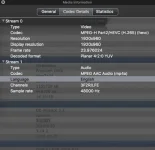
codec.webp
 
Have an issue with both my miracle boxes which leads me to believe that it may not be a mirable issue, more of an Openvix one.

Trying to play a set of files (from my NAS) on the box and I can hear the sound but no Video
playback on my laptop is perfect.

Seems like a codec issue, and if so, how can I confirm the issue and resolve it?

Attached is a screenshot of the codec details from VLC

Many thanks

View attachment 47106

You will need to set your refresh rate to 50Hz as I'm guessing you will have it set on Multi. To get around this I've converted my mkv container files to m2ts using tSmuxeR to play them on Multi refresh rate as setting to 50Hz/60Hz makes them judder n unplayable for me anyhow.


Sent from my iPhone using Tapatalk
 
Thanks for your reply.

I do have it set to 50Hz. Auto Resolution = Off.


Don't seem to have issue with other Video files on the NAS
 
Is it something to do with "GSSTreamer Plugin (H265)"
 
Do you have the same issues with 3.2 035. It uses the previous version of GStreamer
 
Same issue with 35.


error.webp

now rolling back to 37.
 
Last edited:
Doesn't h.265 need libde265 in gstreamer? (Which I can't find in the build tree).
 
You will need to set your refresh rate to 50Hz as I'm guessing you will have it set on Multi. To get around this I've converted my mkv container files to m2ts using tSmuxeR to play them on Multi refresh rate as setting to 50Hz/60Hz makes them judder n unplayable for me anyhow.


Sent from my iPhone using Tapatalk

Took your advice and recoded the files in H264 / mkv format and the box now plays those just fine.

There seems to be an issue with H265 support & openvix.
 
H265 is for UHD, its not support by any receiver that has the same CPU. Its not a OpenViX problem, hardware does not support it.
 
H265 is for UHD, its not support by any receiver that has the same CPU. Its not a OpenViX problem, hardware does not support it.

Thanks for the clarification.

Question - can it not do it in software?
 

OpenViX Feeds Status

Back
Top