Superb quality and spec AB-Com PULSe 4K SE. Crazy offer! Only £129! FREE UK DELIVERY! 4K UHD, Enigma 2, Multiboot 4 images & more!...
Superb quality and spec AB-Com PULSe 4K Rev II Twin Satellite tuner only £179! FREE UK DELIVERY! 4K UHD, Enigma 2, SATA HDD facility, Multiboot 4 images & more!...

[VU+ Duo2] Movie Location Menu, Labels insted of Location

  • Thread starter Thread starter vps11
  • Start date Start date
V

vps11

Guest
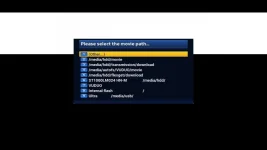
Is it possible to give the movie path list proper names / labels other than having the locations on the list,

So for example, /media/hdd/movie can be labeled: Recorded TV
/media/hdd/transmission/download can be labeled: Transmission Downloads
etc etc
1_0_1_15BC_7ED_2_11A0000_0_0_0.webp
 
Yes: make the folders (via FTP or the windows-explorer, or DreamboxExplorer) and make bookmarks in recording paths (under system --> recording or so).
 
Sorry, have to ask. How exactly can you do that? I've gone through the menus and you can create bookmarks but you cannot name them. Like I have the default bookmark /media/hdd/movie. It shows that path, it cannot be named like "Recorded TV" like the OP would like to. Just like in OP's screenshot.
 
In the folder 'Movie' (or any other location) you can create any folder you like (via FTP or Windos Explorer). Once done, you can add them as bookmarks.
 
In the folder 'Movie' (or any other location) you can create any folder you like (via FTP or Windos Explorer). Once done, you can add them as bookmarks.
You can also create a folder (or directory) directly on OpenVix by:
  • go to the folder where you want to create a sub-folder
  • press Menu
  • select 7 Create Directory
  • enter the name you desire
 
Yes you can create a folder but that's not what the OP asked. "Is it possible to give the movie path list proper names / labels other than having the locations on the list". And that you cannot do as far as I can tell. If you create a folder it appears in the same list as a full path. There is no way to label it to hide the full path.
 
That's not what I read from OP.
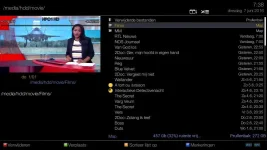
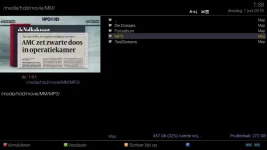
Anyway: in the movie list they just show the given names; see 'Films' & 'MM', and several folders inside 'MM':

ML-fo;ders.webp ML-fo;ders 1.webp

I have no idea what more/else you would want to see?
 
OK I see what you mean, Rob. You can create folders inside the defined path, like in your case /media/hdd/movie/Films and then these folders show up in the recording list. Have you still defined the main recording path as /media/hdd/movie?

I have to test this, although I have the default skin which is a bit different.

The OP just wanted to rename the bookmarks in his screenshot list. But you way seems to be the only way to achieve even close to this.
 
Last edited:
OK I see what you mean, Rob. You can create folders inside the defined path, like in your case /media/hdd/movie/Films and then these folders show up in the recording list. Have you still defined the main recording path as /media/hdd/movie?
I have indeed defined the main recording path as /media/hdd/movie, but you can:
1- change that into any other location (such as /media/hdd/XXXX or /media/hdd/XXXX/YYYY), or
2- change the location per recording when making an (auto) timer (when the locations have been bookmarked).

The OP just wanted to rename the bookmarks in his screenshot list. But you way seems to be the only way to achieve even close to this.
For 'renaming' I simply rename the folder, delete the existing bookmark, and add the new(ly named) one.
 

OpenViX Feeds Status

Back
Top