Superb quality and spec AB-Com PULSe 4K SE. Crazy offer! Only £99! FREE UK DELIVERY! 4K UHD, Enigma 2, Multiboot 4 images & more!...
Superb quality and spec AB-Com PULSe 4K Rev II Twin Satellite tuner only £149! FREE UK DELIVERY! 4K UHD, Enigma 2, SATA HDD facility, Multiboot 4 images & more!...

[PC-APP] E-Channelizer

Version 2.2.0 Released

New
- New application logo.
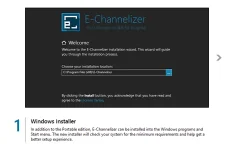
- Windows installer for better setup experience (recommended).
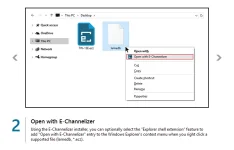
- Open files from the Windows explorer context menu (installer only).
- Display progress and prompt indications in the Windows taskbar.
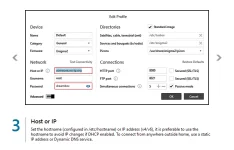
- Support hostname, DNS, and IPv6 in the profile configuration.
- Show/hide password in the profile configuration.
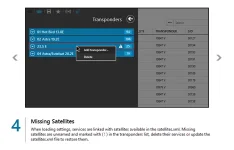
- Delete services of the missing satellites after loading (optional).
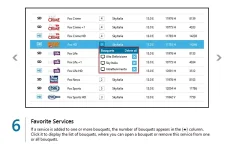
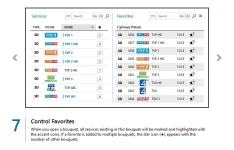
- Show number of bouquets where services are favorited (sortable).
- Show number of the other bouquets where favorites are existing.
- Mark and highlight services which are existing in the current bouquet.
- Allow to adjust the height of alternative services list.
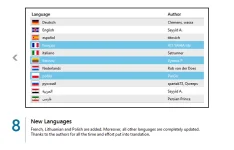
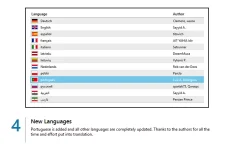
- Added French language, thanks to AIT YAHIA Idir.
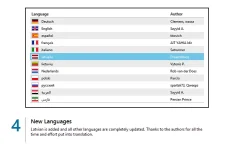
- Added Lithuanian language, thanks to Vytenis P.
- Added Polish language, thanks to Pan3o.
- Updated all language translations, thanks to the authors.

Changed
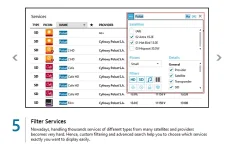
- Combined the satellite filters with other service filters.
- Improved search algorithm for better results.
- Improved importing/exporting large numbers of picons.

Fixed
- Bouquets not loaded if renamed in the "bouquets.tv/radio" file.
- Drop services/favorites into bouquets which include "<N/A>" items.
- Import bouquets if no settings loaded yet.
- Other minor issues.

Highlights
windows-installer.webp open-w-echannelizer.webp host-or-ip.webp missing-satellites.webp filter-services.webp favorite-services.webp control-favorites.webp new-languages.webp

Download
Download or update if you already have a previous version of E-Channelizer.

FAQ
What is the difference between installer and portable editions?
How to open a support ticket?

Regards
Sayyid A.
 
Version 2.2.1 Released

Fixed
- Incorrect order when loading and rearranging bouquets.
- Installation path of the icon associated with ECZ file type (*.ecz).

Download
Download or update if you already have a previous version of E-Channelizer.

Regards
Sayyid A.
 
Version 2.3.0 Released

New
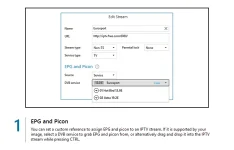
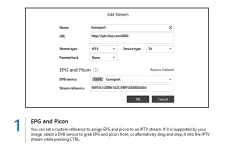
- Support custom reference (dvb-service or user-defined) of IPTV streams.
- Assign DVB service to IPTV stream by drag and drop while pressing CTRL.
- Add, import and export picons of IPTV streams with custom references.
- Define the streaming / transcoding port in the profile configuration.
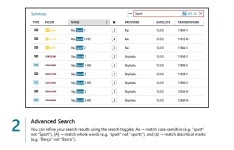
- Toggle match diacritical marks in the search results (e.g. Barça).
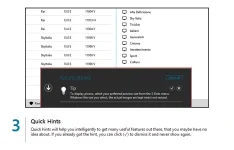
- Display quick hints for better usability and user experience.
- Added Latvian language, thanks to DreamMuca.
- Updated all language translations, thanks to the authors.

Changed
- Naming of alternatives file name, thanks to littlesat & Dimitrij.
- Display '(no name)' for services with blank names.
- Improved dragging / dropping of services and favorites.
- Improved resizing of the main layout.

Fixed
- Streaming not working from some devices.
- Display cable and terrestrial groups in the transponders list.
- Filter and sort cable and terrestrial services.
- Service not selected when right-clicking on the service name.
- Refresh the online status of STB when using hostname or DNS.
- Other minor issues.

Highlights
epg-picon.webp advanced-search.webp quick-hints.webp new-languages.webp

Download
Download or update if you already have a previous version of E-Channelizer.

Tutorials
How to assign EPG and Picon to stream?

Regards
Sayyid A.
 
For what reason have you dropped support for machines running vista? You hav'nt stated it in any changelog but it no longer works since version 2.2.0
 
For what reason have you dropped support for machines running vista? You hav'nt stated it in any changelog but it no longer works since version 2.2.0

Vista is not dropped :)

It was a bug because of the taskbar progress and status indicators, introcued in v2.2!
This should be fixed now in the recent release v2.3. So, please check it and feedback.
 
Version 2.4.0 Released

New
- Speed up the load time of settings.
- Redesign and improve the "Edit Stream" dialog to be more intuitive.
- Support RAW streams along with DVB and IPTV types.
- Define the default stream type (useful when importing M3U streams).
- Add, import and export picons of DVB streams with custom references.
- Rename the picons imported from a folder using either SRP or SNP.
- Filter bouquets on type (TV, Radio, or both).
- Allow duplicate favorites in a bouquet (optional).
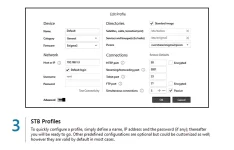
- Define the Telnet port in the profile configuration.
- Remember the last opened paths of different file foramts seperately.
- Added Portuguese language, thanks to Luiz A. Rodrigues.
- Updated all language translations, thanks to the authors.

Changed
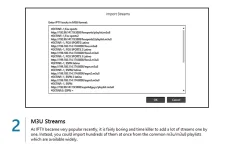
- Improved importing streams from M3U tracks/lists.

Fixed
- Error message when editing the reference of DVB stream.
- Files renamed to lowercase when deleting the unused picons.
- Other minor issues.

Highlights
epg-picon.webp m3u-streams.webp stb-profiles.webp new-languages.webp

Download
Download or update if you already have a previous version of E-Channelizer.

Tutorials
How to assign EPG and Picon to stream?

Regards
Sayyid A.
 
Version 3.0.0 Released

E-Channelizer 3.0 is another major milestone that delivers a massive update introducing: revamped look and feel, a bunch of new features, as well as dozens of improvments, and numerous bug-fixes. This release aims to be the most robust experience yet!


screenshot.png


What's New | Download
​

Changelog

New
  • Clean user interface with fresh look and elegant graphics.
  • New tabbed toolbars organized in logical groups (Ribbon).
  • New toolbars in the context menus for the most used commands.
  • Info tooltips of the services, streams and bouquets (optional).
  • Support for the UHD services (H.265 / HEVC).
  • Support for the cable services (DVB-C Annex-C).
  • Support for the terrestrial services (DVB-T2).
  • Open and save settings in the zipped file format (*.zip).
  • Download services and bouquets from the web (KingOfSat).
  • Download satellites data from the web (LyngSat and KingOfSat).
  • Export satellites to a local file in the XML file format.
  • Delete services when deleting a satellite from the satellites.xml.
  • Filter services on UHD type and favorites.
  • Advanced bouquet search with highlighted results.
  • Change the parental control of services from the context menu.
  • Change the stream type (DVB, IPTV or RAW) from the context menu.
  • Better layout of alternative services with different display modes.
  • Show statistics of the current satellites and bouquets.
  • Search the local network for the connected devices powered by E2.
  • Rename and delete the groups of profiles.
  • Show the current service, EPG events, signal meter and device info.
  • Stream the current service.
  • Zap to the selected service or favorite.
  • Redesign and improve the integrated stream player (based on VLC).
  • Support seeking and show the current / total time while streaming.
  • Select audio tracks and video aspect ratio when streaming.
  • Change network caching (buffer) for smoother streaming.
  • Auto detect VLC in the application folder and program files.
  • Updated language translations, thanks to the authors.
Changed
  • Improved handling of streams and M3U lists.
  • Improved the quality and size of picons.
  • Give priority to the stream picon over the linked service picon.
  • Auto refresh the online status of all profiles.
  • Allow duplicate of profiles with the same host or IP.
Fixed
  • Sort bouquets alphabetically.
  • Copy and paste streams into a bouquet.
  • GIF image files are not displayed when selecting picons..
  • Languages not loaded occasionally in the portable edition..
  • Other minor issues.

Thanks To
AIT YAHIA Idir, Clemens, DreamMuca, FRAP, GioppyGio, Huevos, Lulu, Luiz A. Rodrigues, Michael Pauser, Pan3o, Persian Prince, Rob van der Does, Satrunner, sirius black, spartak73, titovich, Vytenis P., wassa


Regards
Sayyid A.
 
Version 4.0.0 is Finally Here!

After months of working on the next major release, E-Channelizer just got a massive update. The update includes a wealth of new features, improvments and bug-fixes, that make experiencing your TV channels easier than ever.

 
Stupid question - how do you update ? I can view the changes but can not see an option to update :confused:
 
Stupid question - how do you update ? I can view the changes but can not see an option to update :confused:

There's a arrow on the changes page, think it's in the top right hand corner


Sent from my iPhone using Tapatalk
 
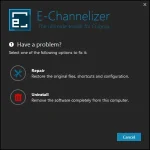
I tried this, found it was not what I wanted, and found that the Uninstall option didn't do anything (on Windows 10). Has anyone else had this problem?

EMJB
 
I tried this, found it was not what I wanted, and found that the Uninstall option didn't do anything (on Windows 10). Has anyone else had this problem?

EMJB

This is for version 4.0.0.

The web page has a tutorial section and right at the end of the How to Install E-Channelizer topic says this : -

Code:
How to Un-install

Simply delete the whole E-Channelizer directory from your PC. You will not have to even clean the temp directory.
 
But it left an entry (or group of entries - can't remember which) in the registry, which is a bit naughty!

EMJB
 
But it left an entry (or group of entries - can't remember which) in the registry, which is a bit naughty!

Exactly why a proper uninstall routine is needed, but I couldn't find one anywhere - maybe drop the author a line?
 
I tried this, found it was not what I wanted, and found that the Uninstall option didn't do anything (on Windows 10). Has anyone else had this problem?

But it left an entry (or group of entries - can't remember which) in the registry, which is a bit naughty!

Simply uninstall it from the Apps and Features on Windows 10.
It is straight froward and NO entries left behind in the registry!

Uninstall.webp
 
Simply uninstall it from the Apps and Features on Windows 10.

That is precisely what I did in the first instance, and nothing happened - program files were still there, desktop shortcut was still there, and registry entries were still there. However I have since had some problems with Windows, so perhaps this was an early sign of Windows problems rather than an E-Channelizer problem.

I trust the uninstall instructions that Valiant found are now being corrected.

EMJB
 

OpenViX Feeds Status

Back
Top