Superb quality and spec AB-Com PULSe 4K SE. Crazy offer! Only £129! FREE UK DELIVERY! 4K UHD, Enigma 2, Multiboot 4 images & more!...
Superb quality and spec AB-Com PULSe 4K Rev II Twin Satellite tuner only £179! FREE UK DELIVERY! 4K UHD, Enigma 2, SATA HDD facility, Multiboot 4 images & more!...

Vix 5.1.006. Time wrong

The concerning thing for me is that this did not work for me yesterday at 16:20 ish,. Stopping enigma2 and tehn running those commands also did not work. So it can't be the Enigma2 cpp code.

Code:
....
root@vusolo4k:~# ntpdate -s -u pool.ntp.org
...
The -s option makes ntpdate send its output to syslog, so there would have been something in the /var/log/messages file indicating the result of the command.
If you want to see the report on your terminal, omit the -s option.
 
One thing that seems to be missing here is any discussion about how the time should be set. There are options within enigma2 (at least the OpenVix one) about synchronizing using the transponder or NTP (let's ignore, for the moment how or whether these work).
But there is also a one-off shot to run NTP when a network interface is brought up and also a cron job in place to run hourly at xx:30 (which will do nothing, as cron doesn't run by default). Even that one-off attempt runs differently according to whether you have a static or DHCP interface - for the static case it will set the time, whereas for a DHCP interface it will try to slew the clock towards the correct value (which might explain why Abu is seeing the wrong time set...).

So surely what is actually needed is an agreement/discussion as to what should be setting the clock, how and when and work towards that, rather then just making a fix to what is currently there and ending up with another issue later down the line.

I reckon the system, not an application, should be setting the time. But I can't see how the system could get a time from the transponder...
 
A discussion can only be had when people do not dismiss reports of problems as bovine excreta.

I am rather annoyed that someone has broken something that used to work and shows no intention of addressing the damage caused. Discussing this on PLI is semi-awkward because they don't have the commits we have had forced on us.

I spent close to four days tracking the commit that broke recordings on the Solo 4K. Then as soon as we traced it some lovely fellow messes it all up. I am scared to reboot/restart the receiver now because the time may get messed up, epg get messed up and miss recordings.

It well and truly annoying.
 
I agree with you.
Even though I changed to ntp after my dead clocks situation, I have still seen some strange situations, even though for most of the time it now appears to be accurate.
... but most people will be on transponder time, which I still think could be an issue.

I don‘t think we will know if there is still an issue or not until people are running on the next ViX release build.

I still believe it should have been installed first on nextP3 and then 4.2 and eventually on 4.1., but that has been disputed as not sufficient for proving the change.

Hopefully by the time I get back from my New Year experience (no internet and probably no phone access), everything will have stabilised...... my New Year hope!
 
Last edited:
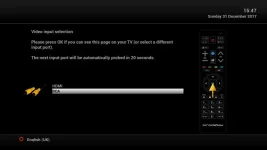
Just flashed 5.1 007 Release on an MB Micro premium to test the keyboard fixes. Looks like it is keen to welcome the new year.

Of course the network is up. Otherwise I couldn't get a screenshot.
 

Attachments

  • mbmicro_release_007.webp
    mbmicro_release_007.webp
    14.6 KB · Views: 19
Even that one-off attempt runs differently according to whether you have a static or DHCP interface - for the static case it will set the time, whereas for a DHCP interface it will try to slew the clock towards the correct value (which might explain why Abu is seeing the wrong time set...).
I will change that to always adjust the time at once on ifup.
As that will usually be during boot, that's the perfect time for bigger jumps.
During normal operation, large jumps could be problematic.

I reckon the system, not an application, should be setting the time. But I can't see how the system could get a time from the transponder...
That would probably be possible through existing DVB tools, but it would probably also be vety time consuming.

I don't think that waste of boot time is really necessary, as an E2 box always boots into the GUI and the GUI can already do that.
The approximate time (continued from build time or last reboot/shutdown) is good enough for the period that it gets used (until NTP one shot or initial DVB sync).

Gesendet von meinem SM-N910F mit Tapatalk
 
@Abu, any chance you could get lottery results as you're in the future haha.

If I may offer my opinion...

@SpaceRat previously brought up something that shouldn't get overlooked and that is that although those in UK maybe ok with transponder syncing (and time as accurate as can be), there are those where transponder info may not be accurate at all (ie down under). Basically, it's would be unfair to fixate on sorting just one method for syncing, when it appears neither appear to be working as, at least, I would expect.

For example, I was surprised to find out that transponder syncing really only checks if current box time is different from transponder time but doesn't actually appear to try and fix the issue by updating time if it is out by 2mins or more.

Also, why have a regular time period setup for time syncing when @Birdman states the cron daemon isn't running. Doesn't this make the regular time sync useless?

The main problem I can see is getting the so-called time syncs (by both transponder and NTP) working and confirmed as such. Then start looking at how best to implement this to keep as accurate time as possible depending on circumstances and, ideally, it be an option where user can choose their preferred method of syncing time - Transponder, NTP or both (little similar to options now in menus).

Now I don't know how much of this is possible but if it's possible to read the "settings" file at bootup to determine preferred method of time syncing then in my head anyhow the following could be done (forgive me as I don't have knowledge you guys have so i'm probably way off on this lol)....

  1. Due to unreliable RTC issue that I've read in this thread, initially set date/time as mentioned and recorded when box closed down. From what I understand it does this now to a degree anyhow.
  2. Regardless of above, try as a one-off and sync time via NTP and if unsuccessful then try via transponder info. Would need to know somehow whether NTP was successful or not (like if possible the return code of the command to determine if successfully ran - if accurate) or another method like checking date/time before and performing syncing and check date/time afterwards and ideally most of the time if NTP was successful then date/time would differ between the "before" and "after" (and not just by a few seconds it would need to execute the NTP sync).
  3. Then at some semi regular intervals or at certain trigger actions, sync would happen as per users' preferred method based on their circumstances. This could be set intervals for NTP or if transponder then maybe during a channel change

Again forgive me if some or none of this is really possible due to potentially more issues arising or limitations to E2, etc


UPDATE: By time I took to write all this, @SpaceRat pretty much answered most of this haha
 
Last edited:
The pre-start script got the date for us from the internet, until now. Apparently we should be ashamed of that. (We added it because debug logs always had the epoch date. As most of us use 28.2, the date has always been correct for us.)

The reason E2 does not adjust the time if greater than two minutes is because some transponders have wrong times.

Users can select to sync time either with NTP or Transponder. If they have transponder issues, they can select NTP. Surely the two minute restriction should not affect NTP sync. (Please remember, I am not a coder.)

To me, a wrong date/time is a wrong date and time. Just because some services don't run unless the date is within a specific time range, that does not means we should force a wrong date/time and be unable to correct it.

PLI do not have an option to set/select time sync method. You have to install a plugin.

Hopefully the change that SpaceRat will make will bring it back to how it was. Side effects do happen. He is right, the operating system should have the correct time. Enigma2 is just a program.
 
Last edited:
The pre-start script got the date for us from the internet, until now.
It still does, btw.

Apparently we should be ashamed of that.
That wasn't referring to the sync as it, but to the fact that is just a workaround for something that is and always has been implemented in yocto, but just wasn't working.
The final target should always be to get the core OS (yocto/OpenEmbedded) working for all, rather than implementing workarounds in distro specific repos so that every team has to re-invent the wheel.

We added it because debug logs always had the epoch date. As most of us use 28.2, the date has always been correct for us.
Forget about 28.2, especially when you are really talking about NTP (= Internet Time).

We are in the very same situation: Astra 19.2°E delivers sane times, but we suffer from E2 not really syncing to it, due to code for other sats.
That wasn't introduced by latest changes, that has always been the case, I just noticed it when looking for the reason why the time suddenly was totally off, just because it was approximated at boot.

To me, a wrong date/time is a wrong date and time. Just because some services don't run unless the date is within a specific time range, that does not means we should force a wrong date/time and be unable to correct it.
You are confusing hen and egg here. The E2 code contained silly workarounds (which honestly I simply didn't expect).
Then, instead of fixing the E2 code, yocto was broken or not fixed in order to keep the crappy workaround working.

Approx time and NTP sync have always been inside yocto, they have either been patched out (approx time) or kept broken (NTP one shot).


Hopefully the change that SpaceRat will make will bring it back to how it was.
It already is. Birdman is probably right assuming that slewing the time towards real time is simply too slow. I will make the one shot NTP adjust the time instantly.

BTW: Another bug in E2 was encountered in the process. E2 doesn't let tuners sleep before the first DVB sync, which will never happen if NTP sync is selected.

To test: Set time sync to NTP, restart box, send it to standby. In OWIF you can see that one tuner remains powered, if you use a softcam you can see it still working too if the last station was encrypted.
Previously a GUI restart "fixed" this, because E2 considered the now set time as good and as good as a first sync.
E2 lacked code in dvbtime.cpp not to wait for a transponder sync if NTP is chosen.
See my latest two commits in OpenATVfor a better workaround. It's still just a workaround (If NTP sync is selected and time appears good, consider the first DVB sync as done), but a better one as before (No restart required before sending box to standby).
The real solution would be NetworkTime.py telling dvbtime.cpp that a successful NTP sync was done. I'll compare NetworkTime and the PLi plugin if they have a better solution.

Side effects do happen. He is right, the operating system should have the correct time. Enigma2 is just a program.
Exactly.
On the other hand E2 should always be able to configure the OS, as sending the average user to shell isn't really a permanent solution.

Gesendet von meinem SM-N910F mit Tapatalk
 
PS: Latest posts in the OpenPLi thread might indicate another possible problem.
I mean the ones concerning oscam and its time fix.

Gesendet von meinem SM-N910F mit Tapatalk
 
That two minute restriction should only apply if config is set to use Transponder. If it is possible, we will need to change our config entries

PLI use NTP (system time)
config.misc.useTransponderTime=false

OpenVix use NTP
config.misc.SyncTimeUsing=1

OpenATV use NTP
config.misc.SyncTimeUsing=1
 
That two minute restriction should only apply if config is set to use Transponder.
It does.
The only thing that dvbtime.cpp knows about NTP is: Nothing.

It only implements a setting to disable DVB sync, but it will only accept true if the time looks sane (>2004).
This in turn is what NetworkTime.py sets after its first sync, so this is the only point where DVB and NTP sync REMOTELY get in touch with each other.

NTP is simply done by calling ntpdate (or ntpdate-sync in OpenATV, which is a bad idea), no correlation with the 120 sec limit in DVBTime.cpp.

Gesendet von meinem SM-N910F mit Tapatalk
 
Lets agree to disagree on this.
Lets agree on agreeing that I'm right about my/E2 changes.
As others reported, the bad time is gone for them ... just as it was on OpenATV where the same problem was reported and the fix is in since ~7 days.

There must be other factors messing up your affected box (e.g. NTP failing, oscams clock fix, NTP only slewing rather than doing a direct time adjustment).
As I said, I will make the one shot NTP at boot do a full direct time adjustment, that excludes one possible reason.

I will also look into oscams code to check what parasol mentioned. If he's right, we might be in deep shit.

Gesendet von meinem SM-N910F mit Tapatalk
 
I will change that to always adjust the time at once on ifup.
As that will usually be during boot, that's the perfect time for bigger jumps.
During normal operation, large jumps could be problematic.
If you've set it at boot time and later take an interface down/up it's likely your clock will be in time anyway.

There's another weird(?) issue with the time setting scripts.

ntpdate-sync will (by default on OpenVix at least) try to set the front-panel hardware clock on the box when it runs. It does this by running the script /sbin/stb-hwclock. This script has the interesting feature that if you use it to read the FP clock and that clock is ahead of the system time it will set the system time to the FP clock time, which strikes me as an unusual thing to do.
Not that it affects the setting code path, but things liek that make me wonder about the logic of how everything was set-up and what sort of things depend, without stating so, on other things.


That would probably be possible through existing DVB tools, but it would probably also be vety time consuming.
That's what I suspected.

The approximate time (continued from build time or last reboot/shutdown) is good enough for the period that it gets used (until NTP one shot or initial DVB sync).
Probably. Except that this is not what Abu is seeing. So we need to concentrate on that....
 
ntpdate-sync will (by default on OpenVix at least) try to set the front-panel hardware clock on the box when it runs.
Yepp.
In genuine yocto it would try to store the time into the real RTC (Through hwclock).


/sbin/stb-hwclock. This script has the interesting feature that if you use it to read the FP clock and that clock is ahead of the system time it will set the system time to the FP clock time, which strikes me as an unusual thing to do.

Simple:
The only situation where this script is ever getting called in order to read the pseudo-RTC is at boot.
At that time the system time can only be behind real time. System time will be either shortly after build time (First run) or shortly after the last shutdown/reboot.
The real time will always, even after a quick reboot, be a bit further than that recorded and continued time, not even the fastest arm boxes can finish the shutdown and go through initrd in negative times ...

So the RTC must be ahead or it is wrong ... The only cases where the RTC can be behind system time during early boot are:
- Even the pseudo-RTC is just a fake and always returns 0 (= 1970-01-01 0:00 UTC)
- It has lost track of time (= after power off), then it will be at 0 or slightly after.
In either case it would be an invalid time.

So the check for a (ridicilously) low time in the RTC needs to be there in order to prevent setting the time to 1970 again, which is what all the work is about ...
... it could only be relaxed, e.g. by comparing against image build time or 2018-01-01 0:00 (until it's done that will become a good date :) ).

But again: As long as NTP or DVB/E2 have done their job, the RTC can not be behind and be right at the same time.
No, not even right after switching from silly time to normal time in fall (spring forward, fall back :) ), as the time is stored/maintained in UTC.


Probably. Except that this is not what Abu is seeing. So we need to concentrate on that....
There is no truely reproducable problem there ...
... so all I can do as shoot at all possible quirks.

If he's using oscam, starting the box without oscam once could help, according to posts in the OpenPLi forum.
 
Last edited:
If he's using oscam, starting the box without oscam once could help, according to posts in the OpenPLi forum.
The screenshots I have posted are so far of an image just after flashing. The latest one just shows the First Install Wizard. On the the previous ones, I exited out of all menus during the FIW. On one test, I restored a previous image backup and that also had a date and time in the future.

We do not pre-install any cams on our image. In any case, you would need to set them up to start. So that rules out oscam. It is an "off the shelf" image.

If I flash an older image before these latest batch of changes, the date and time is correct at FIW.

You can insist as much as you like that time is being set, but my screenshots show otherwise. This has happened for me on the TM Nano SE M2, MB Micro premium and Solo 4K. So whatever is wrong, it is wrong on all three of them. The IP addresses on my router are reserved.

We need to find a solution instead of insisting everything is fine.
 
Last edited:
@ Spacerat, I've just spent hours testing our release 5.1.002 (before your OE-A changes) and 5.1.007 (includes your OE-A changes) using a GB UHD Quad 4K for these time issues.

1) Our release 5.1.002 shows correct time on first boot after many flashes connecting network cable only or both network cable and satellite coax.

attachment.php


2) Our release 5.1.007 does not consistently show correct time on with network cable only or with both network cable and satellite coax. Two of three flashes might show correct time on first boot. If time is wrong on first boot boxes need to be physically powered off after flashes for the time to correct itself or user must connect coax and achieve a satellite signal in order for the time to correct itself.

attachment.php


3) Flashing our release 5.1.002 with no network and with satellite, terrestrial or cable coax connected shows a 1970 date on first boot. Physically powering off and rebooting does not correct the date, only way to correct the date and time is to connect network cable and reboot or tune to a satellite, terrestrial or cable channel.

4) Flashing our release 5.1.007 with no network and with satellite coax connected shows date image was built on, in this case Thursday 28th December on first boot. Physically powering off and rebooting does not correct the date, only way to correct the date and time is to connect network cable and reboot or tune to a satellite, terrestrial or cable channel.

In plain english please explain what you are trying to achieve with your changes? Sorry but i'm struggling to understand what your changes are supposed to achieve and this thread has lost me.

All I can see that's been achieved here is first boot inconsistencies and instead of showing the 1970 date on first boot with no network cable the image build date is shown on SOME first boot's with no network cable connected. Many boots a 2018 date was shown, box had to be physically powered of to show the image build date.

We've also had a lot of reports of boxes waking after deep standby with the wrong date/time.

I respectfully ask that your changes are reverted until fixed for all OE-A teams. We've had no issues with date/time until now.
 
These changes are worse to E2 than these errors show. In various places E2 and several plugins use 2004 as a date to prove the clock is correctly set. If we just use some "wrong" time that is after 2004 that breaks code in other places. With respect these changes should be reverted until such a time there is compatibility for all team's E2.

If we can't recognize when the clock is not correctly set we are knackered for schedules.
 
Last edited:

OpenViX Feeds Status

Back
Top