Superb quality and spec AB-Com PULSe 4K SE. Crazy offer! Only £129! FREE UK DELIVERY! 4K UHD, Enigma 2, Multiboot 4 images & more!...
Superb quality and spec AB-Com PULSe 4K Rev II Twin Satellite tuner only £179! FREE UK DELIVERY! 4K UHD, Enigma 2, SATA HDD facility, Multiboot 4 images & more!...

[Mut@nt] HD51 Auto Change Channel Before Going on Standby

  • Thread starter Thread starter ess2k
  • Start date Start date
i edited mine from telnet with the command crontab -e
having a look at the location you mention, it seems to have put the cron jobs in a file /etc/cron/crontabs/root and the content of the file is,
Code:
10,20,30,40,50,00,45 * * * * /usr/scripts/bouqepg.sh >>/tmp/ten.log
00  * * * * /usr/scripts/bouqepg.sh >> /tmp/hour.log
FYI: It's better to put log redirection into the script itself. That way, if you ever want to change it you just edit the script - you don't have to edit the crontab file.
 
I've just installed cron on my system. I added a command using the ViX cron menu and this line was added to [FONT=courier\ new]/etc/cron/crontabs/root[/FONT]:
Code:
00  * * * * /home/root/gml.sh
I've edited that line to be:
Code:
*/2  * * * * /home/root/gml.sh
The [FONT=courier\ new]/var/log/messages[/FONT] file now shows:
Mar 3 02:03:19 et8000 cron.info crond[31320]: crond (busybox 1.24.1) started, log level 8
Mar 3 02:10:00 et8000 cron.info crond[31320]: USER root pid 31602 cmd /home/root/gml.sh
Mar 3 02:12:00 et8000 cron.info crond[31320]: USER root pid 31669 cmd /home/root/gml.sh
So what have you done that breaks it?
 
Are you running OpenVix?
The correct file is [FONT=courier\ new]/etc/cron/crontabs/root[/FONT] and your cron daemon (as seen - a bit truncated - in #52) has been told to look in [FONT=courier\ new]/etc/cron/crontabs[/FONT] for the file(s).
I am indeed on openvix, the reason for it being truncated is because i deleted the default entry as i thought it was not necessary - should i add it back?

What log, and how? The /var/log/messages file is always there, and if cron is running it reports each job that it starts there.

i was researching and saw a way to create a cron timer log, sorry i didn't realise the default location this log is /var/log/messages i have checked the log, and the cron timer runs as expected - please do forgive me i am new to cron timers especially (but loving them as they are an extremely powerful tool)

What are they called?
each file was called the same, which is crontab.[random-number]
That first line is the first line of the default root crontab (no idea why it's there, though, as it shouldn't be - but that's for a different thread).
i deleted it :rolleyes: sorry. was just trying to trouble shoot.

Now, first i want to thank you for the location of the log, as after checking that I can tell whether the job is running , which it was, so it was a script issue not a cron job issue - I fixed this by removing from the beginning of the script '#!/bin/sh' and just started with the code itself and now it works - hence loving Cron Timers now

Thank you for your patience with me, i knew i hadn't broken much as i had installed a fresh image yesterday.

You and others are a great asset to this forum, and i have learnt a lot from you guys - have tried many images and i must say the tag line from OpenVix is perfect often cloned, never bettered...
 
I've just installed cron on my system. I added a command using the ViX cron menu and this line was added to /etc/cron/crontabs/root:

And a big thank you for pointing out the location of the crontab file, editing in notepad++ is 10 times easier than how i was doing it.
 
i was researching and saw a way to create a cron timer log, sorry i didn't realise the default location this log is /var/log/messages i have checked the log, and the cron timer runs as expected -
Good. So is your problem now fixed?
please do forgive me i am new to cron timers...
Don't worry. I worked on Unix/Linux systems for >20 years so understand them quite well - haven't any clue about the innards of doing anything on Windows, though.
especially (but loving them as they are an extremely powerful tool)
True but, like a hammer, you have to take care not to hit your thumb, and sometimes you need a screwdriver instead.
 
Good. So is your problem now fixed?

YES :thumbsup: it is now all sorted, thanks you and dsayers, helped me out a lot. All is now working perfect.
Have a script to hide unwanted bouquets and add service ref to streams to get 7 day EPG - if anyone would like the script let me know, i am more than willing to share.

Next and final mission is to find a way to reorder lines (so i can reorder certain channels) within the same file, maybe it can be done with sed command, but very little info out there on this
I worked on Unix/Linux systems for >20 years

Maybe you could help, please?

I am getting into this unix/linux thing, as it is very intresting and useful, esp with receivers/routers/android ect
 
Next and final mission is to find a way to reorder lines (so i can reorder certain channels) within the same file, maybe it can be done with sed command, but very little info out there on this

Maybe you could help, please?
You mean, given a file Line1...Line10 re-arrange it to, say, Line7, 5, 4, 8, .....?
The problem is defining the criteria for the sorting - highly unlikely that sed (a Stream EDitor) is going to be able to help.
 
You mean, given a file Line1...Line10 re-arrange it to, say, Line7, 5, 4, 8, .....?
The problem is defining the criteria for the sorting - highly unlikely that sed (a Stream EDitor) is going to be able to help.

yes, basically. or to use a 'match criteria' to find a line and then move that line and the one below it to the top of the file.

Which command would be best to use?
 
yes, basically. or to use a 'match criteria' to find a line and then move that line and the one below it to the top of the file.

Which command would be best to use?
That specific task is simple in ed. But there is no ed on a Vix system....looking for alternatives.
 
That specific task is simple in ed. But there is no ed on a Vix system....looking for alternatives.
Here's a very specific way....

Code:
#!/bin/sh
#
rm -f top end
awk < input '
BEGIN {collect = 0}
/Line3/ {print $0 >> "top";
         collect = 1;
         next;
        }
     {if (collect ) {
         print $0 >> "top";
         collect--;
         next}
     }
     {print $0 >> "end"};
'
cat top end > output
rm -f top end
which moves the line containing "Line3" and the one following it in input to the top of the file output.
 
You should really start a new thread for a new topic. Helps people searching for similar solution/situation.

Anyway, bear in mind that entries in the bouquet files can come as part of two lines.
 
Here's a very specific way....

Code:
#!/bin/sh
#
rm -f top end
awk < input '
BEGIN {collect = 0}
/Line3/ {print $0 >> "top";
         collect = 1;
         next;
        }
     {if (collect ) {
         print $0 >> "top";
         collect--;
         next}
     }
     {print $0 >> "end"};
'
cat top end > output
rm -f top end
which moves the line containing "Line3" and the one following it in input to the top of the file output.

Amazing! That works perfect, would have taken me months to do that and probably would have given up.

Is there anyway that the changes can be made infile, rather than outputting to a separate file?
 
You should really start a new thread for a new topic. Helps people searching for similar solution/situation.

Anyway, bear in mind that entries in the bouquet files can come as part of two lines.

I know, and i actually did try. I created a new thread about cron timers - but no one replied to that. Maybe i will copy the solutions from here and post over there.
 
Here's a very specific way....

Code:
#!/bin/sh
#
rm -f top end
awk < input '
BEGIN {collect = 0}
/Line3/ {print $0 >> "top";
         collect = 1;
         next;
        }
     {if (collect ) {
         print $0 >> "top";
         collect--;
         next}
     }
     {print $0 >> "end"};
'
cat top end > output
rm -f top end
which moves the line containing "Line3" and the one following it in input to the top of the file output.

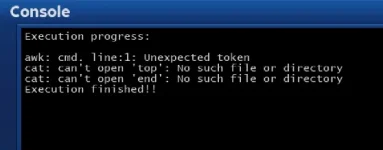
Sorry about this, when i run the code from telnet, it works fine, when i use script runner i get the following error
awk.webp
 
Sorry about this, when i run the code from telnet, it works fine, when i use script runner i get the following error
View attachment 56280
I was going to post that there is a little bug.
Code:
rm -f top end
should be
Code:
cp /dev/null top
cp /dev/null end
as the files both need to exist even if there is nothing to write to them. This starts both as empty. That would remove the last two error lines (but leave you with an empty outfile file).
Is there anyway that the changes can be made infile, rather than outputting to a separate file?
Change:
Code:
 cat top end > output
to be
Code:
 cat top end > input
However, neither of these explains why you have an error. But without seeing what you have edited the script to (given that you don't have infile and outfile and aren't looking for Line3) and where you're files are I can't comment.
 
the final code i have looks like this:
Code:
rm -f top end
awk < /etc/enigma2/userbouquet.1_2.tv '
BEGIN {collect = 0}
/Chan:Name/ {print $0 >> "top";
         collect = 1;
         next;
        }
     {if (collect ) {
         print $0 >> "top";
         collect--;
         next}
     }
     {print $0 >> "end"};
'
cat top end > /etc/enigma2/userbouquet.1_2.tv
rm -f top end

I assume the last 2 error lines are only due to the the awk command not running, if the awk command ran those errors would again disappear, so I think i will leave the code as you originally gave it, saves having extra files.

Above code i have ran in script runner and i still get the same error; I originally had : in the matching text/ channel name and thought maybe it was that what was causing issues, but i have changed that just to normal characters and it is still the same.
 
Last edited by a moderator:
I assume the last 2 error lines are only due to the the awk command not running, if the awk command ran those errors would again disappear, so I think i will leave the code as you originally gave it, saves having extra files.
No.
If what is being looked for doesn't exist then no top will be written, and if there is nothing other than what is being looked for in the file then no end will be written, so it is important to create empty ones at the start.
 
Above code i have ran in script runner and i still get the same error;
Are you running the same script (i.e. not a copy) one the command line ("in telnet") and through Script runner?
One way I can provoke that error (awk seems happy to let various off syntax through) is to make the awk command line have a DOS text-file line ending.
 
No.
If what is being looked for doesn't exist then no top will be written, and if there is nothing other than what is being looked for in the file then no end will be written, so it is important to create empty ones at the start.

Amended to:
Code:
cp /dev/null top
cp /dev/null end
awk < /etc/enigma2/userbouquet.1_2.tv '
BEGIN {collect = 0}
/Chan:Name/ {print $0 >> "top";
         collect = 1;
         next;
        }
     {if (collect ) {
         print $0 >> "top";
         collect--;
         next}
     }
     {print $0 >> "end"};
'
cat top end > /etc/enigma2/userbouquet.1_2.tv
rm -f top end

Still the exact same :(
 

OpenViX Feeds Status

Back
Top