Superb quality and spec AB-Com PULSe 4K SE. Crazy offer! Only £129! FREE UK DELIVERY! 4K UHD, Enigma 2, Multiboot 4 images & more!...
Superb quality and spec AB-Com PULSe 4K Rev II Twin Satellite tuner only £179! FREE UK DELIVERY! 4K UHD, Enigma 2, SATA HDD facility, Multiboot 4 images & more!...

[Mut@nt] HD51 Auto Change Channel Before Going on Standby

  • Thread starter Thread starter ess2k
  • Start date Start date
Basically I have some channels as streams setup on my box, and I can have 2 streams simultaneously, also i record streams too. so i wanted the channel to change before standby so that while the box is in standby it isn't using up a stream.
The standby code should be pausing the current service anyway. Have you checked whether things actually currently work?
 
Last edited:
Hi dsayers
could you try the script with ' before and after the url so
Code:
wget -q -O - 'http://127.0.0.1/web/zap?sRef=1:0:19:1B1D:802:2:11A0000:0:0:0'

I think that would work for you.

Still the same result

Code:
16:47:45.8382 {   } Screens/Standby.py:93 __init__ [Standby] enter standby
16:47:45.8385 [   ] base/console.cpp:110 execute [eConsoleAppContainer] Starting /bin/sh
16:47:45.8398 [   ] dvb/cahandler.cpp:333 unregisterService [eDVBCAService] free slot 0 demux 0 for service 1:0:19:5230:812:2:11A0000:0:0:0::ITV Yorkshire HD
16:47:45.8398 [   ] dvb/cahandler.cpp:497 ~eDVBCAService [eDVBCAService] free service 1:0:19:5230:812:2:11A0000:0:0:0::ITV Yorkshire HD
16:47:45.8438 [   ] service/servicedvb.cpp:1728 timeshift [eDVBServicePlay] timeshift
16:47:45.8441 [   ] service/servicedvb.cpp:1728 timeshift [eDVBServicePlay] timeshift
16:47:45.8470 [   ] dvb/decoder.cpp:836 setState [eTSMPEGDecoder] decoder state: play, vpid=ffffffff, apid=ffffffff
16:47:45.8471 <   > dvb/decoder.cpp:728 stop [eDVBPCR0] DEMUX_STOP ok
16:47:45.8472 [   ] dvb/decoder.cpp:739 ~eDVBPCR [eDVBPCR0] destroy
16:47:45.8473 <   > dvb/decoder.cpp:427 stop [eDVBVideo0] DEMUX_STOP  ok
16:47:45.8486 <   > dvb/decoder.cpp:436 stop [eDVBVideo0] VIDEO_STOP ok
16:47:45.8529 [   ] dvb/decoder.cpp:528 ~eDVBVideo [eDVBVideo0] destroy
16:47:45.8530 <   > dvb/decoder.cpp:159 stop [eDVBAudio0] AUDIO_STOP ok
16:47:45.8616 <   > dvb/decoder.cpp:167 stop [eDVBAudio0] DEMUX_STOP ok
16:47:45.8625 <   > dvb/decoder.cpp:203 unfreeze [eDVBAudio0] AUDIO_CONTINUE ok
16:47:45.8718 [   ] dvb/decoder.cpp:247 ~eDVBAudio [eDVBAudio0] destroy
16:47:45.8718 <   > dvb/decoder.cpp:806 stop [eDVBText0] DEMUX_STOP ok
16:47:45.8730 [   ] dvb/decoder.cpp:817 ~eDVBTText [eDVBText0] destroy
16:47:45.8743 [   ] dvb/dvb.cpp:1495 DVBChannelStateChanged [eDVBResourceManager] start release channel timer
16:47:46.0152 {   } skin.py:1346 readSkin [SKIN] processing screen Standby:
16:47:46.0168 {   } skin.py:1107 readSkin [SKIN] Parsing embedded skin <embedded-in-'StandbySummary'>
16:47:46.0174 {   } skin.py:1346 readSkin [SKIN] processing screen <embedded-in-'StandbySummary'>:
16:47:46.0195 {   } Screens/Screen.py:151 show [SCREENNAME]  StandbySummary
16:47:46.1219 {   } Screens/Screen.py:151 show [SCREENNAME]  Standby
[COLOR="#FF0000"]16:47:46.1361 {   } Navigation.py:250 playService playing 1:0:19:1B1D:802:2:11A0000:0:0:0:
16:47:46.1382 [ E ] gdi/accel.cpp:357 accelAlloc [gAccel] accel alloc failed[/COLOR]

But as birdman pointed out service shouldn't be running in standby. So can I suggest whilst on an IPTV channel copy this and past in notepad
Code:
http://host:port/panel_api.php?username=uuuu&password=pppp&type=m3u_plus&output=ts

Ensure no other devices are connected to IPTV

Replace host with your IPTV host and port with your IPTV port then uuuu with your username and pppp with your password and past in your web browser you should see a line like this "active_cons":"1".

On your box press standby and refresh your web browser and you should have "active_cons":"0"

Alternatively if you have setup yourself with xtream-editor you can see on your xtream panel if you have an active connection just go to lines
 
Last edited:
Still the same result
What release are you running? That doesn't look like a ViX debug log.

And that log claims that the channel was changed (to an HD one), so what makes you think that it isn't working?

But as birdman pointed out service shouldn't be running in standby.
He actually pointed out that it gets paused. I suspect that for a streaming service this just means it remembers the current position, but leaves the network connexions up.
Personally I reckon it would be better to stop a stream when entering standby by default - but then I donlt use them.
So can I suggest whilst on an IPTV channel copy this and past in notepad
Code:
http://host:port/panel_api.php?username=uuuu&password=pppp&type=m3u_plus&output=ts
Don't use notepad!!!
 
You are actually right, it pauses the stream on standby, feel a little embarrassed now. You guys are great though, i have learnt so much. One thing i have managed to do is create a script that hides unwanted bouquets which is great, again thanks to help from you guys on here.

@birdman if you let me know how to modify a cron timer that would be fantastic. i do get how they work, but never tried to modify one. i will search myself too.

Thanks
 
crontab -e is used to edit crontab entries, but it uses a unix editor (which you can define, but it all gets a bit complicated).
 
crontab -e is used to edit crontab entries, but it uses a unix editor (which you can define, but it all gets a bit complicated).

Just tried crontab -e 10 * * * * /usr/scripts/file.sh

and i just get the available options :(
 
What release are you running? That doesn't look like a ViX debug log.

Ive already said currently on OpenATV testing OpenVPN scripts ill flash Vix tomorrow, OpenATV uses Console().ePopen but the code in this thread uses os.system ill test both tomorrow


And that log claims that the channel was changed (to an HD one), so what makes you think that it isn't working?
It was already on ITV 1 HD the highlighted in red code is the channel (BBC 1 HD) it is meant to Zap to so I thought that wasn't working as when I press standby again its still on ITV 1 HD, sorry if I was wrong as that is how i thought its meant to work.

He actually pointed out that it gets paused. I suspect that for a streaming service this just means it remembers the current position, but leaves the network connexions up.
Personally I reckon it would be better to stop a stream when entering standby by default - but then I donlt use them.

The connection to IPTV does stop at least it does for me tested using
Code:
http://host:port/panel_api.php?username=uuuu&password=pppp&type=m3u_plus&output=ts
it shows 1 connection when not in standby and 0 connections when in standby

Don't use notepad!!!

Apologise use Notepad ++ although its just editing a web address
 
Last edited:
Just tried crontab -e 10 * * * * /usr/scripts/file.sh

and i just get the available options :(

Just figured it out,

type crontab -e
press the insert key to edit
make your changes
press esc to exit edit mode
type :wq to save and exit

:)
 
Just figured it out,

type crontab -e
press the insert key to edit
make your changes
press esc to exit edit mode
type :wq to save and exit

:)
Or not...
I remember an issue about this some 18 months ago. But I also remember seeing some comment about changing cron a month ago. I'll have a look when the TV is free....
 
One thing I can see with a quick look at the code is that it may not get started when you install it.
Have you rebooted the system since installing it?
Is there a crond process running (telnet in and type "ps -ef").
 
One thing I can see with a quick look at the code is that it may not get started when you install it.
Have you rebooted the system since installing it?
Is there a crond process running (telnet in and type "ps -ef").

the closest thing i have to crond is
Code:
root      1930     1  0 21:00 ?        00:00:00 /usr/sbin/crond -c /etc/cron/cro

but the cron timer deffo not working, though it says its running in the cron manager and is active on start.

i have restarted a number of times.
 
Well, if I run crond on my et8000 with the root crontab file (which is in [FONT=courier\ new]/etc/cron/crontabs[/FONT]) containing:
*/2 * * * * /home/root/cron-test
it runs every two minutes:
Mar 2 22:13:02 et8000 cron.info crond[23654]: crond (busybox 1.24.1) started, log level 8
Mar 2 22:14:00 et8000 cron.info crond[23654]: USER root pid 23695 cmd /home/root/cron-test
Mar 2 22:16:00 et8000 cron.info crond[23654]: USER root pid 23781 cmd /home/root/cron-test
Where is the file you've been editing? Oh, wait - you used crontab -e, so it knows where it is. So what does [FONT=courier\ new]/var/log/messages[/FONT] contain (since it will report cron jobs running).
 
Last edited:
i edited mine from telnet with the command crontab -e
having a look at the location you mention, it seems to have put the cron jobs in a file /etc/cron/crontabs/root and the content of the file is,
Code:
10,20,30,40,50,00,45 * * * * /usr/scripts/bouqepg.sh >>/tmp/ten.log
00  * * * * /usr/scripts/bouqepg.sh >> /tmp/hour.log
I tried to get a log going but the log is empty.

but at the following location /ect/cron/ i have 3 crontab files each one containing the same info which is
Code:
30 * * * *    /usr/bin/ntpdate-sync silent
00  * * * * /usr/scripts/bouqepg.sh
 
I edited the crontabs/root file manually in notepad++ with this:

*/2 * * * * /usr/scripts/StandbyEnter.sh

I then restarted the GUI expecting it to run every 2 minutes but it didn't.
It did however start running every 2 minutes AFTER the hour.
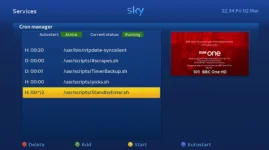
This is how it looks in Cron Manager:

2018-03-02_223444.webp
 
I edited the crontabs/root file manually in notepad++ with this:

*/2 * * * * /usr/scripts/StandbyEnter.sh

I then restarted the GUI expecting it to run every 2 minutes but it didn't.
It did however start running every 2 minutes AFTER the hour.
This is how it looks in Cron Manager:

View attachment 56262

Do you have any files in the folder, /ect/cron/

just wondering if they causing a conflict and i should just delete them.
 
The path is /etc/cron/crontabs and there is just the root file and the readme.txt in there.
 
You cant set a shut down channel. But as in post 2, you can set a start up channel. It doesnt have to be bbc 1.
Please how do you set a start channel?

Sent from my SM-N910F using Tapatalk
 
Something like... select the channel you want, press down key, guide appears, press menu, and it's in there somewhere.
 
i edited mine from telnet with the command crontab -e
having a look at the location you mention, it seems to have put the cron jobs in a file /etc/cron/crontabs/root and the content of the file is,
Code:
10,20,30,40,50,00,45 * * * * /usr/scripts/bouqepg.sh >>/tmp/ten.log
00  * * * * /usr/scripts/bouqepg.sh >> /tmp/hour.log
Are you running OpenVix?
The correct file is [FONT=courier\ new]/etc/cron/crontabs/root[/FONT] and your cron daemon (as seen - a bit truncated - in #52) has been told to look in [FONT=courier\ new]/etc/cron/crontabs[/FONT] for the file(s).

I tried to get a log going but the log is empty.
What log, and how? The /var/log/messages file is always there, and if cron is running it reports each job that it starts there.

but at the following location /ect/cron/ i have 3 crontab files...
What are they called?

each one containing the same info which is
Code:
30 * * * *    /usr/bin/ntpdate-sync silent
00  * * * * /usr/scripts/bouqepg.sh
That first line is the first line of the default root crontab (no idea why it's there, though, as it shouldn't be - but that's for a different thread).
 

OpenViX Feeds Status

Back
Top