Superb quality and spec AB-Com PULSe 4K SE. Crazy offer! Only £129! FREE UK DELIVERY! 4K UHD, Enigma 2, Multiboot 4 images & more!...
Superb quality and spec AB-Com PULSe 4K Rev II Twin Satellite tuner only £179! FREE UK DELIVERY! 4K UHD, Enigma 2, SATA HDD facility, Multiboot 4 images & more!...

[GiGaBlue QUAD+ PLUS] Harmony 650 - Archive button?

leshay

New member
Joined
Sep 6, 2014
Messages
289
Reaction score
0
Points
0
Location
Livingston, Scotland
Hi

New Harmony 650 user.

So far, I seem to have all the 'usual' functions working on this remote, except for Archive. There doesn't seem to be possible to bring up the Recorded program list.

It seems a bit crazy to me that such a remote wouldn't have some provision for accessing a recording list on a PVR.

Had a brief look through the button setup for the remote via the Windows software,but am still at a loss to set up a button to list the recordings.

I have had a look through forum from a search for posts with Harmony 650 and so far haven't found anything relevant.

Seems quite a few forum members are using this remote, I would appreciate some pointers for this.
 
You need to add either PVR or LIST to a button on the remote. I used one of the top buttons next to the display.

Sent from my Moto G (5S) Plus using Tapatalk
 
Hi

Thanks for the reply.

OK, using the Desktop software, 'learned' the 'Archive' command - all seemed to go fine - message said command learned and ready to be assigned. Used the Button setup to assign the new Archive command to - initially the 'channel back' button - didn't work. Tried again using the 'E' button - no response. Tried again using the Info button - got an on screen message 'the DreamPlex plugin is not installed.

I don't even know what 'DreamPlex' is, and am sure it wouldn't be needed for this.

Any other suggestions.
 
You can't be far off now, I've always used "previous channel" to get to recordings, whatever the box.

When you've learned a new command, you then need to assign it to the button you want it to use.
 
You can't be far off now, I've always used "previous channel" to get to recordings, whatever the box.

When you've learned a new command, you then need to assign it to the button you want it to use.


Hi
Yes, as per my last post, tried assigning to various buttons, then used Sync though nothing actually said to use Sync. So far, still no Archive active on remote.
 
Sync usually changes colour (green?) when changes have been detected that need downloading to the remote.
 
Hi
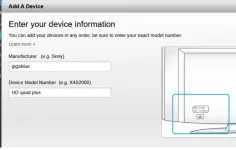
Just noticed this. When first setting up online, I entered GigaBlue for manufacturer and Quad Plus for model. I now notice that this has been changed to GigaBlue HD 800 Quad Plus.

Tried deleting that device and rebuilding on the website - was changed again. I wonder if (they) are suggesting the remotes are same?
 
Last edited:
The command you "learned" from the remote should work irrespective of the box harmony thinks you're using.

If you can't find the exact model (or one with the same remote codes), just learn all the commands, it doesn't take long.
 
Hi
Made a little headway. I suspect that when learning the Archive code from original remote, I may have kept the button pressed long enough to learn a 'long' press. I have now re-learnt it with just a 'click' press and can now get it to work. Now, all I think I need is jump to last/next marker (the <> keys) - I suppose I would use the E and .+ keys for those.
Unless I have forgotten something, I think that would cover all my usual keys I use.
Thanks for the help.

On a separate point: I have to say I do NOT like this remote. The keys are too small and too 'slippery' for me (I know there is limited real estate available) I will persevere with it for the moment though.
 
Hi
Just noticed this. When first setting up online, I entered GigaBlue for manufacturer and Quad Plus for model. I now notice that this has been changed to GigaBlue HD 800 Quad Plus.

Tried deleting that device and rebuilding on the website - was changed again. I wonder if (they) are suggesting the remotes are same?

On the Harmony PC Software the box is listed in the satellite reciever section. When you enter Quad Plus as the model it may fill in the box with the wrong model but the box with the model number has a pull down selection setting where you can then select your box.
 
Last edited:
On the Harmony PC Software the box is listed in the satellite reciever section. When you enter Quad Plus as the model it may fill in the box with the wrong model but the box with the model number has a pull down selection setting where you can then select your box.

Hi
Where would I find the Satellite Receiver section - I don't seem to have that?

I have a drop down in the first box for the GigaBlue portion, but no drop down for the model at all - regardless of what I start to enter.

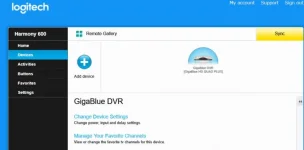
I have attached 2 images: first shows both the boxes filled in and ready to proceed o next screen and second is result of clicking the ADD button on first screen.

tView attachment 56592View attachment 56593
 
Hi
Where would I find the Satellite Receiver section - I don't seem to have that?

I was looking in older Harmony software installed perhaps 10 years ago on my old laptop. The PC software was seriously bad in that nothing was intuitive and it was hard work setting up a remote.

Having downloaded the software you seem to be using you have my sympathy - Harmony have re-written their rubbish to make it worse!

If I enter QUAD PLUS in my older software it defaults to HD 800 Quad Plus (with the option to change it to HD Quad Plus). If I enter HD Quad Plus the older software defaults to HD Quad Plus with no other options.

This suggests that if you enter "HD Quad Plus" in the current software you will probably end up with the correct code.

And trying this in the new software it seems to work - see images

harmony1.webpharmony2.webp

If the mapping on your 650 remote is similar to the mapping of my box on a 600 remote the LIST (Archive in Toppy/Mystuff terms) button may be on one of the pages of the display. You can move the most used functions to the first page.
 
Hi

Thanks all.

I have made good progress here.

After giving myself a strict talking to, I stopped sending long key presses to a learned command and everything seems to be fine now.

The one possible exception may be the Deep st/by versus st/by - which I have yet to test out properly.

I have tried out the HD Quad Plus versus HD 800 Quad Plus, and they seem much the same to me, neither offering a Recording List in the default key functions as such - but learned commands serve for this.

I have stuck with the HD 800 Quad Plus device as I had it already set up.
 
Hi

Turning to the forum once again for some help.

As I mentioned, the last thing I needed to sort out was the Deep st/by for the Harmony. As I said, I am having trouble with this function. It doesn't matter what I try to get that function 'learned', nothing seems to work.

Has anyone else managed to get the Deep st/by function to work on their Harmony?
 
An alternative would be to set up a Power Timer on your box that puts it into deep standby after being in standby for X minutes.

power_timer.webp

You then put your box into standby with the hamony and a little later the box automatically goes to deep standby.
 
Hi

Yes, I do already have such a timer set up, but figured that someone somewhere had managed to get the discrete Deep st/by function set up on their Harmony.
 
You can remap the function of buttons from within ViX (user interface, I think).

So you can define long power toggle to go to deep standby.

I found with my harmony remote that some long key presses couldn't be defined, they just repeated, so it's a bit hit and miss.

I ended up defining F1 on the box remote to go to deep standby, and then mapped a key press on the harmony to F1.
 
Hi

Well then. Intending to try out the key mapping solution, what could be easier? Not for me!

Using the Menu => SetUp => User Interface => Button SetUp, I can't scroll through the list as regardless of key presses, I just get the setup for the first in the list (or, more specifically, for Down key). Tried using both the new Harmony remote and the original remote - both same result. Tried WebIF, but no key mapping option available. Not my day by the look of things. :)

NOTE: the first use of the option, it did scroll down but stopped at the Down key and from then on,all attempts produced the above result.
 
You need to press the key you want to change (not down arrow), I think it says something to that effect.

It's not the easiest interface to work your way thru', just be careful!!

Try long press power toggle on the original remote, and then select power options (not sure of the exact wording).
 
Last edited:
Hi

Thanks for that - I should read the instructions :)

It appears to work fine using your suggested method,but, I think I will stick with the St/By option as the Deep St/By brings up that horrible 'Are you sure ....' message even though nothing is being recorded, nor any scheduled recording within next couple of hours. (that message has always and continues to bug me)

At least now I do have the Deep St/By 'learned' by the Harmony.
 

OpenViX Feeds Status

Back
Top