Superb quality and spec AB-Com PULSe 4K SE. Crazy offer! Only £129! FREE UK DELIVERY! 4K UHD, Enigma 2, Multiboot 4 images & more!...
Superb quality and spec AB-Com PULSe 4K Rev II Twin Satellite tuner only £179! FREE UK DELIVERY! 4K UHD, Enigma 2, SATA HDD facility, Multiboot 4 images & more!...

[ViX_Misc] Zap timer problem

nekrub2

Member
Joined
Dec 6, 2015
Messages
354
Reaction score
5
Points
18
Location
Switzerland
Dear all

I would like to use the timer function to ZAP for a given regular transmission, whenever it starts. So I entered from single EPG to the timer settings and filled out what was needed. The transmission is on from MO to SA at the same time.

I was surprised that also on Sunday the box switched to the channel. Obviously the timer does not look up the EPG but just runs like the old video recorders did by data/time.

Is is possible to have set the timer in a way that it only switches when the selected transmission really starts?

I attach a screenshot with my settings.Timer_settings.webp
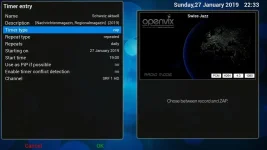
Furthermore I noticed that when the timer starts from standby it asks me whether it should go back to standby? This is very odd.

Thanks for your help
nekrub2
 
Create an autotimer from the epg, set for everyday, you can zap rather than record.
 
All you really need to do is change the timer value for repeats from daily to the days you want.

That only runs on the days you specify and at the time you've specified, an autotimer automatically adjusts the times and days when the program is actually broadcast.
 
I would like to use the timer function to ZAP for a given regular transmission, whenever it starts. So I entered from single EPG to the timer settings and filled out what was needed. The transmission is on from MO to SA at the same time.
"whenever it starts" and "at the same time" are, to me, incompatible. It's one or the other.
To do it whenever it starts, use an AutoTimer to set the relevant Timer(s).
 
Furthermore I noticed that when the timer starts from standby it asks me whether it should go back to standby? This is very odd.
Do you think it should not prompt and go straight to Standby (whilst you may still be watching) or that it shouldn't prompt and stay active?
 
Hi birdman

The prompt comes just after waking up from standby. At this point it does not make sense to ask, whether I would like to go to standy again. So no prompt at all and stay active.

Best regards
nekrub2
 
The prompt comes just after waking up from standby.
Ah, that is significant!
At this point it does not make sense to ask, whether I would like to go to standy again.
True.
My suspicion is that this timer, being a Zap timer, is finished as soon as the box wakes up (a recording timer is only finished when the recording ends).
And the default action of a timer when it ends is to ask you about going back to the original state if that was a standby state.
Looks like this should be ignored for Zap timers - particularly since a Zap timer doesn't allow you to set what to do at the end of it (recording times do).

EDIT (for me..):
Looks like the code at RecordTimer.py:620 (...next_state == self.StateEnded...) should check self.justplay and skip the "From here on we are checking whether to put the box into Standby or Deep Standby." blocks if True.
 
Last edited:
I can reproduce this.
It appears to be result of the zap timer being a repeat one (a one-off zap looks OK - but I'm not sure why* - so setting an Auto Timer, which is what you really want anyway, wouldn't show the problem).
Not quite as simple as I first thought, though, as the log entry for this timer shows:
<log code="12" time="1549627501">stop recording on tuner: (fallback) stream</log>
when it stops. So the logging code needs to handle zap timers better too....

EDIT:
*it seems that the end time for a one-off Zap timer is set to be 3m01s ahead of the start time. So you have to wait that long to get the prompt...so the AT comment is incorrect.

EDIT2:
Fix submitted:
Code:
 https://github.com/OpenViX/enigma2/pull/379

EDIT3:
Fix committed:
Code:
https://github.com/OpenViX/enigma2/commit/f0798d8cb545a19d77d318333d0d82a64db79a2e
 
Last edited by a moderator:
Hi,

The issue is that a previous change to this code removed the duration element of Zap timers. Without the duration as soon as the Zap timer fires it immediately triggers its after event.

Apart from this after event issue removing the duration from Zap timers also creates the following issues:
- As the Zap timer no longer has a duration it is no longer able to be displayed in the EPG.
- As the Zap timer effectively finishes when it starts other timers can then take over the tuner and change the service while the Zap timer should actually be active.

All these hacks to the code should be reversed. Zap timers should be put back the way they were originally designed and implemented.

Regards,
Ian.
 
Actually I agree with Ian. Zap timers should have a duration. If not no collision warning will be given.
 
Zap timers are shown on EPG even with no end time.

Change that has been committed fixes the reported issue. If there is a better fix, it can be added.
 
Actually I agree with Ian. Zap timers should have a duration. If not no collision warning will be given.

But what duration? For instance I zap to a news programme, watch the headlines at the start and then usually immediately change channels again if there is nothing of interest in those headlines. Isn't the function of a zap time fulfilled immedately it changes channels?

There is a "Enable timer conflict detection" option when setting a Zap timer. Isn't this good enough to show that when setting the time of change the channel there may also be something in conflict for recording/zapping.
 
The issue is that a previous change to this code removed the duration element of Zap timers. Without the duration as soon as the Zap timer fires it immediately triggers its after event.
As I noted, the ones I set had a duration of 3m01s (possibly just 3m...).
And the issue was what happened at the end of this time.
 
But what duration? For instance I zap to a news programme, watch the headlines at the start and then usually immediately change channels again if there is nothing of interest in those headlines. Isn't the function of a zap time fulfilled immedately it changes channels?
It should be.
You could argue that you should be able to set the end of a zap timer, to force a free tuner for the whole duration of a programme you wish to watch. But that would be a Watch timer, not a Zap timer, and that is not how the code currently works, nor is it how it is currently intended to work.
Of course, if you had such a timer you'd then have to implement code to disable the user from switching channel without deleting the current "Watch timer". All of which strikes me as wrong.

There is a "Enable timer conflict detection" option when setting a Zap timer. Isn't this good enough to show that when setting the time of change the channel there may also be something in conflict for recording/zapping.
Yes - that is all in place.
 
Hi,

I believe the underlying issue here is that the term "Zap" timer has been interpreted as two completely different types of timers. What was originally a "Zap" timer I believe could be more accurately termed a "Watch" timer. This "Watch" timer is like a "Record" timer in that it has a start time and an end time. That is, there is a duration for the timer and the timer needs to be sure that a tuner is available and the current service for the whole duration of the event and that there are no conflicts. "Watch" timers should also be displayed on the EPG. Looking at it simply, a "Watch" timer is exactly the same as a "Record" timer except that the current service is changed and a recording file is NOT created.

What we now have as a "Zap" timer can be also be considered to be "Reminder" timer. (I will use of the term "Zap" as it is most commonly known here.) I would view a "Zap" timer to be more like a "Power" type timer not a "Record" type timer. "Zap" timers are instantaneous actions that happen at a time and have no lingering actions or effects, just like "Power" timers. They simply trigger and activate a service change and then go away. There is no mandatory duration, no storage requirements, no after actions etc. There is no need for any timer conflict checking. All that needs to be checked is that there is a free tuner on which source the nominated service. Like "Power" timers "Zap" timers can repeat. For example, switch to the news channel every week day at 18:00. If the "Zap" timer is given a duration it works like a "Watch" timer except that the current service is not locked down like a real "Watch" timer.

A "Zap" timer is almost identical to a "Wakeup" timer except that you also get to specify the start up service. ;) The only special consideration may need to be that a "Zap" timer should not be able to override a "Watch" timer. The priority of "Watch" over "Zap" may need to be controllable via a configuration setting. Alternatively defining a "Watch" timer over a "Zap" timer, or a "Zap" timer over a "Watch" timer, could trigger the timer conflict resolution process.

I believe that what I describe creates a more logical and predictable UI and timer configuration.

Regards,
Ian.
 
Hi,

I should note and stress that the "Zap" timer used to work like what we term a "Watch" timer! This behaviour has been broken over time and the "Zap" timer has mutated into what we have now.

I believe that a "Watch" type of timer should be restored.

Regards,
Ian.
 
I believe the underlying issue here is that the term "Zap" timer has been interpreted as two completely different types of timers. What was originally a "Zap" timer I believe could be more accurately termed a "Watch" timer. This "Watch" timer is like a "Record" timer in that it has a start time and an end time.
That seems unlikely, given that there is no way to set an end time for a Zap timer. I don't recall there ever being so (but never use them, so ....).
 
I believe that what I describe creates a more logical and predictable UI and timer configuration
You've omitted the requirement to prevent the user changing channel while this "Watch" timer is running. Remember - they have a timer running which has reserved the tuner.
 

OpenViX Feeds Status

Back
Top