Superb quality and spec AB-Com PULSe 4K SE. Crazy offer! Only £129! FREE UK DELIVERY! 4K UHD, Enigma 2, Multiboot 4 images & more!...
Superb quality and spec AB-Com PULSe 4K Rev II Twin Satellite tuner only £179! FREE UK DELIVERY! 4K UHD, Enigma 2, SATA HDD facility, Multiboot 4 images & more!...

Network shares

avalon65

New member
Joined
Dec 4, 2016
Messages
380
Reaction score
0
Points
0
Location
Leeds
I hope this is in the correct forum, but if not please delete, and I'll post in the ViX support forum.

I have a Mutant HD51 and mounted my network shares from a NAS box. I am using samba for cifs shares and the relevant folders are mounted and activated.
Is it possible to view the actual media on the mounted shares, and how please.

Thanks
 
Movie List/Location will probably get you there.
 
I use Media player to view pics/movies and music on my NAS.
Just set media player to the path of your shares.
 
…. it's where you store your recorded programmes.

Yellow button gives locations.
 
Last edited:
I use Media player to view pics/movies and music on my NAS.
Just set media player to the path of your shares.

Even tho' the shares are cifs shares, and have provided username and password for my NAS box, it is listed in Mount Browser, but Media player can't find any files on it, eh. All the cifs shares are AUTO FS mounted and there is a green tick against the media folders.

The media files are viewable on all my other devices, but not my HD51 for some reason.
 
…. it's where you store your recorded programmes.

Yellow button gives locations.

Thanks, I found it now, but when I select a location on my NAS box, it says no media on /media/AUTOFS/FilmsFREENAS.

That's right as it is not the absolute path, som where can I set the absolute path : ie /mnt/WinShare/Media/Films etc In the Network Browser it shows the absolute path but has NFS against it. When I OK into it , CIFS is clearly there, and for some reason won't change.

Thanks
 
Try removing the nfs share on the nas and then setup after recanning your network and mount it as CIFS.should now work.
 
Try removing the nfs share on the nas and then setup after recanning your network and mount it as CIFS.should now work.[/QUOTE

All my shares are CIFS on my NAS box.

The strange thing is that the shares on the HD51 are NFS shares, there is a green tick against them, but if I change the shares to CIFS, then there is a red cross against them, eh???
 
On your mutant are you using NFS or samba protocol as i used to use Nfs until something happened and went back to Samba.
If its NFS i just remove all mounts and make sure Samba is enabled and running and set up mounts again.
I have about 4 locations + a nas router but cannot remembering if i was in there to setup other locations thinking it had 2 options one to share openly and other not.
Usually when setting up a box with mounts when it reboots it shows the mount with a green tick to show job done and then exit out.
 
I made sure samba was running, then went into Media Player to select a device or share to view media files. I have a listing of about 10 devices in the shares, and there is this: MEDIA, FREENAS, then mediaFREENAS, filmsFreeNAS etc.
It didn't make any difference which one I selected as I got the same message everytime: no media files to view, or similar.

I also checked that each share was enabled and activated, then saved again.
I am not using NFS on the HD51, only samba.

Thanks
 
Are you doing this by pc or box as just checked my nas,one side is password protected and cant access via pc,forgot password but have it handy.
Your recorded files might have a different destination?
On the other e2 boxes what does it say for your nas location to see if it differs.
 
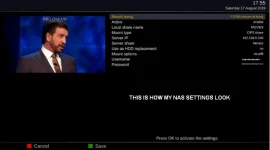
NAS Settings.webp

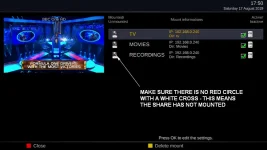
ShareNotMounted.webp

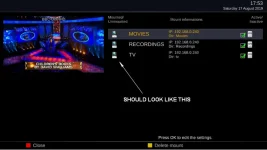
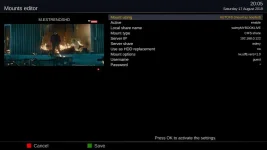
If there is a red circle with white cross, highlight it and press OK and overwrite the existing mount.
This seems to mount all my shares properly at the same time.
Make sure you do a full reboot after initially setting up so that the settings get written to fstab

ShareMounted.webp
 
@willo that looks strange to me so are you recording to the nas as i just use mine for storage and play from there.
 
Yes I record to it but don't use it as a hdd replacement.
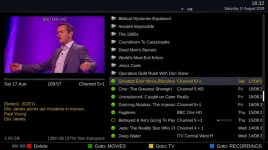
All my boxes record to it and I've setup the coloured buttons in the movie player to go to my shared drives.

movie player.webp
 
Are you doing this by pc or box as just checked my nas,one side is password protected and cant access via pc,forgot password but have it handy.
Your recorded files might have a different destination?
On the other e2 boxes what does it say for your nas location to see if it differs.

I am doing all this on my HD51, no pc involved at all.

I want to access my media files on my FreeNAS server under /mnt/WinShare/Media/Films, and /mnt/WinShare/Media/Music, and /mnt/WinShare/Media/OldFilms.

If it's not possible, I'll use something else instead.
 
Did you go onto your remote and press the list or files button to show your devices that are mounted and select your nas.
My nas is a mybooklive and viewing from my et8000

On doing a search on Freenas storage it uses NFS protocol,so possibly you might have to delete your cifs share for nas and enable nfs and remount it.Just recheck for what protocol it uses on your nas and hope it works.
 

Attachments

  • nas server.webp
    nas server.webp
    24.7 KB · Views: 9
  • mounts editor.webp
    mounts editor.webp
    19.4 KB · Views: 11
Last edited:
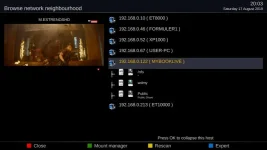
On my remote, I press the menu button, then setup, then network, then mount then mount browser?? to see a list of what is mounted.When I press the green button, the mounts or shares are all ticked green to show they are active. My FreeNAS uses the zfs filesystem, and all the cifs shares are browsable on 3 linux computers, also they are mounted from the fstab file:

//192.168.0.22/WindowsMedia /mnt/SharedMedia cifs credentials=/home/rob/.smbclient,uid=rob 0 0

As I said earlier, I don't have any NFS shares, only cifs, and as 3 other machines rely on or look for cifs shares, I won't be deleting them.

Now when I go to the HD51 box from my PC, I can see a list of mounts, under MNT/autofs. For example : FilmsFREENAS, FREENAS, MEDIA, MediaFREENAS, MusicFREENAS, and non of the said mounts show any files when I click on then: Location could not be displayed.

The mount path on my FreeNASmachine is: /mnt/WinShare/Media/ , so I don't understand why the Mutant is listing it as above. The ViX manual doen't give any information on how to set the correct path.

Just an after thought, how do you mount your shares, do you use Autofs or fstab at boot.

Thanks
 
Now when I go to the HD51 box from my PC, I can see a list of mounts, under MNT/autofs. For example : FilmsFREENAS, FREENAS, MEDIA, MediaFREENAS, MusicFREENAS, and non of the said mounts show any files when I click on then: Location could not be displayed.

The mount path on my FreeNASmachine is: /mnt/WinShare/Media/ , so I don't understand why the Mutant is listing it as above. The ViX manual doen't give any information on how to set the correct path.

Just an after thought, how do you mount your shares, do you use Autofs or fstab at boot.

Thanks

I realised the names above like FilmsFREENAS are just the shared name and NOT the path as I thought.

I found now that I have some other issues with the HD31 in that it cannot see or read any files from any of my external media devices, although by uPnP it can see the folders of the said media, but not the filenames.
 

OpenViX Feeds Status

Back
Top