Superb quality and spec AB-Com PULSe 4K SE. Crazy offer! Only £129! FREE UK DELIVERY! 4K UHD, Enigma 2, Multiboot 4 images & more!...
Superb quality and spec AB-Com PULSe 4K Rev II Twin Satellite tuner only £179! FREE UK DELIVERY! 4K UHD, Enigma 2, SATA HDD facility, Multiboot 4 images & more!...

[Mut@nt] HD51 Crash at end of recording, when end margin starts

So check your disks (including flash) for epg.dat.
Just check in menu/setup where epg is being saved, make sure its what you want)
Telnet into the box and enter init 4(to stop box)(space between init and 4 or later 6)
Using filezilla delete any and all epg.dat‘s!
On telnet enter init 6 (to reboot)

I guess you have said somewhere but how are you creating the EPG?
 
Interesting find! Does this mean it is a bug?

Anyhow, I followed twol's advice:

Following a rescan of channels and autobouquets, I rebooted the box. Then looked around for epg.dat files:
Code:
root@mutant51:~# find / -iname epg.dat
root@mutant51:~#

I manually saved the EPG cache, using Setup/EPG/Load-save-delete and looked again:
Code:
root@mutant51:~# find / -iname epg.dat
/media/hdd/epg.dat
root@mutant51:~# ls -l /media/hdd/epg.dat
-rw-r--r--    1 root     root       3727829 Feb 17 12:42 /media/hdd/epg.dat
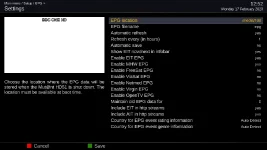
A screenshot of my current EPG settings is attached. I don't know what EPG types I ought to have enabled for Freeview. I noticed in the logs OpenTV EPG could not be found, so I disabled it. I also disabled maintaining old EPG data. I recall enabling this setting recently and wonder if it this was when all these crashes started taking place ... hmm :-/
 

Attachments

  • BBC ONE HD-1722020-1211.webp
    BBC ONE HD-1722020-1211.webp
    29.5 KB · Views: 6
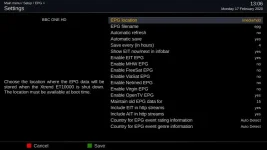
These are my freeview settings....

I've got OpenTV set to yes, not sure why, but it doesn't do (me) any harm.
 

Attachments

  • epg.webp
    epg.webp
    29.7 KB · Views: 6
Last edited:
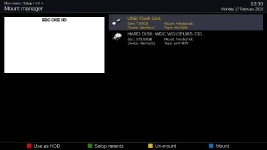
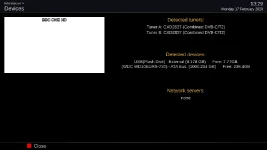
Whats in Menu/setup/ViX/Mount Manager and also in menu/information/devices??
 
Whats in Menu/setup/ViX/Mount Manager and also in menu/information/devices??

Please see attached screenshots.

Looking at ccs' screenshot (thank you) I also removed the EPG autorefresh which I had enabled recently. No crashes so far. :-)
 

Attachments

  • BBC ONE HD-1722020-132.webp
    BBC ONE HD-1722020-132.webp
    15.8 KB · Views: 6
  • BBC ONE HD-1722020-1321.webp
    BBC ONE HD-1722020-1321.webp
    15.1 KB · Views: 5
I wonder if there are any clues in the timers menu.

If you highlight a completed timer which appeared to have issues, and press info, it may tell you what it didn't like.
 
Searching "huffman" from the debug logs comes up with....
That's related to OpenTV, which you don't want/need to have enabled for UK Freeview.
(I get the same message - it's not an issue).

What options do you have enabled for EPG gathering? It should only be getting data from EIT.
 
Problem solved!

What options do you have enabled for EPG gathering? It should only be getting data from EIT.
Thank you all for your help with this problem. I should have retraced my steps as soon as I noticed things going wrong and would have kept this thread shorter!

I had made some changes in the EPG Settings recently. One of these changes was to enable "Automatic refresh" every hour, thinking this ought to be a good thing, because it would catch any changes to programmes and times and adjust timers for recordings accordingly. For some reason, the automatic refresh ended up corrupting the EPG, deleting the cache file on /media/hdd/epg.dat, then crashing Enigma if I was doing anything more than watching live TV with the box. Capturing debug logs while trying to bottom out the cause did not help, as this was consuming additional resources. I think this is a bug of some sort, which can be replicated on this box.

With css and birdman's kind input I've now disabled automatic refresh for EPG and left only EIT as a source for EPG data. The box is now back to its normal stable behaviour.

Thanks again! :)
 
Anyone know what "Automatic refresh" is supposed to do, I've always wondered.
 
Anyone know what "Automatic refresh" is supposed to do, I've always wondered.
Updates epg.dat on disk from the in-memory EPG data.
So when you get EPG data from EIT (which updates "continuously") it is useful to update the data in case enigma2 crashes(on an orderly shutdown it is updated anyway).

I presume it is also useful for those who download their EPG data, so that it saves the last downloaded data (but that may happen by some other means - not using downloaded EPG data I've never looked).
 
Updates epg.dat on disk from the in-memory EPG data.
So when you get EPG data from EIT (which updates "continuously") it is useful to update the data in case enigma2 crashes(on an orderly shutdown it is updated anyway).

I presume it is also useful for those who download their EPG data, so that it saves the last downloaded data (but that may happen by some other means - not using downloaded EPG data I've never looked).
I thought that was automatic save, with the next option save every(in hours).

Automatic refresh almost sounds a bit like the opposite.
 
Automatic refresh almost sounds a bit like the opposite.
Sorry. You are correct.
This does schedule an automatic refresh from epg.dat (and, if that happens to be /epg.dat, deletes it).
Presumably the epgcache.load() method is how downloaded EPG data gets put into use? Not sure why you'd want to schedule reloads of it, though.
 

OpenViX Feeds Status

Back
Top