V
v12nut
Guest
Hi all,
What steps/files are required to set up Openvix 5.3.028 for using 27.5w ?
cheers
What steps/files are required to set up Openvix 5.3.028 for using 27.5w ?
cheers


Same as OpenPli .... the thread you posted in is probably “the“ source - so what is your actual question, as if I read your OpenPli post correctly you had it working?
[reader]
label=BISS
protocol=constcw
device=/etc/tuxbox/config/constant.cw
caid=2600
group=11) did you scan 27.5W and break the changes to the lamedb??
2) you don‘t need oscam emu - on ViX oscamlatest is fine.
3) what files are you currently using?
Important that the lamedb is obviously set up for 27.5W, but I use a very bog standard oscam.conf, oscam.server set up as a BISS reader
Code:[reader] label=BISS protocol=constcw device=/etc/tuxbox/config/constant.cw caid=2600 group=1
And a file constant.cw containing the transponders etc
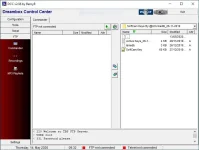
I am sure its not a multiboot issue - goes nowhere near network.... there are/have been issues with DCC and getting a version that works with OE-A images see https://www.world-of-satellite.com/showthread.php?10166-DCC-E2-(-Dreambox-Control-Centre)Morning,
as I told you yesterday since using the Multiboot for Pli and Vix I have lost access to the zgemma h9 twin when using DCC (had no problem previously) I have attached a screen shot from DCC, have you had this problem? or know how I can reset it?
regardsView attachment 60196

Putty or use Filezilla Client FTP
Sent from my iPhone using Tapatalk
Thanks I shall try both of those, If you look at the pic at the bottom box there is mention of a TBS server, I get this when connecting to the Zgemma via a crossover cable, no router.any idea why this should be?
regards

Thanks I shall try both of those, If you look at the pic at the bottom box there is mention of a TBS server, I get this when connecting to the Zgemma via a crossover cable, no router.any idea why this should be?
regards
Is this an ethernet crossover cable? If so, how are you allocating IP addresses to the Zgemma and the (I assume) PC? I'm just wondering if this is a simple failure to connect? Using a router with DHCP is probably the most reliable way of connecting. You can either fix address reservations in the router or assign specific addresses in both devices ensuring they are in the same subnet.
Hi,
Update, I have all channels back but no sound, could I ask you for a copy of your working lamdb file or what do I need to insert in my own?
cheers
So what did you do to cause this? You need to communicate what you are doing/have done - otherwise you generate loads of responses from people trying to help you - just shipping a copy of the lamedb may or may not help you.Hi,
Update, I have all channels back but no sound, could I ask you for a copy of your working lamdb file or what do I need to insert in my own?
cheers


