Superb quality and spec AB-Com PULSe 4K SE. Crazy offer! Only £99! FREE UK DELIVERY! 4K UHD, Enigma 2, Multiboot 4 images & more!...
Superb quality and spec AB-Com PULSe 4K Rev II Twin Satellite tuner only £149! FREE UK DELIVERY! 4K UHD, Enigma 2, SATA HDD facility, Multiboot 4 images & more!...

Testers required for OpenViX Python 3 images

Status
Not open for further replies.
Uploaded:

  • vuultimo4k
  • osmio4kplus
  • vuuno4k
  • vuuno4kse
  • sf8008
  • sf8008m
  • zgemmah7
  • mutant51
  • vusolo2
  • osmega
  • vuuno4kse
  • tmnanosem2plus
  • vuzero4k
  • osninopro
  • zgemmah9sse
 
Yes, you are correct and I will try to implement a change to make sure it defaults to None
Well it's different in 5.5.015.002.

But now the new option is "none" but oscam-latest is started with the new command line anyway and softcam manager doesn't even seem to start another oscam-latest at boot time.

Later:
I'm trying it set up with the new "startup script" method now.
So far it all works.

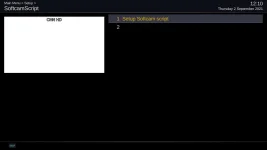
There is an extra blank entry in the menu:
1_0_19_C472_837_2_11A0000_0_0_0_20210902121100.webp
 
Last edited:
Well it's different in 5.5.015.002.

But now the new option is "none" but oscam-latest is started with the new command line anyway and softcam manager doesn't even seem to start another oscam-latest at boot time.

Should "none" be "None" ??

Code:
		if self["config"].getCurrent() == config.misc.softcams and config.misc.softcams.value and config.misc.softcams.value.lower() != "[COLOR="#FF0000"]none[/COLOR]":


https://github.com/OpenViX/enigma2/commit/3c3490e44017b3ddcf0f72e344004f2c10b5a293#diff-af1c8c5aff5c6a15c51a29a03e177e0287e09e86f0ac9bd4660f8566448d2d0eR69
 
Probably. I wrote that mesage from memory.

Wrong "none" - check the rest of my post.

Unless config.misc.softcams.value.lower means lower case, in which case please ignore.
 
Last edited:
Well it's different in 5.5.015.002.

But now the new option is "none" but oscam-latest is started with the new command line anyway and softcam manager doesn't even seem to start another oscam-latest at boot time.

Later:
I'm trying it set up with the new "startup script" method now.
So far it all works.

There is an extra blank entry in the menu:
View attachment 62555

Sharp eyes! Yes there is a blank line to trick the system, forget you saw it. ....Also how do you get the numbers?????? Never had that, you cannot see the blank line on my systems
The oscam installs the script and setup (but no longer automatically starts the selected Oscam) - if you start with script and go to SoftcamManager - it should show softcam running by SoftcamScript and say so in top message (where normally it identifies the softcam)
If running with script don't forget to remove freeze check in SoftcamManager menu options

The softcam install also adds an entry to /etc/tuxbox/config with the name of the softcam e.g. oscam-latest stick your config in there (although I have had one case where it wanted both config & config/oscm-latest)
 
Last edited:
Sharp eyes! Yes there is a blank line to trick the system, forget you saw it. ....Also how do you get the numbers?????? Never had that, you cannot see the blank line on my systems
The oscam installs the script and setup (but no longer starts the selected Oscam) - if you start with script and go to SoftcamManager - it should show its running and say so in top message (where normally it identifies the softcam)
If running with script don't forget to remove freeze check in SoftcamManager menu options

He must have numbering enabled in his config. And as this is just a standard Setup screen it should inherit the full behaviour of any Setup screen.

What was the blank line needed for?
 
I use the Kiddac Onyx skin and in 5.5.15.02 the picons on infobar are working again, they had been "broken" since 5.5.14
 
Sharp eyes! Yes there is a blank line to trick the system, forget you saw it. ....Also how do you get the numbers?????? Never had that, you cannot see the blank line on my systems
The oscam installs the script and setup (but no longer automatically starts the selected Oscam) - if you start with script and go to SoftcamManager - it should show softcam running by SoftcamScript and say so in top message (where normally it identifies the softcam)
If running with script don't forget to remove freeze check in SoftcamManager menu options

The softcam install also adds an entry to /etc/tuxbox/config with the name of the softcam e.g. oscam-latest stick your config in there (although I have had one case where it wanted both config & config/oscm-latest)

He must have numbering enabled in his config. And as this is just a standard Setup screen it should inherit the full behaviour of any Setup screen.

What was the blank line needed for?

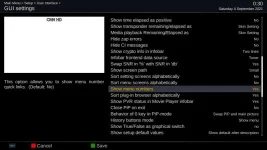
Yes, I enabled menu numbers like this:
1_0_19_C472_837_2_11A0000_0_0_0_20210904003042.webp

It gives a nice quick way to naviagte the menus by just pressing the number.
for example [5] instead of, [down] [down] [down] [down] [Ok]
It's very well implemented. It even works quite well beyond the 9th menu entry by using a timeout to decide when you've finished keying numbers.
[1] [1] (for eleven) instead of [down] [down] [down] [down] [down] [down] [down] [down] [down] [down] [Ok].
 
It gives a nice quick way to naviagte the menus by just pressing the number.
for example [5] instead of, [down] [down] [down] [down] [Ok]
It's very well implemented. It even works quite well beyond the 9th menu entry by using a timeout to decide when you've finished keying numbers.
[1] [1] (for eleven) instead of [down] [down] [down] [down] [down] [down] [down] [down] [down] [down] [Ok].

That works like that irrespective of whether the numbers are displayed or not.
 
@twol When using the new softcam script feature what is the correct procedure to get the softcam running again after flashing a new OpenVIX Version?

I upgrade OpenVIX, restore my settings, and as far as I can see softcam script is all set up exactly as before but the softcam doesn't run, so I've just been sort of fiddling with it until I find my softcam is again running and stays running after a reboot.
 
@twol When using the new softcam script feature what is the correct procedure to get the softcam running again after flashing a new OpenVIX Version?

I upgrade OpenVIX, restore my settings, and as far as I can see softcam script is all set up exactly as before but the softcam doesn't run, so I've just been sort of fiddling with it until I find my softcam is again running and stays running after a reboot.

The issue: I don,t want both softcam mgrs running and have the issue you had. So if you flash an image and restore settings it will (as you noticed) freeze until the user starts one of the softcams. With script manager, normally just hitting Save will start the script and the softcam - always works for me. There is the option to enable restart, in which case it will stop and then restart the softcam by the scripts, although I have never needed to do that.
If you upgrade the software this should not be an issue.
I will look again at resolving this …. As the Softcam Manager starts very early as a plugin, I may be able to handle in the 1st call to the plugin.

edit: running some tests today - hopefully it will automate the softcam script start

edit2: that now appears to be working ... will issue a Pull
 
Last edited:
From where?

Enigma is following the build numbers of ViX Dev. Same with the other repos. It will be changed when the Py3 image becomes the main one.
 
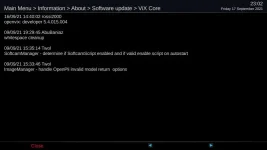
notified by symbol flashing on info bar
 

Attachments

  • updat.webp
    updat.webp
    19.8 KB · Views: 28
Status
Not open for further replies.

OpenViX Feeds Status

Back
Top