Superb quality and spec AB-Com PULSe 4K SE. Crazy offer! Only £99! FREE UK DELIVERY! 4K UHD, Enigma 2, Multiboot 4 images & more!...
Superb quality and spec AB-Com PULSe 4K Rev II Twin Satellite tuner only £149! FREE UK DELIVERY! 4K UHD, Enigma 2, SATA HDD facility, Multiboot 4 images & more!...

[GiGaBlue UHD UE 4K] Storage disks and bookmarking

Does Nas need Samba or Nfs setup as its been a while since setting one up.
Samba is really server software to turn your box into a file-server.
To access file on a different system you'd need the cifs kernel module and the smbclient program, if your file-server is running cifs. If it's NFS you'll need to nfs-client bits.
 
If this is over NFS the box user must match the user of the device being accessed irrespective of being a guest.
Unless the server is set up for writeable anonymous access.

But the error message is, "No such file or directory" implying that it hasn't been mounted in the first place.
 
Which it is. Effectively anyone can access and write to the drive.


Sent from my iPhone using Tapatalk
 
Unless the server is set up for writeable anonymous access.
The users must be the same.

How many people would be stupid enough to set up anonymous write access?
 
Last edited:
I get those messages " no such file or directory ' and go to boxes to see if a utility has stopped running Samba or Nfs or if IP has changed.
When changed and checked and remounted its working again.

I only move excess files to nas to free up box hdd and can play from nas.
 
Hi Huevos,

Are you saying that I need to delete and remount the drive but this time with a username and password?

I have done this and it makes no difference. It still sees the drive as having no space (or perhaps as you suggest unwritable). I am going to reset the sharing of the drive to see if that helps.

Any feedback from the crash logs?
 
I get those messages " no such file or directory ' and go to boxes to see if a utility has stopped running Samba or Nfs or if IP has changed.
When changed and checked and remounted its working again.

I only move excess files to nas to free up box hdd and can play from nas.

That is actually all I am trying to do. I do not want to rely on a network connection for recordings but do want to manage the space on the local HDD.
 
That possibly sounds like its not in the correct format to use with e2 boxes and might be in fat 32.

Might you be using that for other recordings from a different device ?

When usb sticks not setup correctly they had a space issue as might have been fat 32 and not iniatilised as ext4.

Is the nas blank or have recordings from other devices.
 
That possibly sounds like its not in the correct format to use with e2 boxes and might be in fat 32.
The format for a network share is cifs or nfs.
What the server that actually owns the real disk space uses as its file-system is purely a matter for it.
 
Hi, I have searched but cannot find an answer so I am turning to the forum for help.

I have installed a hard drive in my Gigablue UHD UE 4K and it works fine. However I have an existing collection of recordings on a network drive that I would like to access both to view and to record to.

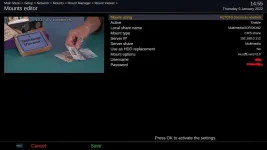
Under Network Mounts I have added the drive and it appears in the mount viewer. I have mounted both the main drive and also one of the subdirectories (movies). Both have a green tick.
...

Geoff

I've read through this thread and I don't see any reference to the network drive and how it's hosted. There is a lot of discussion regarding NFS or SMB (CIFS in old parlance).
Geoff - can you confirm what machine is actually hosting the network drive. Windows? What version? Commercial NAS - Synology or other?

If the network drive is hosted on a recent windows version (10), then probably SMB V1 is disabled and you will need to specify the correct version of SMB in the mount command on the Vix box. Alternatively, if it's an old NAS still running SMB V1, then you may have to force SMB V1 in the mount parameter as most recent Vix builds assume at least version 2 as the SMB version. Note the vers=2.0 in the mount command string.

As an example please see attached screenshot which shows the mount parameters for my home NAS which is using SMB 2 and has user and password authentication for access to the media folder.
 

Attachments

  • mount_info.webp
    mount_info.webp
    21.6 KB · Views: 14
Hi Joe 90. Boy that takes me back.

The drive is not a NAS, just a standard 4T hard drive hanging off my iMac and shared via SMB with open permissions.

Interestingly, although the network shows both the shared drives on the 4T, they were not accessible so I have rebooted everything, they are now available and I will test tonight and report back.


Sent from my iPhone using Tapatalk
 
Maybe been a mac and windows and linux might be issues and awaiting answers to hear.
 
...
The drive is not a NAS, just a standard 4T hard drive hanging off my iMac and shared via SMB with open permissions.
...

Sent from my iPhone using Tapatalk

I don't know anything about Mac implementation of SMB, but you might want to check the actual SMB protocol version in use. The Vix builds assume a default version of 2.02, which you can override in the mount setup with vers=
 
After the reset and defining a new share, I was finally able to add a bookmark and record to it. I just need to confirm moving files also works but I think it will not be a problem.

Feel a bit guilty for wasting your time but it still leaves open the question of why it crashed. There should be a routine that checks availability of the drive and notifies the user if there is a problem.

Can I assume my crash report and issue will come to the attention of the developers or do I need to raise it elsewhere?

G


Sent from my iPhone using Tapatalk
 
In my experience if the shared drive isn't available the box records to /media/hdd/movie/
 

OpenViX Feeds Status

Back
Top