Superb quality and spec AB-Com PULSe 4K SE. Crazy offer! Only £129! FREE UK DELIVERY! 4K UHD, Enigma 2, Multiboot 4 images & more!...
Superb quality and spec AB-Com PULSe 4K Rev II Twin Satellite tuner only £179! FREE UK DELIVERY! 4K UHD, Enigma 2, SATA HDD facility, Multiboot 4 images & more!...

[VU+ Ultimo4K] Stable Update showing

thecaretaker

Forum Supporter
Donated Member
Joined
Apr 22, 2012
Messages
327
Reaction score
4
Points
18
Location
Southern UK
Website
www.thecaretakers.co.uk
Hi, I've got a notification icon to tell me there is a stable update available. I'm currently running Vix 6.0.007

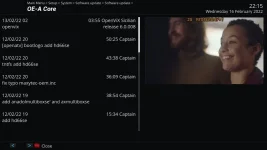
When I go to Settings/Software Update, indeed it finds an update and the info about the update says Scilian 6.0.008 (see screen shot)

I chose to go through the update process and my VU Ultimo4k reboots. But checking the information it still says I am running 6.0.007.

If I go to the Software Update it goes to install it again.

This isn't the first time this has happened. Has something changed to the stable Update notification method? The WOS website only shows the 6.0.007 (No 6.0.008) to download.
1_0_1_621C_7E6_2_11A0000_0_0_0_20220216221511.webp
 
Just to add, I've also tested with the default skin and I'm still getting the blinking update icon even though there is no 'real' stable update available. A reboot stops it blinking until I do a software update check or the check every (hours) does the check. The software settings is set to only check for stable updates, Allow unstable (experimental) updates is set to 'NO'. Any ideas? Are not all users experiencing this? Is it just me?
 
Last edited:
This might be the libx264 issue or 008 update. What is on webserver and what is on feeds are not the same thing. Check for updates by command line to see what is pending.

Code:
opkg update && opkg list-upgradable
 
It say:

Code:
Downloading [url]http://www.openvix.co.uk/feeds/openvix/release/6.0/vuultimo4k/3rdparty/Packages.gz[/url].
Updated source 'openvix-3rdparty'.
Downloading [url]http://www.openvix.co.uk/feeds/openvix/release/6.0/vuultimo4k/all/Packages.gz[/url].
Updated source 'openvix-all'.
Downloading [url]http://www.openvix.co.uk/feeds/openvix/release/6.0/vuultimo4k/cortexa15hf-neon-vfpv4/Packages.gz[/url].
Updated source 'openvix-cortexa15hf-neon-vfpv4'.
Downloading [url]https://raw.githubusercontent.com/oe-alliance/oe-alliance-settings-feed/master/feed/Packages.gz[/url].
Updated source 'oe-alliance-settings-feed'.
Downloading [url]http://www.openvix.co.uk/feeds/picon/Packages.gz[/url].
Updated source 'openvix-picon-feed'.
Downloading [url]http://www.openvix.co.uk/feeds/openvix/release/6.0/vuultimo4k/vuultimo4k/Packages.gz[/url].
Updated source 'openvix-vuultimo4k'.
Downloading [url]http://www.openvix.co.uk/feeds/openvix/release/6.0/vuultimo4k/vuultimo4k_3rdparty/Packages.gz[/url].
Updated source 'openvix-vuultimo4k_3rdparty'.
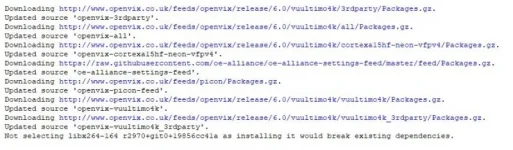
Not selecting libx264-164 r2970+git0+19856cc41a as installing it would break existing dependencies.
 
Code:
Not selecting libx264-164 r2970+git0+19856cc41a as installing it would break existing dependencies.
Not been able to find out how to fix this. If it is bugging you, flash image and restore settings and plugins afterwards.
 
OK, I've stopped it showing the update notification by blanking it out in the user skin file.

Code:
	<screen name="InfobarUpdateIcon">
	</screen>

I assume this must affect all users with all skins.
 
Yes, it affects all users who installed that package. It is not a skin issue, it is a package issue. The other way is to disable the update check.
 
You need to make a settings backup and the flash and restore the latest image.
 
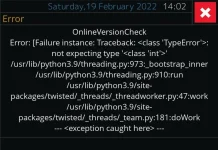
I turned on today and got this screen (see screenshot). Nothing showing in the log files. It might be related to the power cuts and internet outages we have experienced due to Storm Eunice rather than the update check issue.

I just did a manual software check and it showed 1. Nothing to Upgrade. No errors. So may have been a one off.


1_0_19_1B31_802_2_11A0000_0_0_0_20220219140246.webp
 
I had the same kind of error:

< 2581.9844> 07:14:11.6328 [Task] >>> Error: [<Components.Task.FailedPostcondition object at 0xaa525f88>]
< 2581.9850> 07:14:11.6334 [Task] job Components.Task.Job name=OnlineVersionTarkistus #tasks=1 completed with [<Components.Task.FailedPostcondition object at 0xaa525f88>] in Components.Task.Task name=Etsitään päivityksiä...
< 2581.9857> 07:14:11.6341 [Task] unrecoverable task failure
< 2581.9860> 07:14:11.6344 OnlineVersionTarkistus
Virhe: [Failure instance: Traceback: <class 'TypeError'>: 'TimeoutError' object is not subscriptable
/usr/lib/python3.9/threading.py:973:_bootstrap_inner
/usr/lib/python3.9/threading.py:910:run
/usr/lib/python3.9/site-packages/twisted/_threads/_threadworker.py:47:work
/usr/lib/python3.9/site-packages/twisted/_threads/_team.py:181:doWork
--- <exception caught here> ---
/usr/lib/python3.9/site-packages/twisted/python/threadpool.py:238:inContext
/usr/lib/python3.9/site-packages/twisted/python/threadpool.py:254:<lambda>
/usr/lib/python3.9/site-packages/twisted/python/context.py:118:callWithContext
/usr/lib/python3.9/site-packages/twisted/python/context.py:83:callWithContext
/usr/lib/enigma2/python/Components/OnlineUpdateCheck.py:260:JobStart
/usr/lib/enigma2/python/Components/OnlineUpdateCheck.py:143:getFeedsBool
/usr/lib/enigma2/python/Components/OnlineUpdateCheck.py:104:getFeedStatus
]< 2581.9873> 07:14:11.6357
 
I had the same kind of error:

< 2581.9844> 07:14:11.6328 [Task] >>> Error: [<Components.Task.FailedPostcondition object at 0xaa525f88>]
< 2581.9850> 07:14:11.6334 [Task] job Components.Task.Job name=OnlineVersionTarkistus #tasks=1 completed with [<Components.Task.FailedPostcondition object at 0xaa525f88>] in Components.Task.Task name=Etsitään päivityksiä...
< 2581.9857> 07:14:11.6341 [Task] unrecoverable task failure
< 2581.9860> 07:14:11.6344 OnlineVersionTarkistus
Virhe: [Failure instance: Traceback: <class 'TypeError'>: 'TimeoutError' object is not subscriptable
/usr/lib/python3.9/threading.py:973:_bootstrap_inner
/usr/lib/python3.9/threading.py:910:run
/usr/lib/python3.9/site-packages/twisted/_threads/_threadworker.py:47:work
/usr/lib/python3.9/site-packages/twisted/_threads/_team.py:181:doWork
--- <exception caught here> ---
/usr/lib/python3.9/site-packages/twisted/python/threadpool.py:238:inContext
/usr/lib/python3.9/site-packages/twisted/python/threadpool.py:254:<lambda>
/usr/lib/python3.9/site-packages/twisted/python/context.py:118:callWithContext
/usr/lib/python3.9/site-packages/twisted/python/context.py:83:callWithContext
/usr/lib/enigma2/python/Components/OnlineUpdateCheck.py:260:JobStart
/usr/lib/enigma2/python/Components/OnlineUpdateCheck.py:143:getFeedsBool
/usr/lib/enigma2/python/Components/OnlineUpdateCheck.py:104:getFeedStatus
]< 2581.9873> 07:14:11.6357

Can you give us the debug log.
 
Sorry @Huevos, it is gone, but that happened only once last thursday.
 

OpenViX Feeds Status

Back
Top