
Superb quality and spec AB-Com PULSe 4K SE. Crazy offer! Only £129! FREE UK DELIVERY! 4K UHD, Enigma 2, Multiboot 4 images & more!...
Superb quality and spec AB-Com PULSe 4K Rev II Twin Satellite tuner only £179! FREE UK DELIVERY! 4K UHD, Enigma 2, SATA HDD facility, Multiboot 4 images & more!...
You are using an out of date browser. It may not display this or other websites correctly.
You should upgrade or use an alternative browser.
You should upgrade or use an alternative browser.
Technomate Twin 4K help Please
- Thread starter redman1
- Start date


ronand
ViX Beta Tester
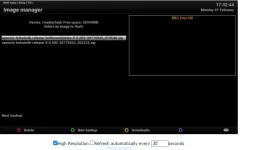
You seem to be using a 128Gb USB stick. For usb flashing its advisable to use a much smaller one (8Gb or less). That is probably the reason that the USB flashing is failing (its formatted as exfat not fat32 and the box cant read it).

abu baniaz
Moderator
Another try
What happens when you press the yellow button.
It seems you have to press Ctrl before it acknowledges the click. I've never had to.
@ronand, we are trying to flash by ImageManger now. Can we leave the USB stick size for another session?
Last edited:

ccs
ViX Beta Tester
- Joined
- Sep 6, 2014
- Messages
- 5,836
- Reaction score
- 5
- Points
- 0
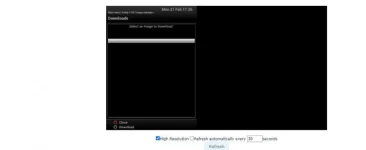
@CCS, we are trying to flash by ImageManger now. Can we leave the USB stick size for another session?
Don't blame me.

abu baniaz
Moderator
There was a server change a long time ago, so your box cannot connect.
There are several options available now. Of the two below, which do you want to use.
1. FTP the zipped image you downloaded to /media/hdd/imagebackups
2. Flash by command line using Putty. ( Guide to Putty in my signature)
There are several options available now. Of the two below, which do you want to use.
1. FTP the zipped image you downloaded to /media/hdd/imagebackups
2. Flash by command line using Putty. ( Guide to Putty in my signature)
Last edited:
abu baniaz
Moderator
A channel editor won't work. Does Esetting+ allow you to transfer files?
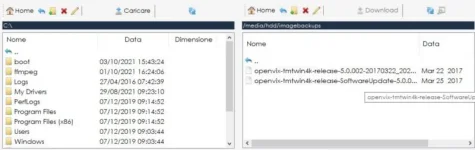
You have to transfer the downloaded image (no need to unzip) to /media/hdd/imagebackups You will then be able to flash it. You can use FTP client like Filezilla
Or you can flash it using Grog's script. Issue that with any terminal client like Putty. Follow the guide in my signature. You seem quite competent and should be able to do it.
Do you want me to do this over teamviewer? If so, PM me your teamviewer details
You have to transfer the downloaded image (no need to unzip) to /media/hdd/imagebackups You will then be able to flash it. You can use FTP client like Filezilla
Or you can flash it using Grog's script. Issue that with any terminal client like Putty. Follow the guide in my signature. You seem quite competent and should be able to do it.
Do you want me to do this over teamviewer? If so, PM me your teamviewer details
abu baniaz
Moderator
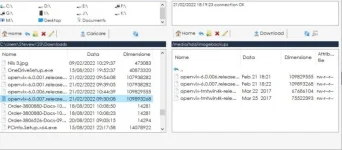
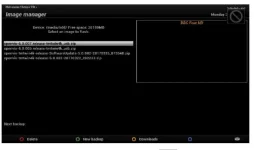
Menu > Setup > Vix > Image manager
Highlight the image you want to flash using remote keys
Blue to flash/restore
Highlight the image you want to flash using remote keys
Blue to flash/restore
abu baniaz
Moderator
OK, I see the blue button does not do anything.
In esetting+, click on telnet, once connected, paste the following command
In esetting+, click on telnet, once connected, paste the following command
Code:
[COLOR=#333333]wget --no-check-certificate -O install_vix.sh [/COLOR][URL="https://www.dropbox.com/s/hc2cdr116lvx3dj/install_vix.sh?dl=1"]https://www.dropbox.com/s/hc2cdr116l...ll_vix.sh?dl=1[/URL][COLOR=#333333] && bash install_vix.sh
[/COLOR]ccs
ViX Beta Tester
- Joined
- Sep 6, 2014
- Messages
- 5,836
- Reaction score
- 5
- Points
- 0
.OK, I see the blue button does not do anything.
The OK button should work (rather than blue), if it's not too late.
abu baniaz
Moderator
See post 54 please.
abu baniaz
Moderator
Try Putty. Guide in my signature. ( Linux commands)
Edit:
https://www.world-of-satellite.com/showthread.php?40948-How-to-use-Putty-for-Unix-Linux-commands
Edit:
https://www.world-of-satellite.com/showthread.php?40948-How-to-use-Putty-for-Unix-Linux-commands
Similar threads

- Replies
- 10
- Views
- 520
- Replies
- 1
- Views
- 2K

[Mut@nt HD2400]
feeds and status-message.php for self built 6.8.007 ?
- Replies
- 6
- Views
- 630