Superb quality and spec AB-Com PULSe 4K SE. Crazy offer! Only £99! FREE UK DELIVERY! 4K UHD, Enigma 2, Multiboot 4 images & more!...
Superb quality and spec AB-Com PULSe 4K Rev II Twin Satellite tuner only £149! FREE UK DELIVERY! 4K UHD, Enigma 2, SATA HDD facility, Multiboot 4 images & more!...

[VU+ Duo4K SE] Twin FBC Tuner card installed on Port B - what tuner settings do I use?

SkyFan

New member
Joined
Dec 29, 2012
Messages
562
Reaction score
0
Points
0
I have a Twin FBC Tuner card physically installed on Port B and it's used with a Universal LNB. Could you please tell me what tuner settings to use for that. I don't have a motorized dish.

There was a long post that I think Abu posted a long time ago which showed the tuner settings required for various positions but I can't seem to find that post.
 
Last edited:
For the tuner with signal wire (from a universal LNB) hooked up to it, set tuner as: Simple, single, 28.2.
 
Last edited:
Port B has the twin tuner card installed. Do I only set Tuner B to Simple, single, 28.2? There's various tuners listed: A,B,C,D up to P, etc
I also have a twin tuner card installed in Port A but it's unused as I don't have any spare sat cables to plug into it. Which tuners do I disable for that?
 
FBC Tuner card in motherboard slot A. (Eight tuners on this card)

Top LNB socket/connection = Tuner A
Bottom LNB socket/connection = Tuner B
The other tuners which do not have physical connections are C-H

You said here is no signal wire hooked up to these, so set A and B to disabled. C-H will be in FBC automatic and won't be used as the root tuners have no signal input.

FBC Tuner card in motherboard slot B. (Also Eight tuners on this card)
Top LNB socket/connection = Tuner I
Bottom LNB socket/connection = Tuner J
The other tuners which do not have physical connection/socket are K-P

I am presuming you only have one wire from a 28.2.
You have not said which LNB socket/connection you are using. The above description tells you which is which. Set the one with wire hooked up to it as simple single 28.2. The one without wire should be disabled.
Leave K-P as FBC automatic


If the above is not clear, as in all your other tuner threads, I repeat my request, please draw a picture to avoid confusion.
 
Last edited:
Good evening. Could i use blind search in Duo 4 K SE if i have one cable connected to one LNB ? If yes, how because it is written error configuration .
 
Good evening. Could i use blind search in Duo 4 K SE if i have one cable connected to one LNB ? If yes, how because it is written error configuration .
You can use blindscan with non-fbc tuners only.
 
FBC Tuner card in motherboard slot A. (Eight tuners on this card)

Top LNB socket/connection = Tuner A
Bottom LNB socket/connection = Tuner B
The other tuners which do not have physical connections are C-H

You said here is no signal wire hooked up to these, so set A and B to disabled. C-H will be in FBC automatic and won't be used as the root tuners have no signal input.

FBC Tuner card in motherboard slot B. (Also Eight tuners on this card)
Top LNB socket/connection = Tuner I
Bottom LNB socket/connection = Tuner J
The other tuners which do not have physical connection/socket are K-P

I am presuming you only have one wire from a 28.2.
You have not said which LNB socket/connection you are using. The above description tells you which is which. Set the one with wire hooked up to it as simple single 28.2. The one without wire should be disabled.
Leave K-P as FBC automatic


If the above is not clear, as in all your other tuner threads, I repeat my request, please draw a picture to avoid confusion.

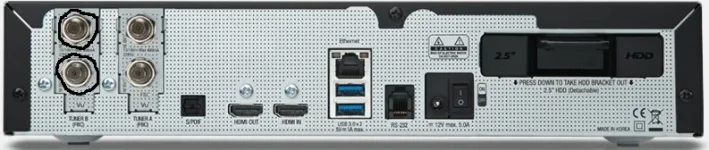
Thanks. Here's a picture. I have a Twin tuner in motherboard port B and universal sat dish cables are connected to both ports of that card.

VU+ Duo 4K SE Back Tuner B Circled.webp
 

OpenViX Feeds Status

Back
Top