Superb quality and spec AB-Com PULSe 4K SE. Crazy offer! Only £99! FREE UK DELIVERY! 4K UHD, Enigma 2, Multiboot 4 images & more!...
Superb quality and spec AB-Com PULSe 4K Rev II Twin Satellite tuner only £149! FREE UK DELIVERY! 4K UHD, Enigma 2, SATA HDD facility, Multiboot 4 images & more!...

[OS-mio] Crash when folder contains filenames with Windows encoding

ocean

Member
Joined
Jun 23, 2022
Messages
82
Reaction score
4
Points
8
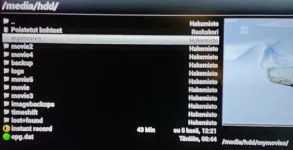
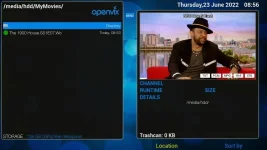
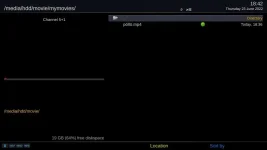
Created folder "mymovies" and copied some mp4 files from Win10 to HDD. But now E2 crashes when I try to access folder /media/hdd/mymovies

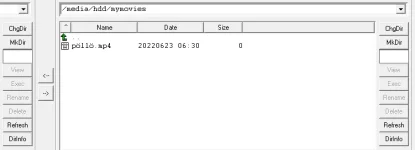
Easy to reproduce. In WINDOWS: Create folder "mymovies" and add new empty file "pöllö.mp4" and FTP folder to HDD. Now try to access folder..

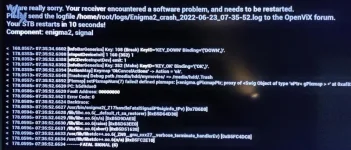
See attached screenshots. Box is Osmio, but I don't think it matters, SF8008 crashes also..
 

Attachments

  • e2_1.webp
    e2_1.webp
    8.7 KB · Views: 9
  • e2_2.webp
    e2_2.webp
    27.2 KB · Views: 8
  • e2_3.webp
    e2_3.webp
    59.5 KB · Views: 18
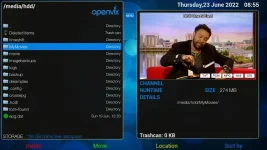
Done exactly as you asked and it played fine

mymovies.webp

mymovies2.webp
 
Last edited:
Can you please upload the crashlog instead of a screenshot of it. Default location is /home/root/logs
 
Log attached

Code:
<    37.4687> 10:51:11.6917 [ActionMap] Keymap 'OkCancelActions' -> Action = 'ok'.
<    37.5573> 10:51:11.7803 [Trashcan] Debug path /media/hdd/mymovies/ => /media/hdd/.Trash
<    37.5620> 10:51:11.7850 [Pixmap] setPixmapNum(7) failed! defined pixmaps: [<enigma.gPixmapPtr; proxy of <Swig Object of type 'ePtr< gPixmap > *' at 0xaf82de90> >, <enigma.gPixmapPtr; proxy of <Swig Object of type 'ePtr< gPixmap > *' at 0xaf82df20> >, <enigma.gPixmapPtr; proxy of <Swig Object of type 'ePtr< gPixmap > *' at 0xaf82dfc8> >, <enigma.gPixmapPtr; proxy of <Swig Object of type 'ePtr< gPixmap > *' at 0xaf82df68> >, <enigma.gPixmapPtr; proxy of <Swig Object of type 'ePtr< gPixmap > *' at 0xaf82de48> >, <enigma.gPixmapPtr; proxy of <Swig Object of type 'ePtr< gPixmap > *' at 0xaf838020> >, <enigma.gPixmapPtr; proxy of <Swig Object of type 'ePtr< gPixmap > *' at 0xaf8380b0> >]
<    37.5651> 10:51:11.7881 PC: b5d9dae0
<    37.5652> 10:51:11.7881 Fault Address: 00000000
<    37.5652> 10:51:11.7882 Error Code: 0
<    37.5654> 10:51:11.7884 Backtrace:
<    37.5656> 10:51:11.7886 /usr/bin/enigma2(_Z17handleFatalSignaliP9siginfo_tPv) [0x7B6B0]
<    37.5657> 10:51:11.7887 /lib/libc.so.6(__default_rt_sa_restorer) [0xB5D64D30]
<    37.5658> 10:51:11.7888 /lib/libc.so.6(n/a) [0xB5D9DAE0]
<    37.5659> 10:51:11.7889 /lib/libc.so.6(raise) [0xB5D63EE0]
<    37.5660> 10:51:11.7890 /lib/libc.so.6(abort) [0xB5D51638]
<    37.5665> 10:51:11.7894 /usr/lib/libstdc++.so.6(_ZN9__gnu_cxx27__verbose_terminate_handlerEv) [0xB5FC4DC8]
<    37.5666> 10:51:11.7896 /usr/lib/libstdc++.so.6(n/a) [0xB5FC2E10]
<    37.5666> 10:51:11.7896 -------FATAL SIGNAL (6)

@JonMMM File content does not matter, it crashes when building the list.. And you need to use Windows (Latin-1 encoding), UTF8 ofcourse works
 

Attachments

Last edited by a moderator:
i did use windows, right click new folder, rename, copy a mkv into it and upload via thumb zilla
 
@JonMMM There are no special / scandinavian characters in your screenshot..
 
@JonMMM There are no special / scandinavian characters in your screenshot..


I think you have just found your problem, try to recreate without special characters and see if you still get the error
 
I think you have just found your problem, try to recreate without special characters and see if you still get the error
That's exactly what this bug report is about. Special characters in filenames crashes E2. Renaming files is just a workaround.. BTW no crash in older Openvix 5.2
 
Last edited:
So I have created pöllö.mp4 on both windows & linux.... no issues.
So post the file here............
 
So I have created pöllö.mp4 on both windows & linux.... no issues.
So post the file here............

Could you post screenshot what it looks like when you open that folder? (Don't create file with Linux, that works)

I can reproduce this in every box. Vu zero4K crashes same way.

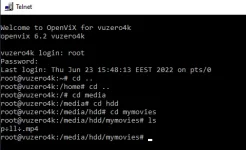
See screenshot what folder looks like in Windows telnet:
 

Attachments

  • e2-4.webp
    e2-4.webp
    19.5 KB · Views: 5
Could you post screenshot what it looks like when you open that folder? (Don't create file with Linux, that works)

I can reproduce this in every box. Vu zero4K crashes same way.

See screenshot what folder looks like in Windows telnet:

so in my windows putty it shows as pöllö.mk4, so its obviously your windows language setup, which is why I need you to post the attachment here to see if I can repeat on my boxes - I need more than the crash log to be able to recreate
 
The actual error message indicates that it has been asked to get a Pixmap that is outside the list of pixmaps it has.

My suspicion is that while this error is reported, the rest of the code assumes that the self.instance.setPixmap has been set; but it hasn't.

So there are probably two bugs here.

  • Why is it being asked to use something which doesn't exist?
  • What should the code be doing on such an error such that the caller doesn't crash after the failure?

My suggestion for the latter is that there should be a fallback, empty/blank pixmap that gets returned when the error is printed.
 
so in my windows putty it shows as pöllö.mk4, so its obviously your windows language setup, which is why I need you to post the attachment here to see if I can repeat on my boxes - I need more than the crash log to be able to recreate

pöllö.mp4 is just empty file. Attached zipped folder. Windows is Finnish locale. I'd guess this is Python3 related issue..
 

Attachments

pöllö.mp4 is just empty file. Attached zipped folder. Windows is Finnish locale. I'd guess this is Python3 related issue..

interesting in that when I unzip there are 2 files there pöllö.mp4 and a 2nd with the ö replaced by hex 94. On copying to the moves folder, both appear but the 2nd now shows as pll.mp4 with the hex characters stripped out. Both are accepted without a crash.
 
pöllö.mp4 is just empty file. Attached zipped folder. Windows is Finnish locale. I'd guess this is Python3 related issue..
Or a Windows one, since filenames are supposed to be utf-16(?).
That filename shows up as pФllФ.mp4 on my Linux systems. (The Ф is a Cyrillic Capital Letter EF - Unicode U+0424.)

But it is a valid utf-8 string (even if it doesn't look as you'd expect). Not sure why the ö (o with diaresis - U+00F6) should show up differently in different places, though.
 
interesting in that when I unzip there are 2 files there
What unzip are you using?
Mine finds one file and says so:

Code:
[parent]: unzip -l ../mymovies.zip  
Archive:  ../mymovies.zip 
  Length      Date    Time    Name 
---------  ---------- -----   ---- 
        0  2022-06-23 16:44   mymovies/pФllФ.mp4 
---------                     ------- 
        0                     1 file
And we disagree about the name which is there too.

However, if I actually peep into the zip file the filename which is there is:
p~ll~.mp4
where both ~s are byte 0x94.
Which in Unicode is a non-printable character. (CANCEL CHARACTER).
Which might be what triggers the bugs.
 
However, if I actually peep into the zip file the filename which is there is:
p~ll~.mp4
where both ~s are byte 0x94.
Which in Unicode is a non-printable character. (CANCEL CHARACTER).
Which might be what triggers the bugs.
On reflexion 0x94, whilst being perfectly legal in an ext4 filename, is NOT legal utf-8.
That should be the 2-byte sequence 0xc2 0x94.

But ö is U+00f6 in Unicode, which is 0xc3 0xb6 in utf-8.

Anything that looks at filesystem names (or, as in console output, might echo this back) has to be able to cater for the result being non-utf8 when decoded.
So this might be what contributes to triggering the bugs.
 
Last edited:

OpenViX Feeds Status

Back
Top