
I am guessing temp ….. because thats where I always look when the E2 compile failsSo I am here:
/home/openvix/6.1/builds/openvix/developer/vuultimo4k/tmp/work/vuultimo4k-oe-linux-gnueabi/enigma2/enigma2-6.2+gitAUTOINC+6ff9cbe887-r0
I commented out #INHERIT += "rm_work"
Ran run.do_compile. So
What folder is the rebuilt binary now in?

Superb quality and spec AB-Com PULSe 4K SE. Crazy offer! Only £99! FREE UK DELIVERY! 4K UHD, Enigma 2, Multiboot 4 images & more!...
Superb quality and spec AB-Com PULSe 4K Rev II Twin Satellite tuner only £149! FREE UK DELIVERY! 4K UHD, Enigma 2, SATA HDD facility, Multiboot 4 images & more!...
You are using an out of date browser. It may not display this or other websites correctly.
You should upgrade or use an alternative browser.
You should upgrade or use an alternative browser.
[OS-mio] Crash when folder contains filenames with Windows encoding
- Thread starter ocean
- Start date


birdman
Moderator
Except that we know we need to pass bytes here, not the str which is what we are doing.There are a lot of strings passed in and out of the c++ code. I think adding that would affect everything.
It really depends on what that setting covers.

Except that we know we need to pass bytes here, not the str which is what we are doing.
It really depends on what that setting covers.
As far as I can see that is a global.
I am guessing temp ….. because thats where I always look when the E2 compile fails
No. That contains the logs and scripts.
So I am here:
/home/openvix/6.1/builds/openvix/developer/vuultimo4k/tmp/work/vuultimo4k-oe-linux-gnueabi/enigma2/enigma2-6.2+gitAUTOINC+6ff9cbe887-r0
I commented out #INHERIT += "rm_work"
Ran run.do_compile.
What folder is the rebuilt binary now in?
So you commented out #INHERIT += "rm_work"
Then you have run your original bitbake commands you posted earlier to build the engima2 package.
You now have the git source code and compiled sources remaining to edit and recompile.
So for example you now edit:
/home/lraizer/openvix/build-enviroment/builds/openvix/release/inihdp/tmp/work/xpeedlx3-oe-linux/enigma2/enigma2-6.2+gitAUTOINC+6124ebc99d-r0/git/lib/components/file_eraser.cpp
you then execute the compile command, it only takes 5 seconds to recompile the file_eraser.cpp to create the new engima2 binary.
/home/lraizer/openvix/build-enviroment/builds/openvix/release/inihdp/tmp/work/xpeedlx3-oe-linux/enigma2/enigma2-6.2+gitAUTOINC+6124ebc99d-r0/temp/run.do_compile
New engima2 binary is in the same git/main/ folder location as the engima.cpp
/home/lraizer/openvix/build-enviroment/builds/openvix/release/inihdp/tmp/work/xpeedlx3-oe-linux/enigma2/enigma2-6.2+gitAUTOINC+6124ebc99d-r0/git/main/
Copy this engima2 binary to /tmp on STB and run from there.
birdman
Moderator
Sorry, didn't mean whether it was local/specific/global but rather what it actually does (and doesn't) do.As far as I can see that is a global.
One solution is to add typemap. I don't know the exact typemap should be used, but here is minimal example how to reproduce same issue with your computer.
testbytes.i
testbytes.py
sudo apt install swig
sudo apt install clang
swig -python -py3 testbytes.i
clang -Wall -Wextra -Wpedantic -I /usr/include/python3.10/ -fPIC -shared testbytes_wrap.c -o _test.so
python3 testbytes.py
Now activate typemap by removing //
swig -python -py3 testbytes.i
clang -Wall -Wextra -Wpedantic -I /usr/include/python3.10/ -fPIC -shared testbytes_wrap.c -o _test.so
python3 testbytes.py
Filename = t�hti.mpg
testbytes.i
Code:
%module test
%{
void erase(const char* filename) {
    printf("Filename = %s\n", filename);
}
%}

//%typemap(in) (const char* filename) {
//    Py_ssize_t len;
//    PyBytes_AsStringAndSize($input, &$1, &len);
//}

void erase(const char* filename);
Code:
from test import erase
erase(b't\xe4hti.mpg')
sudo apt install clang
swig -python -py3 testbytes.i
clang -Wall -Wextra -Wpedantic -I /usr/include/python3.10/ -fPIC -shared testbytes_wrap.c -o _test.so
python3 testbytes.py
Code:
Traceback (most recent call last):
  File "/home/ocean/testbytes.py", line 2, in <module>
    erase(b't\xe4hti.mpg')
  File "/home/ocean/test.py", line 66, in erase
    return _test.erase(filename)
TypeError: in method 'erase', argument 1 of type 'char const *'
Now activate typemap by removing //
swig -python -py3 testbytes.i
clang -Wall -Wextra -Wpedantic -I /usr/include/python3.10/ -fPIC -shared testbytes_wrap.c -o _test.so
python3 testbytes.py
Filename = t�hti.mpg
Ofcource possible to use gcc for that example.
gcc -O2 -fPIC -I/usr/include/python3.10 -shared testbytes_wrap.c -o _test.so
And even simpler typemap
Next step would be to add that and test. But there are also other functions using same parameters (const std::string& filename) and (const char* filename)
gcc -O2 -fPIC -I/usr/include/python3.10 -shared testbytes_wrap.c -o _test.so
And even simpler typemap
Code:
%typemap(in) (const char* filename) {
    $1 = PyBytes_AsString($input);
}After reading documentation, typemap can also be added to class.
file_eraser.h has:
#ifdef SWIG
public:
Added typemap here and it's now WORKING! Also file was erased.
Could not yet make (const std::string& filename) typemap compile, but (const char* filename2) works fine.
file_eraser.h has:
#ifdef SWIG
public:
Added typemap here and it's now WORKING! Also file was erased.
Code:
#ifdef SWIG
public:
%typemap(in) (const char* filename2) {
    $1 = PyBytes_AsString($input);
}After reading documentation, typemap can also be added to class.
file_eraser.h has:
#ifdef SWIG
public:
Added typemap here and it's now WORKING! Also file was erased.
Could not yet make (const std::string& filename) typemap compile, but (const char* filename2) works fine.Code:#ifdef SWIG public: %typemap(in) (const char* filename2) { $1 = PyBytes_AsString($input); }
So with that filename2 change that now works….and if nothing additional is added, then the existing fiename works as before? …. Because that isneeded for the direct C++ calls from other routines to filename
Last edited:
Yes, attached files I currently have and everything seems to be working. You can now call erase with bytes.So with that filename2 change that now works….and if nothing additional is added, then the existing fiename works as before? …. Because that isneeded for the direct C++ calls from other routines to filename
Ofcourse that whole function should not be copy/pasted. It should be possible to call eBackgroundFileEraser::erase(const std::string& filename) from eBackgroundFileEraser::erase(const char* filename2)
Attachments
Yes, attached files I currently have and everything seems to be working. You can now call erase with bytes.
Ofcourse that whole function should not be copy/pasted. It should be possible to call eBackgroundFileEraser::erase(const std::string& filename) from eBackgroundFileEraser::erase(const char* filename2)
OK excellent, but maybe better to just change the 2nd calls name to prevent any other potential issues with other C++ calls and also then calling the 1st routine from the 2nd should be straight forward??
Have you had opportunity to look at playing these files??
OK excellent, but maybe better to just change the 2nd calls name to prevent any other potential issues with other C++ calls and also then calling the 1st routine from the 2nd should be straight forward??
Have you had opportunity to look at playing these files??
Other function could be something like this for example:
Code:
void eBackgroundFileEraser::erase(const char* filename2)
{
	std::string filename(filename2);
	eBackgroundFileEraser *eraser = eBackgroundFileEraser::getInstance();
	eraser->erase(filename);
}
Ofcourse if you want to be sure, just use different name for the function, "erase2" or whatever.
I have not looked at other places in code, but I guess it's just doing this same
The other calls from other C++ calls to the original function are not an issue because they are removing internally created files.Other function could be something like this for example:
Code:void eBackgroundFileEraser::erase(const char* filename2) { std::string filename(filename2); eBackgroundFileEraser *eraser = eBackgroundFileEraser::getInstance(); eraser->erase(filename); }
Ofcourse if you want to be sure, just use different name for the function, "erase2" or whatever.
I have not looked at other places in code, but I guess it's just doing this same
I plan to build today using your code, and then if everything looks OK will commit later.
@Ocean.
Currently using your 2 files as is.
Having a few hiccups, and run out of time today.
Basically in most cases file delete appears to work although I have had one crash where it was apparently doing a stat on a deleted file.
Biggest issue is deleting directories which is not happening but think that is an issue in Trashcan ... I need to follow up and sort out why, probably something very simple.... and stupid.
Currently using your 2 files as is.
Having a few hiccups, and run out of time today.
Basically in most cases file delete appears to work although I have had one crash where it was apparently doing a stat on a deleted file.
Biggest issue is deleting directories which is not happening but think that is an issue in Trashcan ... I need to follow up and sort out why, probably something very simple.... and stupid.
Back to the original issue post #1 crash when loading movielist.
This was much harder to trace, because crash happens inside C++ code.
Problem is in movielist.py, def getItemDisplayName()
Function returns "name" in UTF-8. When filename contains other than UTF-8 characters they are escaped inside str.
def buildMovieListEntry() there is data.txt = getItemDisplayName(serviceref, info)
Now data.txt contains escaped str and when function returns SWIG_PYOBJECT to C-code it crashes.
Avoiding the crash is simple, for example modify getItemDisplayName() to return value: name.encode('UTF-8', 'surrogateescape').decode('UTF-8', 'ignore')
Now question is what name / characters it should display to user? But I think display problem is only minor issue here.
After displayname is fixed movielist loads fine. There is another problem in playing these files, but that is separate issue. I can look at it after this is fixed
This was much harder to trace, because crash happens inside C++ code.
Problem is in movielist.py, def getItemDisplayName()
Function returns "name" in UTF-8. When filename contains other than UTF-8 characters they are escaped inside str.
def buildMovieListEntry() there is data.txt = getItemDisplayName(serviceref, info)
Now data.txt contains escaped str and when function returns SWIG_PYOBJECT to C-code it crashes.
Avoiding the crash is simple, for example modify getItemDisplayName() to return value: name.encode('UTF-8', 'surrogateescape').decode('UTF-8', 'ignore')
Now question is what name / characters it should display to user? But I think display problem is only minor issue here.
After displayname is fixed movielist loads fine. There is another problem in playing these files, but that is separate issue. I can look at it after this is fixed
@Ocean, can you tell me if you see a difference in the output for:
- name.encode('UTF-8', 'surrogateescape').decode('UTF-8', 'ignore')
- name.encode('UTF-8', 'ignore').decode('UTF-8')
I think both do the same.@Ocean, can you tell me if you see a difference in the output for:
- name.encode('UTF-8', 'surrogateescape').decode('UTF-8', 'ignore')
- name.encode('UTF-8', 'ignore').decode('UTF-8')
Maybe it would be possible to check coding and do this for latin-1: name.encode('UTF-8', 'surrogateescape').decode('latin-1')
It does display correctly, attached screencap.
Attachments
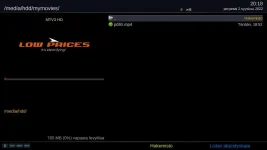
Assuming we are still looking at filenames in some language encoding then…..I believe !
1. the utf8.encode.decode (huevos) will be the same whatever the original text, as if there are any surrogates you are throwing them away.
2. the 2nd(ocean) - if the original encoding is not utf-8, then the encode will restore to the original encoding, and the decode to latin-1 could contain surrogates ( and cause issues) if original encoding not latin-1.
1. the utf8.encode.decode (huevos) will be the same whatever the original text, as if there are any surrogates you are throwing them away.
2. the 2nd(ocean) - if the original encoding is not utf-8, then the encode will restore to the original encoding, and the decode to latin-1 could contain surrogates ( and cause issues) if original encoding not latin-1.
So maybe... encode (with surrogates) to get a bytes string... then try to get the encoding with chardet... then use that encoding in the decode.
Similar threads
- Replies
- 88
- Views
- 7K


- Replies
- 5
- Views
- 2K
[VU+ Duo4K]
SMB1 issues
- Replies
- 15
- Views
- 5K

- Replies
- 94
- Views
- 19K