Superb quality and spec AB-Com PULSe 4K SE. Crazy offer! Only £99! FREE UK DELIVERY! 4K UHD, Enigma 2, Multiboot 4 images & more!...
Superb quality and spec AB-Com PULSe 4K Rev II Twin Satellite tuner only £149! FREE UK DELIVERY! 4K UHD, Enigma 2, SATA HDD facility, Multiboot 4 images & more!...

Problems when trying to record or view 2+ programmes at once - AGC to blame and/or something else?

cerebros

New member
Joined
Jun 23, 2022
Messages
22
Reaction score
0
Points
1
Hi everyone

I'm not quite sure if I've got one or two problems at the moment.

After my Humax Freesat box died, taking quite a lot of recordings with it, I found out about Plex DVR and using Enigma2 boxes as tuners for it, and ended up buying a Gigablue UHD UE 4K and installed a new LNB to feed it on my dish.

The initial problem I saw was that I was setting recordings in Plex DVR that then didn't record. I thought I'd finally got to the bottom of that when I found out that new airings aren't always marked as such in the EPG Plex uses. I went through and updated all the recordings I'd set and thought everything was now working as expected when I saw that current series of The Handmaid's Tale I'm recording from Channel 4 had recorded this week.

Unfortunately, any chance of being in the wife's good books for this working vanished when we sat down to watch it and found the recording was unwatchable due to constant freezes, sound cutting out and the picture degenerating into a mess of squares. (Have tried to do some screen caps which should be in the attachments)

This was the first time I'd had this happen - up til now recordings had all been fine.

When the wife went to bed I thought I'd better check out the episode of SAS Rogue Heroes I'd recorded that aired at the same time as The Handmaid's Tale. That recording exhibited the same issues. However, the recording of the Formula 1 highlights on Channel 4 that started about an hour after those two recordings didn't have any issues.

I've done some test recordings and viewings and as far as I can tell, the issue occurs when more than one tuner is in use. If I watch live TV through Plex on my desktop, everything is fine up until I start watching another channel on my phone or via my Fire TV stick.

I've updated my Plex instance to the latest version (1.30.0.6359-7000) which made no difference. I updated the firmware on my Gigablue a few weeks ago when I was trying to sort out the issue of recordings not happening, although I think there may be a newer firmware since (I'm somewhat reluctant to do firmware updates since it meant having to set the box up from scratch again)

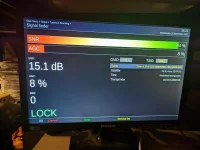
However, having finally found my through the menus to a signal strength screen I'm guessing that the "AGC" might be an issue? As per the attached image, I had an SNR of 94% but an AGC of just 8%, which I'm assuming isn't terribly good.

So, my questions are, is a low AGC likely to be the cause of the issues I'm seeing when trying to use more than one tuner at a time, and how do I improve the AGC?
 

Attachments

  • PXL_20221116_182204370.webp
    PXL_20221116_182204370.webp
    41.3 KB · Views: 8
  • vlcsnap-2022-11-17-07h57m39s005.webp
    vlcsnap-2022-11-17-07h57m39s005.webp
    50.2 KB · Views: 5
  • vlcsnap-2022-11-17-07h58m46s369.webp
    vlcsnap-2022-11-17-07h58m46s369.webp
    32.8 KB · Views: 4
AGC = Automatic Gain Control

The with AGC the box is trying to maintain a constant level of signal somewhere inside its circuitry. If the input signal level is high then expect a low AGC value and if the input signal is low expect a high AGC value.

A low value of AGC doesn't necessarily indicate any problem at all.

Possibly the more important parameter reported in that screen is the BER (Bit Error Rate) which ideally should always be reporting zero (no, or a few, errors in reception). BUT you need to check the BER figure when your picture is breaking up and not when you have perfect reception.

Poor reception (picture breakup)could be as a result of local electrical interference getting into your down-lead or fly-leads. For instance, one cause of local electrical interference getting into inadequately screened leads is running the lead from the dish close to a cordless DECT phone base station. If you find a channel with breakup, as a test, try turning off any nearby electrical equipment to see if this improves the situation. If so consider repositioning the cable or making sure that the cable/fly-lead is 100% screened.

The following gives some detail on why good quality cable is required. Note that the article is very old, the prices given are well out of date and it was written in the era of analogue TV BUT the conclusion and the advice is valid for both digital TV via an aerial and satellite.
Code:
https://www.wrightsaerials.co.uk/articles/coax-cable-quality.shtml

You need to isolate your multiple problems one at a time.
Initially run your Gigablue UHD UE as a stand alone unit with no external third party software controlling it and not recording on any device not directly connected to it (use an external USB drive connected to the box's USB port). If this works without problems you can they say that the problem lies elsewhere.
 
Last edited:
I've updated my Plex instance to the latest version (1.30.0.6359-7000) which made no difference. I updated the firmware on my Gigablue a few weeks ago when I was trying to sort out the issue of recordings not happening, although I think there may be a newer firmware since (I'm somewhat reluctant to do firmware updates since it meant having to set the box up from scratch again)

If you are running something like OpenVix on your box then you can save and restore settings.
There is also 3 ways of updating the the software on your box with OpenVix. If you haven't get a local hard disk connected to your box use a usb stick connected to the box's usb port for saving the settings and store a download new image.

i) Menu/setup/system/software update - this doesn't change any of your settings. The only times this cannot be used is when there are major changes - for instance from Version 4.xxx.xxx to 5.xxx.xxx or from 5.xxx.xxx to 6.xxx.xxx. You could have used this method for the past 11 updates.

This will be you quickest and easiest option - a few minutes and your box will be working with all your settings maintained.

ii) Menu/setup/VIX/Backup Manager - this backups your settings - then go to Menu/setup/VIX/Image Manager, press yellow to find and download the update to the box. Highlight the downloaded image and press blue to flash, after the update the install wizard will appear and you select the settings backup you have just created and/or you can again go to Menu/setup/VIX/Backup Manager and restore from there

iii) download the new image to your computer and use a usb to flash. However if you have previously performed a settings backup in ii) a restore of those settings will be offered again in the setup wizard that appears after you have upgraded and/or you can again go to Menu/setup/VIX/Backup Manager and restore from there.
 
Last edited:
Hi everyone

I'm not quite sure if I've got one or two problems at the moment.

After my Humax Freesat box died, taking quite a lot of recordings with it, I found out about Plex DVR and using Enigma2 boxes as tuners for it, and ended up buying a Gigablue UHD UE 4K and installed a new LNB to feed it on my dish.

The initial problem I saw was that I was setting recordings in Plex DVR that then didn't record. I thought I'd finally got to the bottom of that when I found out that new airings aren't always marked as such in the EPG Plex uses. I went through and updated all the recordings I'd set and thought everything was now working as expected when I saw that current series of The Handmaid's Tale I'm recording from Channel 4 had recorded this week.

Unfortunately, any chance of being in the wife's good books for this working vanished when we sat down to watch it and found the recording was unwatchable due to constant freezes, sound cutting out and the picture degenerating into a mess of squares. (Have tried to do some screen caps which should be in the attachments)

This was the first time I'd had this happen - up til now recordings had all been fine.

When the wife went to bed I thought I'd better check out the episode of SAS Rogue Heroes I'd recorded that aired at the same time as The Handmaid's Tale. That recording exhibited the same issues. However, the recording of the Formula 1 highlights on Channel 4 that started about an hour after those two recordings didn't have any issues.

I've done some test recordings and viewings and as far as I can tell, the issue occurs when more than one tuner is in use. If I watch live TV through Plex on my desktop, everything is fine up until I start watching another channel on my phone or via my Fire TV stick.

I've updated my Plex instance to the latest version (1.30.0.6359-7000) which made no difference. I updated the firmware on my Gigablue a few weeks ago when I was trying to sort out the issue of recordings not happening, although I think there may be a newer firmware since (I'm somewhat reluctant to do firmware updates since it meant having to set the box up from scratch again)

However, having finally found my through the menus to a signal strength screen I'm guessing that the "AGC" might be an issue? As per the attached image, I had an SNR of 94% but an AGC of just 8%, which I'm assuming isn't terribly good.

So, my questions are, is a low AGC likely to be the cause of the issues I'm seeing when trying to use more than one tuner at a time, and how do I improve the AGC?


In my experience the only thing that matters is the SNR - and yours are fine.
You have probably said previously but what are you recording to??
 
Poor reception (picture breakup)could be as a result of local electrical interference getting into your down-lead or fly-leads. For instance, one cause of local electrical interference getting into inadequately screened leads is running the lead from the dish close to a cordless DECT phone base station. If you find a channel with breakup, as a test, try turning off any nearby electrical equipment to see if this improves the situation. If so consider repositioning the cable or making sure that the cable/fly-lead is 100% screened.

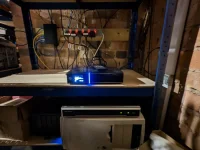
I'll have to try repositioning the box in the first instance then as the only things I can think of that might be causing electrical interference would be the NAS and the NVR for my CCTV system; the Gigablue is sat on top of the NVR and is only a few cm away from the NAS.


The following gives some detail on why good quality cable is required...
[/code]

Well the cable I used for the install was this https://www.world-of-satellite.co.uk/Technomate-High-Quality-Black-RG6-Coax-100m-drum?search=Technomate%20RG6%20Coax%20Black%20100m, which I hope would be good quality.
 
If you are running something like OpenVix on your box then you can save and restore settings.
There is also 3 ways of updating the the software on your box with OpenVix. If you haven't get a local hard disk connected to your box use a usb stick connected to the box's usb port for saving the settings and store a download new image.

i) Menu/setup/system/software update - this doesn't change any of your settings. The only times this cannot be used is when there are major changes - for instance from Version 4.xxx.xxx to 5.xxx.xxx or from 5.xxx.xxx to 6.xxx.xxx. You could have used this method for the past 11 updates.

This will be you quickest and easiest option - a few minutes and your box will be working with all your settings maintained.

ii) Menu/setup/VIX/Backup Manager - this backups your settings - then go to Menu/setup/VIX/Image Manager, press yellow to find and download the update to the box. Highlight the downloaded image and press blue to flash, after the update the install wizard will appear and you select the settings backup you have just created and/or you can again go to Menu/setup/VIX/Backup Manager and restore from there

iii) download the new image to your computer and use a usb to flash. However if you have previously performed a settings backup in ii) a restore of those settings will be offered again in the setup wizard that appears after you have upgraded and/or you can again go to Menu/setup/VIX/Backup Manager and restore from there.

Hmm... when I searched for how to update the firmware when I did the update I didn't come across anything showing the first two methods you mention. Would have been helpful to know at that time.
 
Hmm... when I searched for how to update the firmware when I did the update I didn't come across anything showing the first two methods you mention. Would have been helpful to know at that time.

To change what the manufacturer supplied to something like Openvix you would need to use the method you found, and at one time if you wanted to change to the other images that your box is capable of supporting the method that had to be used. You found the flashing guide which doesn't depend on what is installed on your box - the generic flashing guide and the one that will work when all other methods fail perhaps due to major corruption where you may think your box is bricked.

The other two methods need Openvix to be already installed before they can be used.
 
right, after locating a spare USB drive I've moved the Gigablue onto the shelf above the NVR instead of having it on top of the NVR (so it's about 10cm away from it now).

Unfortunately, I'm still having issues

If I try recording 2 programmes at once I get the same sort of break up I saw with my recordings via Plex DVR.

If I try recording one programme and watching another the results are inconsistent.

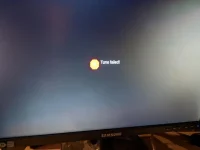
Earlier on I started recording the programme on BBC1 HD that was on at the time. Pressing channel up (or was it down...) got me to BBC2 HD which didn't exhibit any of the breakup I've been seeing. Neither did moving on to ITV. However, when I got onto Channel 4 the problem was back and I was getting "Tune failed!" messages coming up every few seconds.

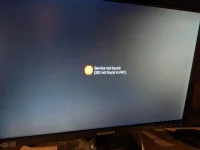
I tried another channel (can't remember which now) and got "Service not found! (SID not found in PAT)" as a message.

Starting back at BBC1 HD and then trying moving up through the channels again, this time I got break up when I got to ITV.

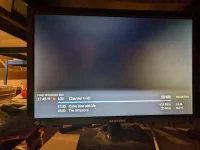
Opening up the signal finder screen on BBC1 HD while the recording was ongoing and I was getting similar, if not the same, numbers as previously posted. Switching to Channel 4 and I got "N/A" for everything (SNR, AGE, BER)

So, I think I can rule Plex out as the cause of the issue but what's the next step?

PXL_20221117_174939159.webp

PXL_20221118_174509681.webp

PXL_20221118_131232633.webp

PXL_20221118_131154072.webp
 
I wonder if one of your tuners is misbehaving or the cable to one of the tuners is faulty or intermittent (intermittent electrical connection)

When you are tuned into BBC1 HD that single tuner (say, tuner A) is also decoding everything else on that transponder frequency such as BBC2 HD and CBBC HD/BBC3 HD. So you can record from one channel carried on that transponder and view the another on that transponder without having to bring in a second tuner. In fact you can record all TV channels and view one on that transponder frequency simultaneous using only one of your tuners.

If you go to a site such as
Code:
https://en.satexpat.com/sat/east/28.2/
you will see a list of transponder frequencies and the TV channels carried on them.
This means that certain combinations of two channels may be either using one or two tuners depending if they are on the same or different transponder frequencies. Do you only get a breakup if two tuners are being used?

Perhaps there are OpenVix configurations that may not allow the following tests to work but other forum members reading this may be able to advise (or if there is a better/easier way).
4 tests to check each cable* or tuner in turn
Disconnect the input cable to one of your tuners and just go through all TV channels to see if they all can be displayed on the TV to see if they are OK. Then swap the cable to the other tuner and repeat. Do the same two tests with the cable that was originally removed.

* If narrowed down to a input cable the problem could be at the LNB connection or even the LNB itself.

If, from these 4 tests, you narrow a potential fault to a cable examine it carefully for one strand of the screen potentially touching the centre pin of the F connector or the screen of the cable correctly mating with the outer shell of the F connector.

How to fit a (twist on) F plug
http://www.satcure.co.uk/tech/fplugs.htm
read to end of page
Note: Satcure is no longer trading but their web help pages have been left up for few years.
 
Last edited:
I think my next step is checking if I've messed up putting the F connectors on then as I'm using the Gigablue in unicable FBC mode, so I've only got the one cable running from the LNB to the box.

Hopefully if I have messed up an F connector it's the one at the box end as it's not really been the weather for messing about up a ladder at the dish end the past couple of days and looks like there's more of the same coming
 
Really does sound like you've set up your tuners incorrectly. FBC tuners really do need to be set up correctly.
 
Which LNB do you have? Make and model please. Please post screenshots of tuner configuration for all the demodulators. Maybe you have set up the wrong frequencies for your LNB.
 
Like Abu says, lnb model. Also how is the signal getting sent from enigma to plex? Is it though WiFi?
 
As the weather turned out not to be peeing down all afternoon as was forecast, I've checked the F connectors at both ends of the cable this afternoon, which has made no difference.

I also tried putting the box in the lounge and swapping cables round on the LNB to use the old cabling for my old Humax Freesat box and still get the same problem.
 
Which LNB do you have? Make and model please. Please post screenshots of tuner configuration for all the demodulators. Maybe you have set up the wrong frequencies for your LNB.

LNB is GT-Sat GT-S2DCSS24

I'm 99.9% sure that's the model I picked when setting up the box although I can't seem to find anywhere in the menu system that'll let me check that.


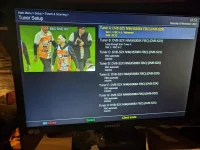
Tuner config: (If there's another screen I need to be looking at you'll have to tell me how to find it in Open Vix as this seemed to be the only one I could see with details of the tuners on it)

PXL_20221119_165108285.webp
 
Last edited:
Also how is the signal getting sent from enigma to plex? Is it though WiFi?

No, I never use Wifi for something I want to be sure is working. Connection is via ethernet.

For now, I don't believe Plex is the issue as the problem is happening even when I'm just checking on the Gigablue box directly.
 
Tuner config: (If there's another screen I need to be looking at you'll have to tell me how to find it in Open Vix as this seemed to be the only one I could see with details of the tuners on it)

View attachment 64457

Click on the highlighted tuner and another configuration screen should appear, Repeat for other tuners.
 

OpenViX Feeds Status

Back
Top