Superb quality and spec AB-Com PULSe 4K SE. Crazy offer! Only £99! FREE UK DELIVERY! 4K UHD, Enigma 2, Multiboot 4 images & more!...
Superb quality and spec AB-Com PULSe 4K Rev II Twin Satellite tuner only £149! FREE UK DELIVERY! 4K UHD, Enigma 2, SATA HDD facility, Multiboot 4 images & more!...

Problems when trying to record or view 2+ programmes at once - AGC to blame and/or something else?


Ah, thanks.. that's the ticket. Wish I'd come across that when I was looking for guides on setting the box up.

Have gone through and changed them all and things seem to be working as expected now - had something recording via Plex, something recording to the external USB drive plugged into the GigaBlue and was able to flick through channels without the break ups or "Tune Failed" messages I was getting before.
 
Ok, may possibly have declared this sorted a bit prematurely.

So, as a test to try and make sure I can record from at least four different channels at the same time (which is basically the reason I went for the UHD UE 4K as I wanted 3 or more tuners from one box and the options were apparently boxes with 1, 2 or 8 tuners..), I set up 4 recordings of programmes that were to take place at roughly the same time which all appeared to go as planned apart from one, of Apocalypse Now on BBC 2.

Now, it turns out, after checking the schedule for last night, that the snooker massively overran and that's why I ended up with a recording of what looked just like a load of Adele performances.

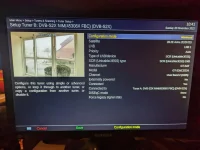
However, before I located last night's schedule, I did have a look at the tuner settings again and I wonder if I've made an error somewhere.

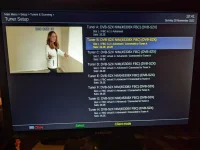
When I got to the Tuner Setup screen, Tuner B shows "19.2E, 28.2E" for the satellites. I'm pretty sure I only selected 28.2 when I was changing the tuners yesterday.

I also noticed, and I don't know if this is an issue or not, that if I start a recording on the Gigablue (in this instance it was on BBC1 HD) and then start going up and down the channels, when the info bar changes Tuner B never seems to be used - it was always tuner A showing yellow (which I assume is the indicator that it is in use) and tuner C showing green (which I assume means that it's in use and is the active tuner you're looking at)

So, do I still have a configuration issue, or is this expected behaviour?
PXL_20221120_104139244.webp

PXL_20221120_104150579.webp
 
Yes you have configured tuner B wrong. You have included 19.2E. That means it will keep tuner B vacant just in case you want to switch to a channel on 19.2E.
 
Thanks guys. I'm not quite sure how I managed to add 19.2 on to that tuner and must admit it took me a couple of goes to figure out how to de-configure it (which has made me doubly perplexed as to how I managed to configure it in the first place...).

However, all appears sorted now and tuner B shows as the tuner being used when flicking through channels while recording to the USB drive
 
Thanks guys. I'm not quite sure how I managed to add 19.2 on to that tuner and must admit it took me a couple of goes to figure out how to de-configure it (which has made me doubly perplexed as to how I managed to configure it in the first place...).

However, all appears sorted now and tuner B shows as the tuner being used when flicking through channels while recording to the USB drive
Backup your settings now, before doing anything else, so you have a setup you can restore back if necessary
 

OpenViX Feeds Status

Back
Top