Superb quality and spec AB-Com PULSe 4K SE. Crazy offer! Only £99! FREE UK DELIVERY! 4K UHD, Enigma 2, Multiboot 4 images & more!...
Superb quality and spec AB-Com PULSe 4K Rev II Twin Satellite tuner only £149! FREE UK DELIVERY! 4K UHD, Enigma 2, SATA HDD facility, Multiboot 4 images & more!...

[VU+ Uno4KSE] What is the best way to update OpenVIX please?

Initialise=format


Did that when I put it in and I also did the Filesystem Check.

I'm not new to this, I've been messing and installing satellite receivers from the D2Mac days in the early 90s.
I bought my first box from WOS in 2013 and sent everybody there to get their boxes and then I set them up.
This is the first time I've replaced a HD and then wanted to put a new image on, I've always just put an old saved image on before so wanted to know the best order.

Touch wood it all seems OK, if it goes funny again then it must be the unit.
 
Sorry if I have rubbed you up the wrong way.

Lots of people keep using the term "initialise" as if it is something that makes the receiver use the box. The advice is given even for devices that are already in ext4 file system. A reboot after formatting the hdd will generally ensure device is mounted. Accessing the module will then create the folders required for that process. Settings backup, image backup, recording etc. Formatting the storage won't create those folders, but nonetheless should be done first time it is connected to box.

Once again, sorry.
 
Sorry if I have rubbed you up the wrong way.

Lots of people keep using the term "initialise" as if it is something that makes the receiver use the box. The advice is given even for devices that are already in ext4 file system. A reboot after formatting the hdd will generally ensure device is mounted. Accessing the module will then create the folders required for that process. Settings backup, image backup, recording etc. Formatting the storage won't create those folders, but nonetheless should be done first time it is connected to box.

Once again, sorry.

Oh you haven't rubbed me up the wrong way, I appreciate your advise or I wouldn't have asked in the first place.
There is always something new to learn.
I suppose I just wanted you to know I'm not new to this stuff but there's always something new to learn.

"A reboot after formatting the hdd will generally ensure device is mounted."

Pretty sure I didn't reboot after initialising and file checking but it rebooted 4 times I was trying to put the upgrade on.
Like I say, 5th time it all worked!!

I can also remember there wasn't a Movie folder so I thought maybe 9 years ago I put the Movie folder on.
I then copied some recordings to it but in the HDD folder.
A bit later all the other folders ended up in there like backup and the Movie folder!!
 
AAAAAAAAAAAAARGH
I've got serious problems going on and I now think it's my box.

So a couple of months ago my old HDD started to go missing, it then behaved for around six weeks then finally went again.
I bought a new SSD, set it up with great advice and a new image and for 3 days going great.
Got up this morning and it's gone missing again.
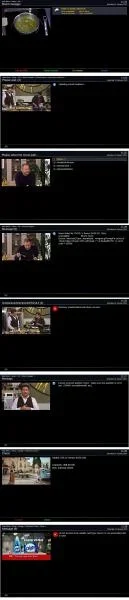
Looking at the pictures I've tried everything to get it back.
I've even tried both drives in my PC and I can't see them which is strange unless the VU puts a whole new filesystem on them.
I'm now thinking the VU+ Uno4k SE is at fault because it's done it on two drives.
I've just put the original drive back in and initialised and recorded something to it no problem but I just know if I put the old and the new in they would go missing.

Another link to the pictures if you can't see the attached properly - https://www.dmpoole.co.uk/pics/1.jpg

Any advise appreciated

1.webp
 
Did you see it listed in storage , if so did you try to Initialize it to be in correct format to use on box.

If so it should give SSD a size and show ext4.

Are you leaving the box in standby or deep sleep or powering it off completely.
 
Last edited:
You will not see the drives on your PC as they are in linux ext4 filesystem you would need to ftp to stb with filezilla or windows explorer by entering \\192.168.xx.xx (your IP address of stb) into search bar.
 
Did you see it listed in storage , if so did you try to Initialize it to be in correct format to use on box.

If so it should give SSD a size and show ext4.

Are you leaving the box in standby or deep sleep or powering it off completely.

All 6 times it's failed on two different drives, they are initialised and can be seen for several days working OK and then they just disappear off the box.
I did have about 6 weeks of it working OK.

I always leave the box in Standby and have done since October 2021.
 
You will not see the drives on your PC as they are in linux ext4 filesystem you would need to ftp to stb with filezilla or windows explorer by entering \\192.168.xx.xx (your IP address of stb) into search bar.

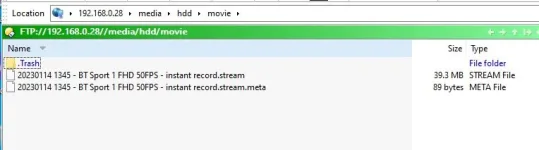
I always do that since I've had E2 boxes but it couldn't see both drives until I initialised again.

This is what I see at the moment because I'm recording to my NAS.

Capture.webp
 
THERE'S ALSO ANOTHER PROBLEM.

So three times this has happened, my STB is freezing.
Last use was last night up to 2am watching football that had been recorded to my NAS.
At 04.11am my screen had froze.
This has happened three times in 1 day so I'm thinking my STB has faults.
I'm just going to try my old full image before I put the new one on and see how that goes.

Froze again at 10.31am while posting this.

Just put an old image on and froze again.
 
Last edited:
Could you also try recording to USB stick instead of NAS.

Might also try rebooting network as my be a bug.
 
Could you also try recording to USB stick instead of NAS.

Might also try rebooting network as my be a bug.

It's funny you say that.
I've just put a bare 6.3 image on and then setup from scratch.
Got to the point where I was recording 8 channels at once to the STB HDD so all great.
I then mounted my NAS and immediately frozen.
It would freeze virtually immediately when I rebooted so I unplugged NAS from Network so I could remove from STB and it behaved itself.
I then mounted it again and the STB froze.
I have no idea why the NAS is freezing the STB because it's been working on this STB since October 2021 and previous STBs !!!

I haven't rebooted the router because the wife will be upset so I'll give that a go when she's finished watching something on the Firestick.
 
Could you also try recording to USB stick instead of NAS.

Might also try rebooting network as my be a bug.

At this moment and at least 15 minutes in, the STB is not freezing after mounting my NAS after I reset the router.
Now to see if the internal HDD stays connected.

Thanks for that (for now :)).
 
Is the NAS actually freezing the STB altogether or does it just spool and become unresponsive when looking at the recordings list on the NAS?

If it's the latter mine is the same and it seemed to be movieplayer updating ts files etc.

I record everything to the STB now and move the recordings to the NAS on a cron timer.
 
Is the NAS actually freezing the STB altogether or does it just spool and become unresponsive when looking at the recordings list on the NAS?

If it's the latter mine is the same and it seemed to be movieplayer updating ts files etc.

I record everything to the STB now and move the recordings to the NAS on a cron timer.

How does that work as never used the cron timer before and sound interesting . Cheers M8
 
Is the NAS actually freezing the STB altogether or does it just spool and become unresponsive when looking at the recordings list on the NAS?

If it's the latter mine is the same and it seemed to be movieplayer updating ts files etc.

I record everything to the STB now and move the recordings to the NAS on a cron timer.

Total freeze and I can't even FTP.
So nearly 1 hour and it's behaving with the NAS.
Who would think a reset of the Network would do that because the NAS has been working over the Network for Firesticks etc and of course WiFi has been OK.

So at this moment it looks like I had one fault, HDD going missing and the freezing was just a coincidence.
I'll have to see if the HDD stays connected, if not then I have already made a ticket with WOS.
 
I meant that I run a simple script from a cron timer in the early hours when no recordings are in progress.


mv -f /media/hdd/movie/* /media/autofs/RECORDINGS/ 2>/dev/null
 
UPDATE because somebody may have the same problem.

Shortly after my last post I decided on a clean install of 6.3 and then setup the tuners, EPG etc and install no extra plugins and see how I went on.
Funnily enough the following day WOS replied and told me to do the same thing.
It's now the 24th and behaving so there was obviously something in my Backup file that was buggering things up.

Thanks
 
ANOTHER UPDATE and I'm at my wits end.

On Sunday Jan 29 I did another virgin install of 6.3.
I didn't use a backup file but programmed the tuners, downloaded the channels and used EPG Importer for the EPG, I also disabled the EPG so that it didn't download every day.
No plugins were installed and I didn't connect it to my NAS so it was a totally new imaged box just for Freesat.
It behaved on Sunday through to Thursday where I downloaded the EPG for a week and programmed it every day for a week since we were going to Lanzarote and got back this evening.
It recorded the 4 programmes on Thursday evening (Feb 2nd) and then it crashed so we've come home to only last Thursdays recordings.
I've attached 2 Logs but surprisingly I expected to see one for the day it went wrong on Feb 3rd!!

The only thing I can see now is it is a hardware problem but I am going to try a rival image.

I also need to explain that from the day I bought my VU+ Uno4K SE that bi-weekly (sometimes weekly) I was getting the 'Green Screen Of Death' so we put up with just resetting the box. Last November it then went into Green Screen of Death and the HD going missing and my problems seem to have got worse.

View attachment Enigma2_debug_2023-02-01_23-05-58.logView attachment Enigma2_debug_2023-02-09_22-25-54.log
 
ANOTHER UPDATE and I'm at my wits end.

On Sunday Jan 29 I did another virgin install of 6.3.
I didn't use a backup file but programmed the tuners, downloaded the channels and used EPG Importer for the EPG, I also disabled the EPG so that it didn't download every day.
No plugins were installed and I didn't connect it to my NAS so it was a totally new imaged box just for Freesat.
It behaved on Sunday through to Thursday where I downloaded the EPG for a week and programmed it every day for a week since we were going to Lanzarote and got back this evening.
It recorded the 4 programmes on Thursday evening (Feb 2nd) and then it crashed so we've come home to only last Thursdays recordings.
I've attached 2 Logs but surprisingly I expected to see one for the day it went wrong on Feb 3rd!!

The only thing I can see now is it is a hardware problem but I am going to try a rival image.

I also need to explain that from the day I bought my VU+ Uno4K SE that bi-weekly (sometimes weekly) I was getting the 'Green Screen Of Death' so we put up with just resetting the box. Last November it then went into Green Screen of Death and the HD going missing and my problems seem to have got worse.

View attachment 64725View attachment 64726

You have a crash loop in the web interface using a package called cheetah.(the web interface is some thing common to the OE-A Images )
1) stop using the web interface for the moment
2) is the cheetah package something you have installed?
 
Last edited:

OpenViX Feeds Status

Back
Top