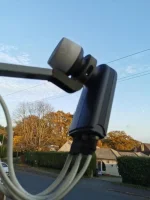
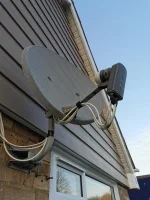
Hi.
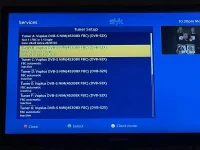
I updated the software on my Duo4k SE and I'm now once again getting the problem where I can only watch/record two channels at a time. Before I could record at least 8 channels simultaneously if required.
This is a recurring problem that keeps happening after software updates. Unfortunately I cannot find the thread when this problem happened last time to look to see how it was fixed.
I have 10 tuners. A-H are DVB-S NIM(45308X FBC) and I and J are DVT-T NIM(BCM3466). I upgraded to 6.5.003 from 6.4.008 and the problem started again.
Any ideas please? Thanks.
The settings file contains:
config.audio.volume=95
config.autobouquets.area=4099#67#4103
config.autobouquets.ordering=True
config.autobouquetsmaker.addprefix=True
config.autobouquetsmaker.FTA_only=terrestrial_uk_freeview|sat_282_sky_uk
config.autobouquetsmaker.hidesections=terrestrial_uk_freeview:670|sat_282_sky_uk:490|sat_282_sky_uk:560|sat_282_sky_uk:701|sat_282_sky_uk:900|sat_282_sky_uk:993|sat_282_sky_uk:1000|sat_282_sky_uk:1020|sat_282_sky_uk:1030|sat_282_sky_uk:580
config.autobouquetsmaker.nextscheduletime=1629676800
config.autobouquetsmaker.providers=terrestrial_uk_freeview:rowridge___________:45:|sat_282_sky_uk:hd_west_dorset:76:
config.av.autores_delay=500
config.av.autovolume=hdmi
config.av.btaudiodelay=0
config.av.downmix_aac=passthrough
config.av.downmix_ac3=passthrough
config.av.generalAC3delay=0
config.av.generalPCMdelay=0
config.av.hdmicolordepth=12bit
config.av.surround_3d=hdmi
config.av.videomode.HDMI=1080p
config.av.videorate.1080p=60Hz
config.av.videorate.2160p=60Hz
config.backupmanager.backupdirs=['/etc/enigma2/', '/etc/fstab', '/etc/hostname', '/etc/network/interfaces', '/etc/passwd', '/etc/shadow', '/etc/etc/shadow', '/etc/resolv.conf', '/etc/ushare.conf', '/etc/inadyn.conf', '/etc/tuxbox/config/', '/etc/wpa_supplicant.conf', '/usr/softcams/', '/etc/auto.network', '/usr/crossepg/crossepg.config', '/usr/crossepg/providers', '/usr/keys', '/etc/samba/smb-user.conf', '/etc/samba/private']
config.crash.daysloglimit=8
config.crash.debugloglimit=4
config.crash.enabledebug=True
config.crash.logtimeformat=1
config.crash.sizeloglimit=10
config.epg.freesat=True
config.epg.histminutes=30
config.epg.netmed=False
config.epg.viasat=False
config.epgselection.grid.btn_blue=openEPGSearch
config.epgselection.grid.btn_channeldown=nextPage
config.epgselection.grid.btn_channelup=prevPage
config.epgselection.grid.btn_reclong=addEditAutoTimer
config.epgselection.grid.btn_red=forward24Hours
config.epgselection.grid.btn_yellow=addEditAutoTimer
config.epgselection.grid.eventfs=0
config.epgselection.grid.infowidth=50
config.epgselection.grid.number_buttons_mode=service
config.epgselection.grid.piconwidth=100
config.epgselection.grid.primetime=19:0
config.epgselection.grid.servfs=0
config.epgselection.grid.servicetitle_mode=picon+servicenumber+servicename
config.epgselection.grid.servicewidth=250
config.epgselection.grid.timelinefs=0
config.epgselection.multi.btn_blue=openEPGSearch
config.epgselection.multi.btn_yellow=addEditAutoTimer
config.epgselection.multi.eventfs=0
config.epgselection.multi.servicewidth=7
config.hdmicec.control_receiver_standby=True
config.hdmicec.debug=1
config.hdmicec.enabled=True
config.hdmicec.force_volume_forwarding=True
config.hdmicec.minimum_send_interval=10
config.hdmicec.tv_wakeup_detection=wakeup
config.hdmicec.volume_forwarding=True
config.keyboard.keymap=eng.kmap
config.lcd.bright=3
config.lcd.dimbright=0
config.misc.ButtonSetup.displayHelp=Infobar/openEventView
config.misc.ButtonSetup.power_long=Module/Screens.Standby/TryQuitMainloop/1
config.misc.ButtonSetup.text=Infobar/showPiP,Infobar/openEventView
config.misc.epgcachepath=/media/hdd/
config.misc.firstrun=False
config.misc.initialchannelselection=False
config.misc.languageselected=False
config.misc.pluginbrowser.plugin_order=Plugins/Extensions/AutoBouquets,Plugins/SystemPlugins/CrossEPG,Plugins/Extensions/EPGImport,Plugins/Extensions/IMDb,Plugins/Extensions/MediaScanner,Plugins/Extensions/MovieOrganisor,Plugins/Extensions/OpenWebif,Plugins/Extensions/PicturePlayer,Plugins/SystemPlugins/TransCodingSetup,Plugins/Extensions/WitAiSpeechToText
config.misc.pluginlist.extension_order=Turn on HDMI-IN PiP mode,AutoBouquets Downloader,CrossEPG Downloader,EPG-Importer,Turn on HDMI-IN full screen mode,Softcam manager,ViX Image Management,Activate Picture in Picture
config.misc.pluginWakeupName=EPG-Importer
config.misc.restorewizardrun=True
config.misc.startCounter=121
config.misc.videowizardenabled=False
config.misc.zapkey_delay=5
config.movielist.enable_collections=1
config.movielist.fontsize=0
config.Nims.0.advanced.lnb.1.diseqcMode=1_0
config.Nims.0.advanced.sat.192.lnb=1
config.Nims.0.diseqcA=282
config.Nims.0.diseqcB=3601
config.Nims.0.diseqcC=3601
config.Nims.0.diseqcD=3601
config.Nims.0.powerMeasurement=False
config.Nims.1.advanced.lnb.2.diseqcMode=1_0
config.Nims.1.advanced.sat.192.lnb=2
config.Nims.1.diseqcA=282
config.Nims.1.diseqcB=3601
config.Nims.1.diseqcC=3601
config.Nims.1.diseqcD=3601
config.Nims.1.powerMeasurement=False
config.Nims.2.advanced.lnb.1.lof=unicable
config.Nims.2.advanced.lnb.1.scrfrequency=1210
config.Nims.2.advanced.lnb.1.scrList=1
config.Nims.2.advanced.lnb.1.unicableManufacturer=Dura-Sat(DUR-line)
config.Nims.2.advanced.lnb.1.unicableProduct=UK101
config.Nims.2.advanced.sat.192.lnb=1
config.Nims.2.advanced.sat.282.lnb=1
config.Nims.2.advanced.sats=282
config.Nims.3.advanced.sats=192
config.Nims.8.terrestrial=All regions, United Kingdom, (Europe DVB-T/T2)
config.Nims.9.terrestrial=All regions, United Kingdom, (Europe DVB-T/T2)
config.OpenWebif.responsive_enabled=True
config.osd.language=en_GB
config.pic.lastDir=/media/hdd/
config.pluginbrowser.src=True
config.plugins.autotimer.show_help=False
config.plugins.bluetoothsetup.enable=True
config.plugins.bluetoothsetup.lastAudioConn=cc:98:8b:93:a6:37
config.plugins.epgimport.deepstandby=wakeup
config.plugins.epgimport.enabled=True
config.plugins.epgimport.longDescDays=5
root@vuduo4kse:/etc/enigma2#
root@vuduo4kse:/etc/enigma2#
root@vuduo4kse:/etc/enigma2#
root@vuduo4kse:/etc/enigma2#
root@vuduo4kse:/etc/enigma2#
root@vuduo4kse:/etc/enigma2#
root@vuduo4kse:/etc/enigma2#
root@vuduo4kse:/etc/enigma2# more settings
config.audio.volume=95
config.autobouquets.area=4099#67#4103
config.autobouquets.ordering=True
config.autobouquetsmaker.addprefix=True
config.autobouquetsmaker.FTA_only=terrestrial_uk_freeview|sat_282_sky_uk
config.autobouquetsmaker.hidesections=terrestrial_uk_freeview:670|sat_282_sky_uk:490|sat_282_sky_uk:560|sat_282_sky_uk:701|sat_282_sky_uk:900|sat_282_sky_uk:993|sat_282_sky_uk:1000|sat_282_sky_uk:1020|sat_282_sky_uk:1030|sat_282_sky_uk:580
config.autobouquetsmaker.nextscheduletime=1629676800
config.autobouquetsmaker.providers=terrestrial_uk_freeview:rowridge___________:45:|sat_282_sky_uk:hd_west_dorset:76:
config.av.autores_delay=500
config.av.autovolume=hdmi
config.av.btaudiodelay=0
config.av.downmix_aac=passthrough
config.av.downmix_ac3=passthrough
config.av.generalAC3delay=0
config.av.generalPCMdelay=0
config.av.hdmicolordepth=12bit
config.av.surround_3d=hdmi
config.av.videomode.HDMI=1080p
config.av.videorate.1080p=60Hz
config.av.videorate.2160p=60Hz
config.backupmanager.backupdirs=['/etc/enigma2/', '/etc/fstab', '/etc/hostname', '/etc/network/interfaces', '/etc/passwd', '/etc/shadow', '/etc/etc/shadow', '/etc/resolv.conf', '/etc/ushare.conf', '/etc/inadyn.conf', '/etc/tuxbox/config/', '/etc/wpa_supplicant.conf', '/usr/softcams/', '/etc/auto.network', '/usr/crossepg/crossepg.config', '/usr/crossepg/providers', '/usr/keys', '/etc/samba/smb-user.conf', '/etc/samba/private']
config.crash.daysloglimit=8
config.crash.debugloglimit=4
config.crash.enabledebug=True
I updated the software on my Duo4k SE and I'm now once again getting the problem where I can only watch/record two channels at a time. Before I could record at least 8 channels simultaneously if required.
This is a recurring problem that keeps happening after software updates. Unfortunately I cannot find the thread when this problem happened last time to look to see how it was fixed.
I have 10 tuners. A-H are DVB-S NIM(45308X FBC) and I and J are DVT-T NIM(BCM3466). I upgraded to 6.5.003 from 6.4.008 and the problem started again.
Any ideas please? Thanks.
The settings file contains:
config.audio.volume=95
config.autobouquets.area=4099#67#4103
config.autobouquets.ordering=True
config.autobouquetsmaker.addprefix=True
config.autobouquetsmaker.FTA_only=terrestrial_uk_freeview|sat_282_sky_uk
config.autobouquetsmaker.hidesections=terrestrial_uk_freeview:670|sat_282_sky_uk:490|sat_282_sky_uk:560|sat_282_sky_uk:701|sat_282_sky_uk:900|sat_282_sky_uk:993|sat_282_sky_uk:1000|sat_282_sky_uk:1020|sat_282_sky_uk:1030|sat_282_sky_uk:580
config.autobouquetsmaker.nextscheduletime=1629676800
config.autobouquetsmaker.providers=terrestrial_uk_freeview:rowridge___________:45:|sat_282_sky_uk:hd_west_dorset:76:
config.av.autores_delay=500
config.av.autovolume=hdmi
config.av.btaudiodelay=0
config.av.downmix_aac=passthrough
config.av.downmix_ac3=passthrough
config.av.generalAC3delay=0
config.av.generalPCMdelay=0
config.av.hdmicolordepth=12bit
config.av.surround_3d=hdmi
config.av.videomode.HDMI=1080p
config.av.videorate.1080p=60Hz
config.av.videorate.2160p=60Hz
config.backupmanager.backupdirs=['/etc/enigma2/', '/etc/fstab', '/etc/hostname', '/etc/network/interfaces', '/etc/passwd', '/etc/shadow', '/etc/etc/shadow', '/etc/resolv.conf', '/etc/ushare.conf', '/etc/inadyn.conf', '/etc/tuxbox/config/', '/etc/wpa_supplicant.conf', '/usr/softcams/', '/etc/auto.network', '/usr/crossepg/crossepg.config', '/usr/crossepg/providers', '/usr/keys', '/etc/samba/smb-user.conf', '/etc/samba/private']
config.crash.daysloglimit=8
config.crash.debugloglimit=4
config.crash.enabledebug=True
config.crash.logtimeformat=1
config.crash.sizeloglimit=10
config.epg.freesat=True
config.epg.histminutes=30
config.epg.netmed=False
config.epg.viasat=False
config.epgselection.grid.btn_blue=openEPGSearch
config.epgselection.grid.btn_channeldown=nextPage
config.epgselection.grid.btn_channelup=prevPage
config.epgselection.grid.btn_reclong=addEditAutoTimer
config.epgselection.grid.btn_red=forward24Hours
config.epgselection.grid.btn_yellow=addEditAutoTimer
config.epgselection.grid.eventfs=0
config.epgselection.grid.infowidth=50
config.epgselection.grid.number_buttons_mode=service
config.epgselection.grid.piconwidth=100
config.epgselection.grid.primetime=19:0
config.epgselection.grid.servfs=0
config.epgselection.grid.servicetitle_mode=picon+servicenumber+servicename
config.epgselection.grid.servicewidth=250
config.epgselection.grid.timelinefs=0
config.epgselection.multi.btn_blue=openEPGSearch
config.epgselection.multi.btn_yellow=addEditAutoTimer
config.epgselection.multi.eventfs=0
config.epgselection.multi.servicewidth=7
config.hdmicec.control_receiver_standby=True
config.hdmicec.debug=1
config.hdmicec.enabled=True
config.hdmicec.force_volume_forwarding=True
config.hdmicec.minimum_send_interval=10
config.hdmicec.tv_wakeup_detection=wakeup
config.hdmicec.volume_forwarding=True
config.keyboard.keymap=eng.kmap
config.lcd.bright=3
config.lcd.dimbright=0
config.misc.ButtonSetup.displayHelp=Infobar/openEventView
config.misc.ButtonSetup.power_long=Module/Screens.Standby/TryQuitMainloop/1
config.misc.ButtonSetup.text=Infobar/showPiP,Infobar/openEventView
config.misc.epgcachepath=/media/hdd/
config.misc.firstrun=False
config.misc.initialchannelselection=False
config.misc.languageselected=False
config.misc.pluginbrowser.plugin_order=Plugins/Extensions/AutoBouquets,Plugins/SystemPlugins/CrossEPG,Plugins/Extensions/EPGImport,Plugins/Extensions/IMDb,Plugins/Extensions/MediaScanner,Plugins/Extensions/MovieOrganisor,Plugins/Extensions/OpenWebif,Plugins/Extensions/PicturePlayer,Plugins/SystemPlugins/TransCodingSetup,Plugins/Extensions/WitAiSpeechToText
config.misc.pluginlist.extension_order=Turn on HDMI-IN PiP mode,AutoBouquets Downloader,CrossEPG Downloader,EPG-Importer,Turn on HDMI-IN full screen mode,Softcam manager,ViX Image Management,Activate Picture in Picture
config.misc.pluginWakeupName=EPG-Importer
config.misc.restorewizardrun=True
config.misc.startCounter=121
config.misc.videowizardenabled=False
config.misc.zapkey_delay=5
config.movielist.enable_collections=1
config.movielist.fontsize=0
config.Nims.0.advanced.lnb.1.diseqcMode=1_0
config.Nims.0.advanced.sat.192.lnb=1
config.Nims.0.diseqcA=282
config.Nims.0.diseqcB=3601
config.Nims.0.diseqcC=3601
config.Nims.0.diseqcD=3601
config.Nims.0.powerMeasurement=False
config.Nims.1.advanced.lnb.2.diseqcMode=1_0
config.Nims.1.advanced.sat.192.lnb=2
config.Nims.1.diseqcA=282
config.Nims.1.diseqcB=3601
config.Nims.1.diseqcC=3601
config.Nims.1.diseqcD=3601
config.Nims.1.powerMeasurement=False
config.Nims.2.advanced.lnb.1.lof=unicable
config.Nims.2.advanced.lnb.1.scrfrequency=1210
config.Nims.2.advanced.lnb.1.scrList=1
config.Nims.2.advanced.lnb.1.unicableManufacturer=Dura-Sat(DUR-line)
config.Nims.2.advanced.lnb.1.unicableProduct=UK101
config.Nims.2.advanced.sat.192.lnb=1
config.Nims.2.advanced.sat.282.lnb=1
config.Nims.2.advanced.sats=282
config.Nims.3.advanced.sats=192
config.Nims.8.terrestrial=All regions, United Kingdom, (Europe DVB-T/T2)
config.Nims.9.terrestrial=All regions, United Kingdom, (Europe DVB-T/T2)
config.OpenWebif.responsive_enabled=True
config.osd.language=en_GB
config.pic.lastDir=/media/hdd/
config.pluginbrowser.src=True
config.plugins.autotimer.show_help=False
config.plugins.bluetoothsetup.enable=True
config.plugins.bluetoothsetup.lastAudioConn=cc:98:8b:93:a6:37
config.plugins.epgimport.deepstandby=wakeup
config.plugins.epgimport.enabled=True
config.plugins.epgimport.longDescDays=5
root@vuduo4kse:/etc/enigma2#
root@vuduo4kse:/etc/enigma2#
root@vuduo4kse:/etc/enigma2#
root@vuduo4kse:/etc/enigma2#
root@vuduo4kse:/etc/enigma2#
root@vuduo4kse:/etc/enigma2#
root@vuduo4kse:/etc/enigma2#
root@vuduo4kse:/etc/enigma2# more settings
config.audio.volume=95
config.autobouquets.area=4099#67#4103
config.autobouquets.ordering=True
config.autobouquetsmaker.addprefix=True
config.autobouquetsmaker.FTA_only=terrestrial_uk_freeview|sat_282_sky_uk
config.autobouquetsmaker.hidesections=terrestrial_uk_freeview:670|sat_282_sky_uk:490|sat_282_sky_uk:560|sat_282_sky_uk:701|sat_282_sky_uk:900|sat_282_sky_uk:993|sat_282_sky_uk:1000|sat_282_sky_uk:1020|sat_282_sky_uk:1030|sat_282_sky_uk:580
config.autobouquetsmaker.nextscheduletime=1629676800
config.autobouquetsmaker.providers=terrestrial_uk_freeview:rowridge___________:45:|sat_282_sky_uk:hd_west_dorset:76:
config.av.autores_delay=500
config.av.autovolume=hdmi
config.av.btaudiodelay=0
config.av.downmix_aac=passthrough
config.av.downmix_ac3=passthrough
config.av.generalAC3delay=0
config.av.generalPCMdelay=0
config.av.hdmicolordepth=12bit
config.av.surround_3d=hdmi
config.av.videomode.HDMI=1080p
config.av.videorate.1080p=60Hz
config.av.videorate.2160p=60Hz
config.backupmanager.backupdirs=['/etc/enigma2/', '/etc/fstab', '/etc/hostname', '/etc/network/interfaces', '/etc/passwd', '/etc/shadow', '/etc/etc/shadow', '/etc/resolv.conf', '/etc/ushare.conf', '/etc/inadyn.conf', '/etc/tuxbox/config/', '/etc/wpa_supplicant.conf', '/usr/softcams/', '/etc/auto.network', '/usr/crossepg/crossepg.config', '/usr/crossepg/providers', '/usr/keys', '/etc/samba/smb-user.conf', '/etc/samba/private']
config.crash.daysloglimit=8
config.crash.debugloglimit=4
config.crash.enabledebug=True


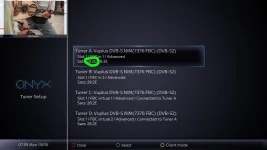
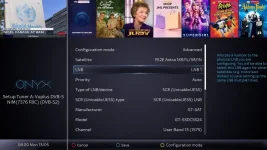

 I was just reading your previous thread, can you please post/upload pictures/details of your LNB again. Your previous thread says you had a universal LNB. In this thread you have a unicable LNB. The model you set only supports 4 frequencies, is this correct? I would like to get this correct for you.