Superb quality and spec AB-Com PULSe 4K SE. Crazy offer! Only £99! FREE UK DELIVERY! 4K UHD, Enigma 2, Multiboot 4 images & more!...
Superb quality and spec AB-Com PULSe 4K Rev II Twin Satellite tuner only £149! FREE UK DELIVERY! 4K UHD, Enigma 2, SATA HDD facility, Multiboot 4 images & more!...

Unable to watch/record more than two channels again

Explanatory/detailed post:

You have a Sky squad LNB. This is just universal LNBs in one unit. The correct tuner configuration for a tuner with that LNB is: Simple, single 28.2 Press Green to save. It should look like this:
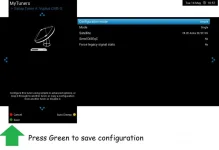
tuner a simple single 28.2.webp


The tuner overview should look like this (this was posted earlier by bmitie)
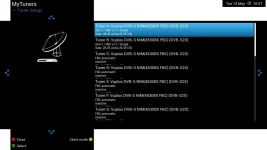
tuners_overview.webp


Once you have to done the transferring, please confirm tuners look as pictured. Please go to Backup manager and create a new settings backup
Blue > Vix > Backup Manager > Green (new backup)


Then delete all the older backups so that in future, you do not inadvertently restore one with wrong details.
Blue > Vix > Backup Manager > Red (Delete)

If you want to do the deletion by FTP, the setting backups are in
/media/hdd/backup


As information only, as you should not be manually editing files, the entries in the settings file for a universal LNB should be:
config.Nims.0.diseqcA=282
config.Nims.1.diseqcA=282

Can I retitle your thread to "Duo 4K SE with Sky quad LNB"?
 
Simple post:

I attach a version configured for a Sky quad LNB.

Using Putty/terminal issue "init 4" command. Ensure that enigma2 has stopped
Using FTP program such as Filezilla, transfer unzipped file to /etc/enigma2
Once File transfer has completed, restart receiver with Putty using the following command "init 4".

I'm afraid this settings file did not work at all. I get no signal. Running an automatic Service scan doesn't return any channels. I reverted to the previous settings files and it works again. The Tuner set up screen does look like the screenshot above.
 
Last edited:
As a follow on I just noticed that ABM section for SKY UK and SKY ROI has disappeared since last night and all I did was change the DTT tuners transmitter but a reboot brought it back and this is on openvix 6.4.

Willo has the right idea but never ever done it before. I cant access duo4kse as tv dead.

Updating to a newer version is no longer easy peasy.

Just saw pic of LNB looks very big for an ordinary universal, has it got a unicable output as well and do you know the brand?
 
Last edited:
@mitchellin,
Forget the file I uploaded and set the tuners yourself properly. Can you confirm that you have signal wires to both tuners? Did you test both tuners individually using signal finder? You have to check several transponders not just one.
 
Updating to a newer version is no longer easy peasy.

Are you seriously suggesting that flashing a newer image and then restoring the settings file added 19.2 and 23.5 to his settings? The OP had the same issue before the latest image.
You seem to dissuade people from using latest image on other forums. This is unhelpful. You are better off in assisting in getting logs and methods to replicate issue so that issues can be addressed.

Please start your own thread for your ABM issue. ABM will only present the providers for which you have configured tuners.
 
@mitchellin,
Forget the file I uploaded and set the tuners yourself properly. Can you confirm that you have signal wires to both tuners? Did you test both tuners individually using signal finder? You have to check several transponders not just one.
Yes, I had completely deleted the tuner config and set it up from scratch from the Tuner Setup menu two days ago. This got the multiple recording working again, but it does have the erroneous 19.2 lines in the settings. However, this does not seem to stop it working.
I think the Tuner setup screen has some sort of bug which is generating dud config lines.

Also now got this dream EPG issue with the receiver throwing 500 errors (I've created another thread for this) . Pretty fed up now. Just as well I'm Linux savvy, or I'd be seriously stuffed.
 
I just set up the tuners and there were no 19.2 entries. The default is 19.2 as the original Enigma coders were in Germany. If you confirm on any setting, they will be saved. Doesn't explain how you got 23.5 on there either.

Can you please test both tuners using signal finder.
 
I just set up the tuners and there were no 19.2 entries. The default is 19.2 as the original Enigma coders were in Germany. If you confirm on any setting, they will be saved. Doesn't explain how you got 23.5 on there either.

Can you please test both tuners using signal finder.
I didn't choose 19.2 anywhere. I don't think I even ever seen it presented anywhere in the screens. I have only ever selected 28.2E Astra, which is working. I'm getting a strong signal on 11426 V 29500 8/9
 
Please check both tuners, not just one. Try a few transponders so you try vertical, horizontal, low, high. Another test is to perform a manual scan, single satellite. You should get over 800 channels if there are no issues. You would have to do that on both tuners too.

I have made the 19.2 mistake myself a few times as it lands on it and you can easily confirm it. You are adamant you didn't do it, so lets leave it that. BTW, if in signal finder or any other scanning applets, you can select other satellites apart from 28.2, your tuners are set incorrectly.
 
Sorry, yes I did the signal finder with both tuners. They both have a good signal for 28.2E. I have the full set of channels available as previously, so all good.
 
Okay, it turns out it's still not able to record multiple channels again. Getting pretty fed up with this now :confused:
 
Hours spent messing about with this :( I guess I still need to remove the erroneous 19.2 entries in settings. Pretty sure something keeps putting them back during a reboot or simply just opening the tuner screen is somehow putting them in again.
 
Last edited:
There's always the nuclear option of a factory reset and configure the tuners from scratch. Painful, but perhaps quicker and cleaner in the long run?
 
I removed the 19.2 entries in the settings file and rebooted, but it just inserted them again. Do you know where it might be picking up this dud setting from please?
There's no mention of 19.2 in my tuner setup screen, so I'm mystified where it's getting it from.
You can't remove them with enigma running. You have to stop enigma, modify the file, then start enigma again.
 
Hours spent messing about with this :( I guess I still need to remove the erroneous 19.2 entries in settings. Pretty sure something keeps putting them back during a reboot or simply just opening the tuner screen is somehow putting them in again.

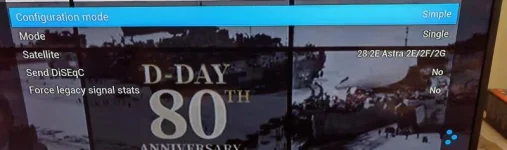
I have said it, huevos has said it…..you have to STOP the box before replacing the settings file…reboot will not fix it.
 
Please post a screenshot of your tuner configuration. The individual tuners, not the overview.

Also post the result of this:

cat /etc/enigma2/settings | grep config.Nims > /tmp/mytunerconfig.txt
 
I have said it, huevos has said it…..you have to STOP the box before replacing the settings file…reboot will not fix it.

I AM stopping the box before doing anything. I'm following all provided instructions exactly.

I've attached the mytunerconfig.txt file and screenshots of the tuner screens. The first one shows Tuner A. Tuner B is the same. The 2nd screenshot shows Tuner C and the rest of the satellite ones are the same.

Thanks
View attachment mytunerconfig.txt
IMG_20240521_144441_edit_155972527721801.webp IMG_20240521_144547_edit_155952902297434.webp
 
You have only shown part of one tuner, we needed to see both tuners. Is there a reason why screenshots are not working?

This is what is in your tuner configuration. A unicable configuration is somehow getting added as well as 19.2 and 23.5 are being added. And a diseqc setup has got added.


config.Nims.0.advanced.lnb.1.diseqcMode=1_0
config.Nims.0.advanced.sat.192.lnb=1
config.Nims.0.advanced.sat.282.lnb=1
config.Nims.0.advanced.sats=282
config.Nims.0.diseqcA=282
config.Nims.0.diseqcB=3601
config.Nims.0.diseqcC=3601
config.Nims.0.diseqcD=3601
config.Nims.0.powerMeasurement=False
config.Nims.1.advanced.lnb.2.diseqcMode=1_0
config.Nims.1.advanced.sat.192.lnb=2
config.Nims.1.advanced.sat.235.lnb=2
config.Nims.1.advanced.sats=235
config.Nims.1.diseqcA=282
config.Nims.1.diseqcB=3601
config.Nims.1.diseqcC=3601
config.Nims.1.diseqcD=3601
config.Nims.1.powerMeasurement=False
config.Nims.2.advanced.lnb.1.lof=unicable
config.Nims.2.advanced.lnb.1.scrfrequency=1210
config.Nims.2.advanced.lnb.1.scrList=1
config.Nims.2.advanced.lnb.1.unicableManufacturer=Dura-Sat(DUR-line)
config.Nims.2.advanced.lnb.1.unicableProduct=UK101
config.Nims.2.advanced.sat.192.lnb=1
config.Nims.2.advanced.sat.282.lnb=1
config.Nims.2.advanced.sats=282
config.Nims.3.advanced.sats=192
config.Nims.8.terrestrial=All regions, United Kingdom, (Europe DVB-T/T2)
config.Nims.9.terrestrial=All regions, United Kingdom, (Europe DVB-T/T2)
 
Ok, so for satellite you have one tuner, a 45308X. With that tuner and your universal LNB you will be able to record from a maximum of 2 satellite transport streams. Updating to a Unicable II LNB will allow you to record from up to 8 satellite transport streams.
 
I have two satellite tuner cards and a DVB-T card as well. Three tuners cards in total. I have been able to record multiple channels in the past. It's software updates that seems to keep breaking it.

I know no one seems to believe me, but I am not adding those extra tuner settings either manually or via the tuner set up screens. I still think there is a bug in either the config backup or restore code, or even the tuner setup screen itself possibly that's adding these entries . I just need a way to get this back to something sensible or a settings file that will work.

Perhaps I should upgrade to a known LNB to help with support. The one I have was fitted to the house when I moved in. The previous owners had a Sky box. This was 11 years ago. So perhaps an upgrade will be best. Any particular recommendations please?

Thanks.
 
Last edited:

OpenViX Feeds Status

Back
Top