Superb quality and spec AB-Com PULSe 4K SE. Crazy offer! Only £99! FREE UK DELIVERY! 4K UHD, Enigma 2, Multiboot 4 images & more!...
Superb quality and spec AB-Com PULSe 4K Rev II Twin Satellite tuner only £149! FREE UK DELIVERY! 4K UHD, Enigma 2, SATA HDD facility, Multiboot 4 images & more!...

[VU+ Uno4KSE] Can channel names be edited via OpenWebif?

diceman01

Forum Supporter
Donated Member
Joined
Jan 30, 2013
Messages
74
Reaction score
3
Points
8
Age
47
Location
Australia
Hi everyone im after a bit of advice. I want picons to display with my IPTV channels and the only way to make it work is to edit the channel names. Now it works when I edit them but doing it through the remote is very time consuming, is there a way I can do it through OpenWebif?
 
maybe install DBE then you can edit them on your PC and save them forr future use
 
maybe install DBE then you can edit them on your PC and save them forr future use

Just downloaded it dosent seem to work properly with Windows 10 cant open saved channel list or enter IP of box to download channel list
 
Last edited:
you need to set a password in box and make config in DBE
 
you need to make a config in tools options for your box or maybe read the manual help files
 
you need to make a config in tools options for your box or maybe read the manual help files
Thanks I rebooted my box now it allows me to edit IP address and ad username and password but keeps coming up with errors trying to create a directory to save settings from box
 
just ignore the error message and list should load.Save it before editing
 
Without it letting me save a destation folder I cant proceed to retrive channel list from STB
 
maybe show the config here so I can see the error in it.
 
maybe show the config here so I can see the error in it.

Connecting to 192.168.1.33.
Connected.
Dreambox response: Login successful.
** Retrieving file list of "/var/tuxbox/config/enigma/" **
Starting FTP transfer
Transfer complete
** Retrieving file list of "/var/tuxbox/config/enigma/" **
Starting FTP transfer
Transfer complete
Neither a "services" nor a "lamedb" file was found in directory "%" on the Dreambox. /var/tuxbox/config/enigma/
Check the dream path settings on the option panel to point to the correct Dreambox directories and try again.
Disconnecting.
Disconnected.
 
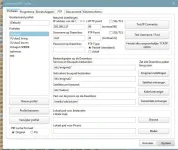
this are not responses from dreambox editor. Ftp comes from files -FTP -and choose box. Also you have enigma instead off enigma2.Settings aren not right.So show settings setDBE.webp
 

OpenViX Feeds Status

Back
Top