Superb quality and spec AB-Com PULSe 4K SE. Crazy offer! Only £129! FREE UK DELIVERY! 4K UHD, Enigma 2, Multiboot 4 images & more!...
Superb quality and spec AB-Com PULSe 4K Rev II Twin Satellite tuner only £179! FREE UK DELIVERY! 4K UHD, Enigma 2, SATA HDD facility, Multiboot 4 images & more!...

Want to update to latest image from 6.4.009 via image manager

bangorbob

Forum Supporter
Donated Member
Joined
Feb 22, 2012
Messages
128
Reaction score
0
Points
16
Age
71
Location
Rojales, Alicante, Spain
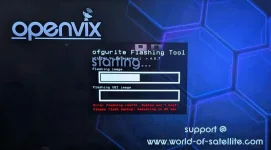
Hi, I am trying to update to the latest image on this H9. S currently on 6.4.009 but when the flash procedure starts it stalls and I get the message as seen in the screenshot, could someone please tell me what I need to do to update successfully. Thank you.
 

Attachments

  • PXL_20250311_103755722.MP~2.webp
    PXL_20250311_103755722.MP~2.webp
    34.2 KB · Views: 13
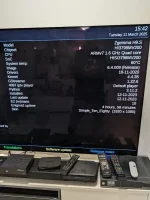
Can you post a pic of the menu/information/about screen?

I use this box all the time in a bedroom, BUT I use a sd card for the root as flash on this box is small….and maybe thats the issue as then it doesn,t flash the ubi root file…. And you are on an old release.
So I would first do a settings backup…..blue button, ViX , backupmanager
and then usb flash
https://www.openvix.co.uk/openvix-builds/Guides%20and%20Tutorials/Flashing%20Guides/Zgemma%20USB%20Flashing%20Guides/How%20to%20flash%20a%20Zgemma%20H9%20Series%20by%20USB.pdf

Or you could insert an sd card, use the h9init tool in the ViX plugin and copy the root to the sd card(in ViX plugin)… reboot and then go multiboot selector and choose the h9 root option to boot from the sd card……then use imagemanager to update!
 
Thanks for the reply, I've installed an SD card and initialize it, were exactly do I find the h9init tool you are talking about, can't seem to find it lol.
 

Attachments

  • PXL_20250311_154257485.webp
    PXL_20250311_154257485.webp
    37.6 KB · Views: 4
OK…so blue button, ViX plugin, H9SDcard Manager…. Green button will initialise card and then copy the root to the sdcard… followed by a reboot.
At this point you are still on the root in memory.
So long press power button, choose H9SDroot and swaptoSD
On reboot menu/information/about should show sdcard in use.

The advantage is that flash memory is as large as the sd card which means that even Kodi(when its working) will run on thsi box.
 
OK…so blue button, ViX plugin, H9SDcard Manager…. Green button will initialise card and then copy the root to the sdcard… followed by a reboot.
At this point you are still on the root in memory.
So long press power button, choose H9SDroot and swaptoSD
On reboot menu/information/about should show sdcard in use.

The advantage is that flash memory is as large as the sd card which means that even Kodi(when its working) will run on thsi box.

I have followed your instructions but after the final reboot the front display goes red and doesn't boot, I flashed it again using an usb stick and tried the procedure again but the same thing happened again, don't know what I'm doing wrong.
 
I have followed your instructions but after the final reboot the front display goes red and doesn't boot, I flashed it again using an usb stick and tried the procedure again but the same thing happened again, don't know what I'm doing wrong.

The screen actually is red?
Not sure why that doesn,t work, but then again sometime since I did it on my box.
did you see the disk initialisation messages on teh screen, normally takes about 7 or 8 minutes
 
I have followed your instructions but after the final reboot the front display goes red and doesn't boot, I flashed it again using an usb stick and tried the procedure again but the same thing happened again, don't know what I'm doing wrong.

I will have a look on my box when I get back nexr week..
 
Hi twol, I decided to attempt it again and this time it worked, thank you for helping me sort this and get the box working better now than it was.

thanks .... now use ImageManager to flash onle an update ... this will automatically flash teh sdcard root
 

OpenViX Feeds Status

Back
Top