Superb quality and spec AB-Com PULSe 4K SE. Crazy offer! Only £99! FREE UK DELIVERY! 4K UHD, Enigma 2, Multiboot 4 images & more!...
Superb quality and spec AB-Com PULSe 4K Rev II Twin Satellite tuner only £149! FREE UK DELIVERY! 4K UHD, Enigma 2, SATA HDD facility, Multiboot 4 images & more!...

[VU+ Solo2] Timmer settings

nekrub2

Member
Joined
Dec 6, 2015
Messages
354
Reaction score
5
Points
18
Location
Switzerland
What type of support thread are you creating?
Support question
What OpenViX Image build number are you using?
6.7.0.019
Have you tried re-flashing WITHOUT settings restore?
NO
Have you tried re-flashing WITH a settings restore?
NO
Dear all
I use the timer for zapping at the right time to the right channel out of EPG. Unfortunately I do not find somewhere default setting, instead of "record" use "zap" and for the time span before. When I select a transmission starting at 8.00 the time set in the timer is 7.59. I would like to have a default time span I can choose myself.

Of course, I have a work-around and manually adjust it every time - so this is not urgent.
 
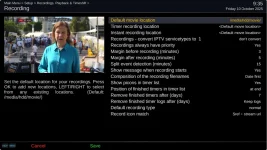
I think this is what you need: Press green to bring up timers list then menu, there is a setting 'Margin before Recording'
 
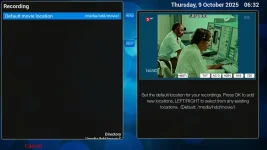
Strange: If I press green I get up the timers. However on on menu I only have the default recording location to choose. Am I missing anything?
timer_menu.webp
 
Just found out, that in autotimer you can edit new timer defaults. However they are only effective in autotimer. So far I only used the normal timer. I would have expected the same.
 
expert setting? Setup Mode in Customise Settings
 
Last edited:
> Settings > Customize settings > Setup mode = Expert.
Change to different GUI skin: Switched from VIXBMC-1080 Confluence to Simple Ten Eighty > Still the same
Skin Default OE-A > still just movie location.
 
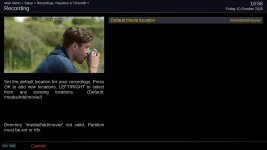
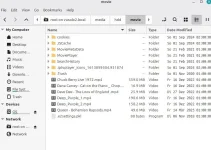
The media hdd is a drive I can access a) via MP3Browser plugin b) via MovieBrowser c) via FTP from my laptop. It is a 32 GB USB mounted as HDD.

media_hdd_movie.webp
 
You were dead right - the USB was formated as FAT32. This meant: copying all 4695 files to the HD of the Laptop. Next I tried to format the stick under Linux as ext4 and loaded the files again - in vain. the ext4 format of Linux Mint must be different to the one in he box. Final solution: Device initiated and mounted as hdd, load all files again. After reboot I can see now all recording settings.
Thanks a lot
 
Next I tried to format the stick under Linux as ext4 and loaded the files again - in vain. the ext4 format of Linux Mint must be different to the one in he box.
As I recall it will use an option that isn't recognized by the kernel on (most?) Vix boxes.
You can just use the same options that Vix uses, but that requires knowing them....
 

OpenViX Feeds Status

Back
Top