Superb quality and spec AB-Com PULSe 4K SE. Crazy offer! Only £99! FREE UK DELIVERY! 4K UHD, Enigma 2, Multiboot 4 images & more!...
Superb quality and spec AB-Com PULSe 4K Rev II Twin Satellite tuner only £149! FREE UK DELIVERY! 4K UHD, Enigma 2, SATA HDD facility, Multiboot 4 images & more!...

[VU+ Solo2] IPTV with M3UIPTV plugin working, no epg?

bug2k14

New member
Joined
Apr 14, 2014
Messages
20
Reaction score
0
Points
1
What type of support thread are you creating?
Support question
What OpenViX Image build number are you using?
6.7.010
Have you tried re-flashing WITHOUT settings restore?
YES
Have you tried re-flashing WITH a settings restore?
YES
Just re-flashed with the latest 6.7.010 openvix on a Vu+ Solo2. Installed the m3uiptv plugin and configured with the iptv provider settings, it creates the correct bouquets and iptv channels do play but it does not populate the epg.
After creating the provider and the bouquets are created correctly but when going to epgimporter there is no entry for the new iptv provider in the 'sources' section. The option "Generate EPG files for EPGImport plugin" is set to "yes".
I have removed and recreated the provider and still no entry in the 'sources' of the epgimporter.
What should I check to get get this working?

Thanks.
 
What type of provider you are creating? How your playlist looks like (if m3u). Did that ever worked?
 
An example line from the m3u file would be:
Code:
#EXTINF:-1 tvg-ID="together.uk" tvg-name="UK: Together" tvg-logo="http://filedb.me/picons/united-kingdom/together-tv-uk.png" group-title="U.K - Entertainment",UK: Together
http://urlremoved:80/username/password/34294

This is the first time I'm setting iptv up, the freesat bouquets and epg work fine.

I also have to set picons to no (even with picons stored on the 500GB ssd) and blacklist most of the other international channels and vod as the initial bouquet creation fails with everything selected, out of resources I presume, the full m3u is just over 32MB. With those options it does create the bouquets and I can select the channels and they play correctly, I just get no epg for any of the iptv channels.
 
Well first of all i have to see the first 2-3 lines from your playlist...
There is where EPG is specified. If it is not you will not get EPG. In this case you have to setup custom EPG url and that have to match to your playlist tvg-ids.
EPG works for sat/terrestrial tv since its built in. For IPTV it have to be imported.
The Picons and other stuff are heavy for such an old box like solo2. Keep in mind that if you have huge playlist with a lot of channels that have EPG you should store the epgcache file to the HDD which will degrade the performance.
 
Ok, that explains it, the first line is just "#EXTM3U" all following lines are as in the previous post.
How would I create a custom list for the epg, what is required?
 
You must have XMLTV source at first (url). And that source have to be defined so the channel ids in it to match the tvg-ids from your playlist.
Then in M3UIPTV plugin just select Use custom EPG Url and specify it.
 
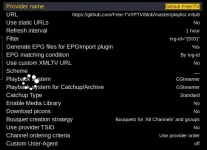
Hi guys. I am just trying this for the first time with some GitHub IPTV links. I have set up IPTV (I think) right but then I click the yellow button it says "Bouquets have been generated succesfully". I don't see any bouquets in the EPG and if I go into EPG Import and look at sources I don't see any new sources being created so I can't select them to import the EPG either.

Can I have some pointers as to what mess up I've made? I appreciate these will not work well as free IPTV but I'm just testing at the moment.

Here is my config:

2026-02-03 15_14_41-dreamboxEDIT - C__Users_pauls_Documents_2b. PaulsSoftwareKeep_Dreambox4Oc...webp

Here is a link to the M3U8 file: https://github.com/Free-TV/IPTV/blob/master/playlist.m3u8

Thanks :-)
Paul
 
Hi guys. I am just trying this for the first time with some GitHub IPTV links. I have set up IPTV (I think) right but then I click the yellow button it says "Bouquets have been generated succesfully". I don't see any bouquets in the EPG and if I go into EPG Import and look at sources I don't see any new sources being created so I can't select them to import the EPG either.

Can I have some pointers as to what mess up I've made? I appreciate these will not work well as free IPTV but I'm just testing at the moment.

Here is my config:

View attachment 68399

Here is a link to the M3U8 file: https://github.com/Free-TV/IPTV/blob/master/playlist.m3u8

Thanks :-)
Paul
I think you have to click 'Raw' and use that url which is : https://raw.githubusercontent.com/Free-TV/IPTV/refs/heads/master/playlist.m3u8
 
Last edited:

OpenViX Feeds Status

Back
Top