
Superb quality and spec AB-Com PULSe 4K SE. Crazy offer! Only £129! FREE UK DELIVERY! 4K UHD, Enigma 2, Multiboot 4 images & more!...
Superb quality and spec AB-Com PULSe 4K Rev II Twin Satellite tuner only £179! FREE UK DELIVERY! 4K UHD, Enigma 2, SATA HDD facility, Multiboot 4 images & more!...
You are using an out of date browser. It may not display this or other websites correctly.
You should upgrade or use an alternative browser.
You should upgrade or use an alternative browser.
Openvix 6.8.007 - Resurrection of Grog68's Movieorganisor plugin - working but not logging anything
- Thread starter smipx
- Start date


Willo3092
ViX Beta Tester
mine is up-to-date - no python2 and a few other things.I got this version that I adapted a few years ago.
It still works but I don't know if it's the latest version.

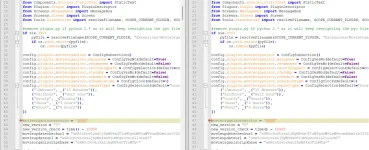
This matches the 3.90 version I got from Techkings some years ago apart from the build number in the PY file. The rest of the code is identical according to notepad++ compare tool. Attached is my IPK from my version 3.90 as comapred to "3092" - in case it is useful:I got this version that I adapted a few years ago.
It still works but I don't know if it's the latest version.
Attachments
OK @dsayers has just messaged me about this. this is part of my reply to him is below but reading this thread the OP has also mentioned the sorting, ie series folders first and then newest recordings etc, this has nothing to do with the MovieOrganisor plugin, this is down to the sort order in your file manager, sorry I am going to be despised here but I am using ATV and if I go to my file list the blue button can be used to sort the order that recordings are listed, I assume that VIX is similar.
The plugin has never logged anything when recordings are moved, it's not an issue with the plugin but something he wants. ie if he manually runs the plugin, he expects it to log the fact it's moved tonights jackanory into the jackanory folder. Can you imagine how big that log could become if every time the plugin moves a file it is logged?
I've not touched anything on the plugin for years, not really into e2 stuff much lately, just use my box as freeview/sat box and that's it so can't remember even how it was coded, especially as someone else fixed it to work with py3. (yes it's been that long)
You can grab the files from https://grab4.me/Movieorganisor.zip, there are two py files, Movieorganisorpy3-plugin.py and plugin.py, the latter is dated later and has about 200 lines more but not compared them. I am assuming the other is just the moded file I was sent by the person who moded it but really can't remember.
Also the script has the following early on:
movieupdatecheckurl = "aHR0cDovLzkxLjEyMS4xOTIuMTgvbW92aWVvcmdhbmlzb3J2ZXJzaW9uLnR4dA=="
movieupdateurl = "aHR0cDovLzkxLjEyMS4xOTIuMTgvcGx1Z2luLnB5"
These are base64 encoded urls to my serveer to check version.txt (version number) and update the plugin, these two urls are now dead so if the plugin is being resurected regularly then these may need to be updated, maybe link to a github url the first to version.txt or whatever and the second the the updated plugin.py
Personally, the plugin still works as designed, I use it regularly for the wifes soaps etc. But I am sure someone could improve on it, ie maybe totally rewriting it lol
The plugin has never logged anything when recordings are moved, it's not an issue with the plugin but something he wants. ie if he manually runs the plugin, he expects it to log the fact it's moved tonights jackanory into the jackanory folder. Can you imagine how big that log could become if every time the plugin moves a file it is logged?
I've not touched anything on the plugin for years, not really into e2 stuff much lately, just use my box as freeview/sat box and that's it so can't remember even how it was coded, especially as someone else fixed it to work with py3. (yes it's been that long)
You can grab the files from https://grab4.me/Movieorganisor.zip, there are two py files, Movieorganisorpy3-plugin.py and plugin.py, the latter is dated later and has about 200 lines more but not compared them. I am assuming the other is just the moded file I was sent by the person who moded it but really can't remember.
Also the script has the following early on:
movieupdatecheckurl = "aHR0cDovLzkxLjEyMS4xOTIuMTgvbW92aWVvcmdhbmlzb3J2ZXJzaW9uLnR4dA=="
movieupdateurl = "aHR0cDovLzkxLjEyMS4xOTIuMTgvcGx1Z2luLnB5"
These are base64 encoded urls to my serveer to check version.txt (version number) and update the plugin, these two urls are now dead so if the plugin is being resurected regularly then these may need to be updated, maybe link to a github url the first to version.txt or whatever and the second the the updated plugin.py
Personally, the plugin still works as designed, I use it regularly for the wifes soaps etc. But I am sure someone could improve on it, ie maybe totally rewriting it lol
Last edited:
That's my mistake then (about the logging). I'm sure I saw it previously but I must have been mistaken. It's possibly it was logging when it encountered a set of file names it could not deal with - who knows 
That being the case the movieorganisor is working well still and I'm very happy to keep using it (as I am right now).
On the other hand if the minor changes to the built in virtual folders feature can be made then I can finally ditch the movieorganisor plugin and become compliant to the standard vix build. An additional sort option would be perfect (for me) to sort firstly by series virtual folders (at the top) and then the individual items by date (rather than having the series folders mixed in with the individual recordings. Not exactly life changing but as and when the code is updated it would be nice to have.
Thanks
Paul
That being the case the movieorganisor is working well still and I'm very happy to keep using it (as I am right now).
On the other hand if the minor changes to the built in virtual folders feature can be made then I can finally ditch the movieorganisor plugin and become compliant to the standard vix build. An additional sort option would be perfect (for me) to sort firstly by series virtual folders (at the top) and then the individual items by date (rather than having the series folders mixed in with the individual recordings. Not exactly life changing but as and when the code is updated it would be nice to have.
Thanks
Paul

What license is this under? Are you happy with GPL v3?OK @dsayers has just messaged me about this. this is part of my reply to him is below but reading this thread the OP has also mentioned the sorting, ie series folders first and then newest recordings etc, this has nothing to do with the MovieOrganisor plugin, this is down to the sort order in your file manager, sorry I am going to be despised here but I am using ATV and if I go to my file list the blue button can be used to sort the order that recordings are listed, I assume that VIX is similar.
The plugin has never logged anything when recordings are moved, it's not an issue with the plugin but something he wants. ie if he manually runs the plugin, he expects it to log the fact it's moved tonights jackanory into the jackanory folder. Can you imagine how big that log could become if every time the plugin moves a file it is logged?
I've not touched anything on the plugin for years, not really into e2 stuff much lately, just use my box as freeview/sat box and that's it so can't remember even how it was coded, especially as someone else fixed it to work with py3. (yes it's been that long)
You can grab the files from https://grab4.me/Movieorganisor.zip, there are two py files, Movieorganisorpy3-plugin.py and plugin.py, the latter is dated later and has about 200 lines more but not compared them. I am assuming the other is just the moded file I was sent by the person who moded it but really can't remember.
Also the script has the following early on:
movieupdatecheckurl = "aHR0cDovLzkxLjEyMS4xOTIuMTgvbW92aWVvcmdhbmlzb3J2ZXJzaW9uLnR4dA=="
movieupdateurl = "aHR0cDovLzkxLjEyMS4xOTIuMTgvcGx1Z2luLnB5"
These are base64 encoded urls to my serveer to check version.txt (version number) and update the plugin, these two urls are now dead so if the plugin is being resurected regularly then these may need to be updated, maybe link to a github url the first to version.txt or whatever and the second the the updated plugin.py
Personally, the plugin still works as designed, I use it regularly for the wifes soaps etc. But I am sure someone could improve on it, ie maybe totally rewriting it lol
Just FYI, That link is to an older version (3.60) than both my version and the version with the v 3092 (identical versions) which does not have the PY2 logic in it.You can grab the files from https://grab4.me/Movieorganisor.zip, there are two py files, Movieorganisorpy3-plugin.py and plugin.py, the latter is dated later and has about 200 lines more but not compared them. I am assuming the other is just the moded file I was sent by the person who moded it but really can't remember.
Also. If there is no logging then what are the print functions in the snippet below doing. Genuine question as I am not a PY programmer but to my uneducated eyes it looks like it is logging every rename and every error:
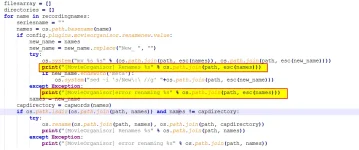
well one is an error (which hopefully doesn,t happen) and the other only appears if "new" is in titleJust FYI, That link is to an older version (3.60) than both my version and the version with the v 3092 (identical versions) which does not have the PY2 logic in it.
Also. If there is no logging then what are the print functions in the snippet below doing. Genuine question as I am not a PY programmer but to my uneducated eyes it looks like it is logging every rename and every error:
View attachment 68727
I only showed the firt two print statements as an example below are a few more. Like I said I don't know py but as I expect you have checked the rest of the code and there are no print stements for a normal "Create a folder name based on file name then move file into said folder" then 1 100% belive you and will move onwell one is an error (which hopefully doesn,t happen) and the other only appears if "new" is in title

thanks
paul
if config.plugins.movieorganisor.renamenew.value:
new_name = names
new_name = new_name.replace("New_ ", "")
try:
os.system("mv %s %s" % (os.path.join(path, esc(names)), os.path.join(path, esc(new_name))))
print("[MovieOrganisor] Renames %s" % os.path.join(path, esc(names)))
if new_name.endswith('meta'):
os.system("sed -i 's/New\:\ //g' "+os.path.join(path, esc(new_name)))
except Exception:
print("[MovieOrganisor]error renaming %s" % os.path.join(path, esc(names)))
names = new_name
capdirectory = capwords(names)
if os.path.isdir(os.path.join(path, names)) and names != capdirectory:
try:
os.rename(os.path.join(path, names), os.path.join(path, capdirectory))
print("[MovieOrganisor] Renames %s" % os.path.join(path, names))
except Exception:
print("[MovieOrganisor] error renaming %s" % os.path.join(path, names))
..
..
..
if noofrecordings == 1:
directory1 = esc(directory)
os.system("mv %s %s" % (os.path.join(path, directory1 + "/" + recordingname + ".*"), path))
if noofrecordings < 2:
if os.listdir(fullpath) == []:
try:
os.rmdir(fullpath)
print("[MovieOrganisor] Removing %s" % fullpath)
except Exception:
print("[MovieOrganisor] error removing %s" % fullpath)
return
just went back through my old settings file from 6.8.003 and I had:
config.plugins.movieorganisor.renamenew=True
which now explains why I was seeing a load of logging as the part of the code that *is meant* to identify and remove the word "new" has the print statements. In my new settings I did not have this option set.
I moved all my files once again into the root of movies and then ran it with the option "Remove new" and held my breath.......
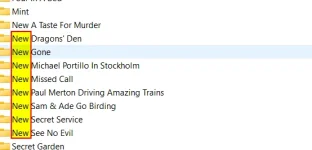
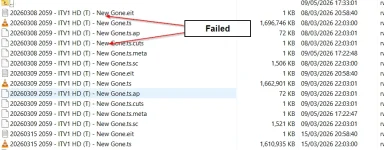
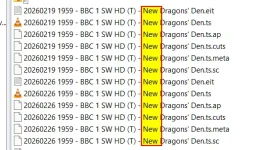
Mystery solved... Except - that bit of code does not actually work as intended and does not remove the word "New" in all instances. It runs clearly enough and I now get a load of logging in the debug log (attached - see around time 17:22:43) but many of the directories it creates still have the word "New" in them and the File names are also left with the word "New" at the beginning of the title. Below and example of there is DID NOT work:
Below is an example of where it DID work:

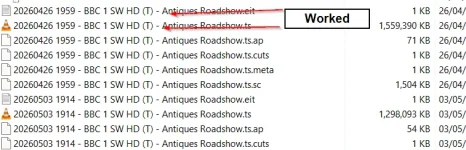
No wonder I was getting so flaming confused as I saw folders with "New" so assumed I did not originally have this option set (so no logging to be expected if the code only does it in this scenrio)!
Paul
config.plugins.movieorganisor.renamenew=True
which now explains why I was seeing a load of logging as the part of the code that *is meant* to identify and remove the word "new" has the print statements. In my new settings I did not have this option set.
I moved all my files once again into the root of movies and then ran it with the option "Remove new" and held my breath.......
Mystery solved... Except - that bit of code does not actually work as intended and does not remove the word "New" in all instances. It runs clearly enough and I now get a load of logging in the debug log (attached - see around time 17:22:43) but many of the directories it creates still have the word "New" in them and the File names are also left with the word "New" at the beginning of the title. Below and example of there is DID NOT work:
Below is an example of where it DID work:
No wonder I was getting so flaming confused as I saw folders with "New" so assumed I did not originally have this option set (so no logging to be expected if the code only does it in this scenrio)!
Paul
Attachments
Last edited:

birdman
Moderator
The 3.90 ipk at
contains the plugin.py file.
Code:
https://www.dropbox.com/scl/fi/4g1o6jqgv18nygt39sb5n/enigma2-plugin-extensions-movieorganisor_3.90_all.ipk?rlkey=05wniyyhaeeyglkzqg6lnsv3l&dl=1contains the plugin.py file.
Providing feedback from random versions is a nightmare. We all need to be using the same version. Attached is the version we are going to use. Just remove the ".txt" from the filename. Please test and give feedback so we can correct any problems.
Attachments
When we replace the one we have installed do we need to delete the old py file in the plugin folder too. The ipk always installed both.Providing feedback from random versions is a nightmare. We all need to be using the same version. Attached is the version we are going to use. Just remove the ".txt" from the filename. Please test and give feedback so we can correct any problems.
Thanks
Paul
Delete the complete folder... install new.
It is built from Twol's repo.

 github.com
It is built from Twol's repo.
GitHub - TwolDE2/MovieOrganisor
Contribute to TwolDE2/MovieOrganisor development by creating an account on GitHub.
github.com
Done. I am just backing up my HDD (just in case) and will then run a test afresh.Delete the complete folder... install new.
It is built from Twol's repo.
GitHub - TwolDE2/MovieOrganisor
Contribute to TwolDE2/MovieOrganisor development by creating an account on GitHub.
Hi, deleted complete (old) Movieorganisor folder and then tried to import the new one and go errors in the plugins folder:Delete the complete folder... install new.
It is built from Twol's repo.
GitHub - TwolDE2/MovieOrganisor
Contribute to TwolDE2/MovieOrganisor development by creating an account on GitHub.
11:45:14.9386 [IPKinstaller]4 sel:/tmp/enigma2-plugin-extensions-movieorganisor_V3.99-git13+564efb50+564efb5380-r0_all.ipk, cmd1:/usr/bin/opkg install /tmp/enigma2-plugin-extensions-movieorganisor_V3.99-git13+564efb50+564efb5380-r0_all.ipk
..
..
11:46:52.0084 [PluginComponent] Plugin Extensions/MovieOrganisor failed to load: bad magic number in 'Plugins.Extensions.MovieOrganisor': b'+\x0e\r\n'
11:46:52.0103 Traceback (most recent call last):
11:46:52.0108 File "/usr/lib/enigma2/python/Components/PluginComponent.py", line 58, in readPluginList
11:46:52.0108 File "/usr/lib/enigma2/python/Tools/Import.py", line 2, in my_import
11:46:52.0109 ImportError: bad magic number in 'Plugins.Extensions.MovieOrganisor': b'+\x0e\r\n'
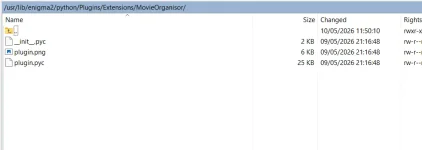
Tried a second time by going into the IPK and extracting the moviorganisor folder and copying it across to the box under usr\lib\enigma2\python\Plugins\Extensions\
Rebooted inbetween but keep getting this pesky error message
Similar threads
- Replies
- 3
- Views
- 318

[Mut@nt HD2400]
feeds and status-message.php for self built 6.8.007 ?
- Replies
- 6
- Views
- 637
- Replies
- 48
- Views
- 10K