Superb quality and spec AB-Com PULSe 4K SE. Crazy offer! Only £129! FREE UK DELIVERY! 4K UHD, Enigma 2, Multiboot 4 images & more!...
Superb quality and spec AB-Com PULSe 4K Rev II Twin Satellite tuner only £179! FREE UK DELIVERY! 4K UHD, Enigma 2, SATA HDD facility, Multiboot 4 images & more!...

[GiGaBlue UHD UE 4K] Backups fail at 77%

Robgh

Member
Joined
Sep 26, 2024
Messages
81
Reaction score
6
Points
8
Age
76
Location
Leeds
What type of support thread are you creating?
Support question
What OpenViX Image build number are you using?
6.9.003
Have you tried re-flashing WITHOUT settings restore?
NO
Have you tried re-flashing WITH a settings restore?
NO
Hi,
I have been trying to make a backup of my present settings etc, but each time I try it stops at 77% saying not enough space for the backup.

I have recently replaced the ssd with a same size ssd, and then flashed it with 6.9.003 image,but now I can't do a backup before in flash my box with the latest version.
 
What is your backup location. Check in backup manager. Check free space of that drive in information - devices.
 
Backup location is /media/hdd with 275Gb free space. The new ssd is 500Gb with 93% free space

Where should the location be then
 
If it says no space it probably means /media/hdd is not the drive you think it is. Check in mount manager and post a screen grab.
 
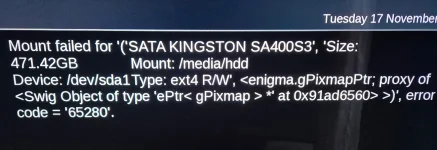
When I went to mount manager to mount the Kingston ssd drive it produced this error message.
I couldn't do a screen grab because the error message had gone before I had chance to do so.
This is the best I could do
 

Attachments

  • 20261117_085324.webp
    20261117_085324.webp
    93.7 KB · Views: 9
I think I would remove the SSD and checkout on a PC and probably re format as Ext4 - it obviously has issues.
What Brand is the SSD?
 
Well it's only about 2 or 3 weeks old and I did format it as ext4, then mounted it when I put it in the box.
Just for information it's a kingston drive
 
No I formatted it on my computer and is a sata ssd. It shows up in Mount Manager and also in Initialise devices. I am also recording to it without any errors.
I did think of upgrading the vix image to 6.9.004 and using an older backup to restore my settings. Would that work ok.
 
Last edited:
It seems from what you're posting and the screenshot that you are not using the SSD as your primary drive. Do you have another HDD or USB drive installed? Your post #3 would indicate that you are using another drive with 275GB free space, whereas your SSD has almost 500GB space. It would be best to allow the receiver to initialise the SSD assuming there is nothing on it that you want to keep. Then use it as your primary drive and ensure it is mounted as /media/hdd. If another drive is mounted as /media/hdd, then you can't have two mounts with the same name.
 
I moved any recordings off the 500Gb ssd, then initialised it again, as I'm sure I did that when I first installed it. Then did a backup of vix image which went without a hitch.

There is only 1 drive mounted as /media/hdd, and it seems all is back to what it should be.

Thanks
 
Well somethings not right!!
I downloaded the latest vix image, then proceeded to flash my box, but the files were been backed up first and again it stalled at 77%.

So it's ok 1 minute, but 20 minutes later it isn't!!
 
Ok, so how do I format it on the box, is it by initialise it which I have done recently
 

OpenViX Feeds Status

Back
Top